
BYOD Security That Actually Works in 2026
Practical BYOD security controls for IT teams running guest WiFi, schools, healthcare and offices. Segmentation, DNS filtering, identity and monitoring
Published 16 October 2026
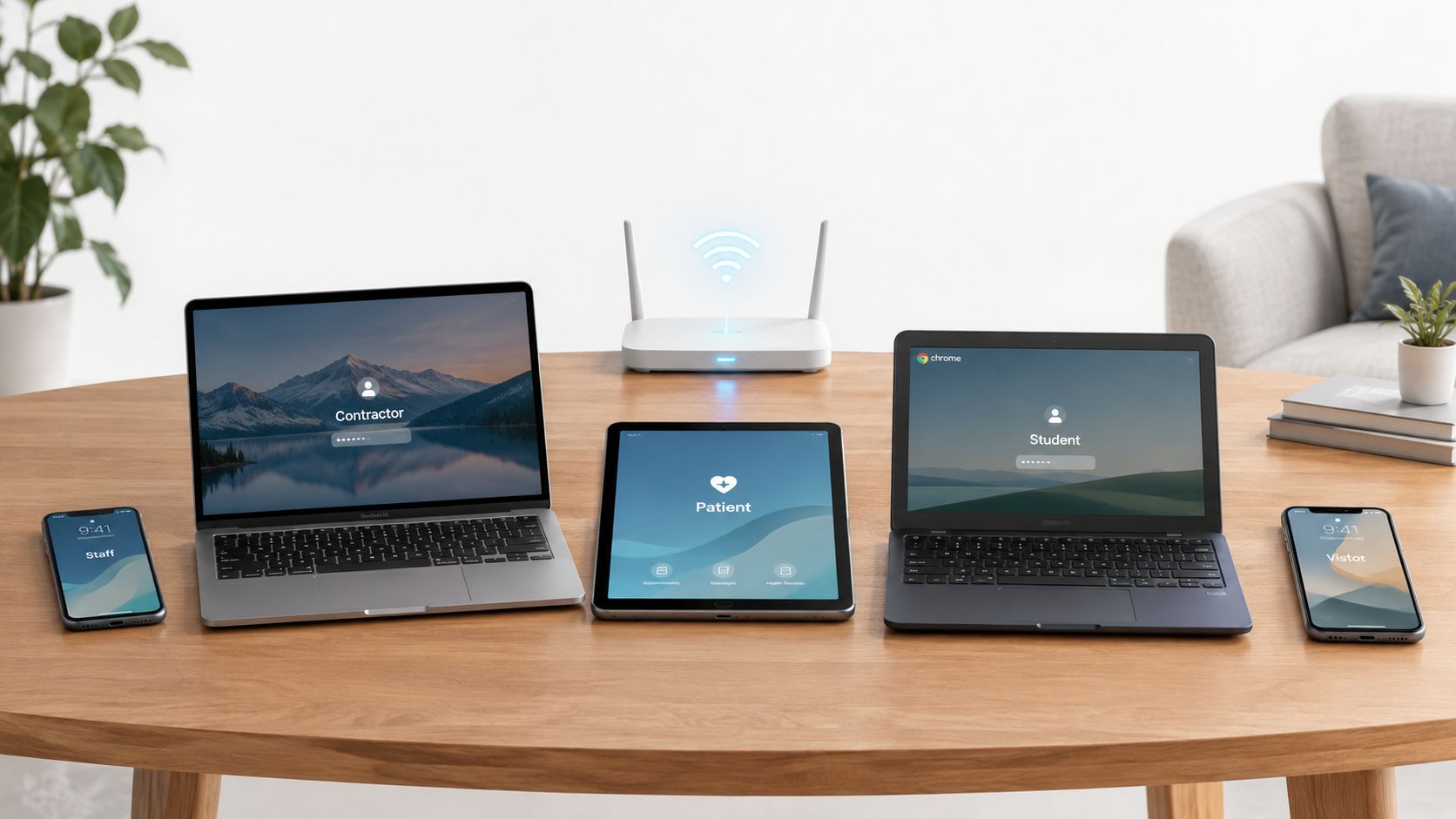
You know the scene already. A nurse checks in a patient on a tablet, a teacher logs into a roster from a personal laptop, a hotel guest joins WiFi from a phone, and a contractor opens a ticket from a device nobody in IT owns. The network has to make a decision anyway, because all of those devices are touching the same resources. BYOD security is the discipline of making that decision safely, even when the device is unmanaged and the user is moving fast.
Table of Contents
- What BYOD Security Really Means in 2026
- The Unmanageable Majority
- Building a Defensible BYOD Program
- When the Device Looks Healthy but the Identity Is Not
- Network Layer Containment Without an Agent
- Monitoring That Evidences BYOD Risk Reduction
- Your BYOD Security Checklist for This Week
What BYOD Security Really Means in 2026
A clinic I worked with had staff phones, vendor laptops, and patient tablets all landing on the same wireless estate. One unmanaged device blended in with the rest until it started behaving like a normal client, while still staying outside our control. That is the BYOD problem. Once a device joins the environment, the question is how much damage it can do if the user, the app, or the network path goes bad.
BYOD is a blast-radius problem
The old endpoint-first view assumes the main job is enrolling personal devices into MDM. That is too narrow. BYOD spans identity, network access, app separation, logging, privacy, and offboarding, because the device may live on home WiFi, public WiFi, cellular, or shared guest infrastructure, often without the controls you get on a corporate endpoint.
The useful mental model is blast-radius reduction. You may not manage the device, but you can still limit what it reaches, what data it can touch, and how quickly you can cut it off if something goes wrong. NIST's wireless guidance makes the same practical point by stressing threat modeling, risk assessment, and user awareness before broad access is granted, because shared networks need containment as much as they need connectivity NIST wireless guidance.
Shared infrastructure changes the stakes
A visitor phone on guest WiFi is not the same as a managed laptop on an internal port. Shared infrastructure lets a weak device sit beside many others, and the operator still has to keep the environment usable for everyone else. That is why BYOD security in 2026 is really about layered containment, not ownership.
For venues, schools, and clinics, the useful question is no longer whether personal devices can be banned. Blanket restriction usually fails operationally. The better question is what you can still enforce when the device is outside your control, and how you can prove it later.
The Unmanageable Majority
The gap between BYOD use and device manageability is why so many programs stall. NIST reported in December 2022 that more than 95% of organizations already allowed employees to use personal devices for work before the pandemic, and 86% of IT managers believed mobile attacks were becoming more frequent NIST BYOD spotlight. That is the operating reality. BYOD is normal, and the pressure on shared networks keeps increasing.
Computerworld's 2025 summary of BYOD research adds the uncomfortable part. It reported that 90% of employees use a mix of work and personal devices on the job, 82% of organizations have a BYOD program, and as many as 70% of workplace BYOD devices are unmanaged Computerworld BYOD summary. If you run a shared network, most of what connects may sit outside your normal management plane.
Why endpoint-only thinking breaks
An unmanaged device leaves gaps you cannot see. You do not know whether it is patched, whether security software exists, or whether the user has already connected it to a hostile network. The same Computerworld summary noted that 20% of businesses had experienced malware from unmanaged devices, nearly half could not determine whether unmanaged devices had compromised security, and 22% of BYOD devices had connected to malicious wireless networks. Those are not edge cases. They are signs that visibility is already broken.
That is why shared WiFi is such a poor place to depend on endpoint trust alone. A compromised personal phone does not just expose its owner. It can sit beside other guests, students, patients, or staff, then attempt phishing, malware delivery, or command-and-control traffic while looking like any other client.
Practical rule: if you cannot answer which devices joined yesterday, you do not have a BYOD program yet, you have a connectivity problem.
Offboarding matters too. Old laptops and phones often outlive the policies that governed them, and secure disposal needs the same discipline as access control. For teams that are retiring fleets, secure laptop recycling for remote teams belongs in the same risk chain.
Building a Defensible BYOD Program
A defensible BYOD program starts before anyone connects. First map where BYOD exists, which user groups use it, and what data those devices can reach. NIST's implementation guidance treats that as a threat-modeling and risk-assessment exercise, and that matters because the controls differ for staff phones, contractor laptops, and guest tablets NIST NCCoE BYOD guidance.
Start with use cases and data classes
Start by inventorying the BYOD scenarios in front of you. Staff may need email and scheduling. Contractors may need a narrow slice of application access. Guests may only need internet, while students or patients may need a captive network path with tight restrictions. Once the use case is clear, classify the data it can reach and the minimum device state you will accept.
Write down the device, OS, patch, and encryption states that are acceptable for each access tier. A personal laptop that opens a browser portal carries a different risk than a phone that can sync files, and the policy should reflect that difference.
Separate work and personal data at the app layer
NIST SP 1800-22 VolB recommends separating organizational and personal data by restricting transfers between managed and unmanaged applications, and by encrypting device-to-organization traffic through a VPN or an equivalent control where appropriate. The point is practical. Work data should not drift into consumer apps, shared photo libraries, or personal cloud storage.
App-level containment works better than pretending you control the whole phone. If the device is personal, the work container still needs to behave like a work environment. That is why identity and access tools that enforce session rules matter so much. Purple Shield's access features are a good example of policy being applied without assuming the device itself is under your management, which is the right approach in mixed environments.
Make authentication device-aware
A password alone is too weak for unmanaged access. NIST SP 1800-22 VolB recommends using device certificates alongside user credentials so access is tied to both the person and the device state. In practice, that means certificate-backed authentication and phishing-resistant MFA where the business can support it, then logging access in a way you can review later.
Treat enrollment as the start of control, not proof of ongoing compliance.
Lifecycle discipline is the last piece. Test lost-device flows, offboarding, and revocation before you need them. If a user leaves or a device goes missing, the response should already be rehearsed, because weak BYOD programs tend to fail at exactly that point.
When the Device Looks Healthy but the Identity Is Not
The biggest mistake in BYOD is treating device risk as the main failure mode. Breach research points in a different direction. Verizon's 2025 breach research, as cited in the verified data, reported that 46% of systems compromised by infostealers where corporate login data was present were non-managed devices, and that compromised credentials were an initial access vector in 22% of breaches, with phishing at 16% and vulnerability exploitation at 20% Verizon breach research summary. A device can look clean and still hand an attacker the session.
Identity is where the blast radius starts
A 2026 survey of managed service providers found that 55% had reported a BYOD-related client incident in the prior 24 months. Among those incidents, 45% involved credential theft or account compromise, 42% involved email or messaging compromise, 40% involved malware, and only 29% involved lost or stolen devices Aura MSP report. The usual lost-phone story is not the dominant one.
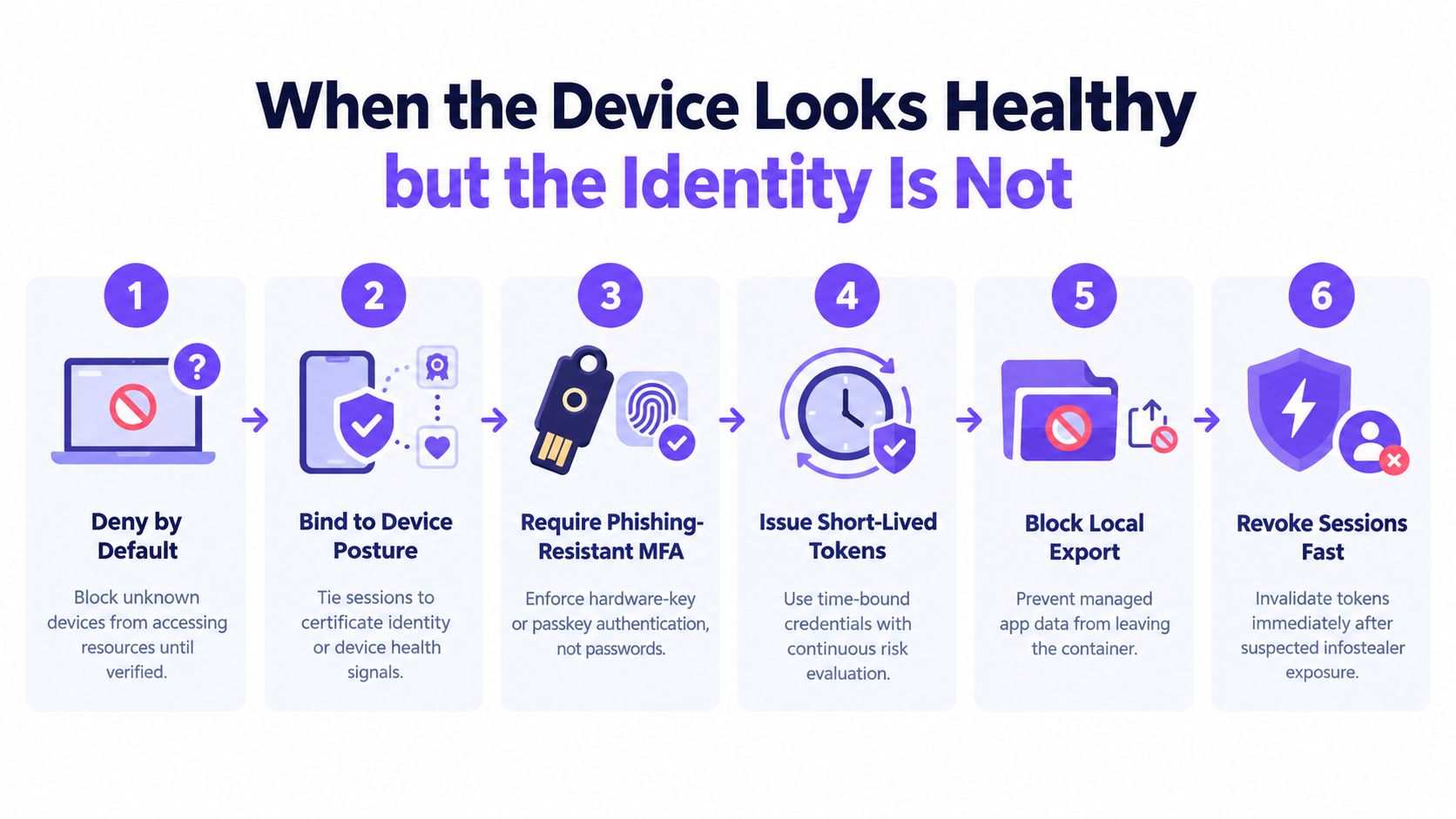
That is why default-deny matters for unknown devices. If the endpoint cannot be trusted, access has to be earned through posture, certificate identity, or both. The authentication layer should then require phishing-resistant MFA, preferably passkeys or hardware-backed authenticators, so the user proves more than knowledge of a password.
Make the session disposable
The control path that works in practice is straightforward, though not easy to run well. Bind access to device posture or certificate identity. Issue short-lived tokens. Recheck risk continuously. Revoke sessions quickly when you suspect infostealer exposure. If the app allows local export, block it through managed containers or equivalent policy.
The operational metric to watch is not enrollment volume. It is how fast you can rotate credentials and cut off sessions after a suspicious event. Verizon's analysis of SSO logs also found credential stuffing represented a median 19% of daily authentication attempts, rising to 25% at enterprise-sized organizations. That is why authentication telemetry matters, not just device compliance.
BYOD access should be revocable by design. If identity is compromised, the session has to collapse quickly, even when the device itself still appears healthy.
Network Layer Containment Without an Agent
A student, guest, or visitor can connect to WiFi and still never be trusted. If you cannot install anything on the device, the network has to carry more of the burden. That pattern holds in guest WiFi, school WiFi, hospital visitor networks, and public venues where agents are not accepted. NIST's wireless guidance says unsecured wireless networks should disable unnecessary networking capabilities and that mobile devices should be secured throughout their lifecycle, yet many BYOD environments still include users who will not accept an agent or MDM profile NIST wireless guidance.
Segment first, then filter
Separate SSIDs and VLANs are still the base layer. Guest, staff, and sensitive-service networks should not share the same ruleset, and routing should stay least-privilege. That does not remove risk, but it keeps one compromised segment from spilling into everything else.
Protective DNS is the most practical agentless control, as described in how Purple Shield works. It sees each lookup before a connection starts, so you can block phishing domains, malware domains, and command-and-control callbacks without touching endpoint traffic or installing software on the device. For mixed estates, that placement matters because enforcement sits at the network edge, not on the user's device.
Add policy layers that reflect time and place
Safe Search enforcement helps in public and family-facing environments where duty of care matters. Scheduled policies can tighten controls after hours, during weekends, or in low-staff windows. Transparent block pages cut confusion and show users that the network is enforcing policy, not randomly breaking websites.
For a provider, the practical question is simple. Ask whether the platform can enforce policy per SSID, VLAN, venue, and time of day, and whether it can report exactly what was blocked. Purple Shield is built around that agentless model for venue and guest WiFi, with content filtering, threat defense, and DNS-layer controls that run behind existing firewalls Purple Shield overview.
Operator's test: if a device never gets an agent, the controls still need to work, and the logs still need to tell the story.
That same control logic also matches the protection model for digital businesses, where access has to stay safe even when the device sits outside your control.
Network containment has limits. It does not replace endpoint security on corporate devices, and encrypted traffic will always reduce what the network can inspect. For unmanaged devices on shared WiFi, it is still the layer that exists when nothing else does.
Monitoring That Evidences BYOD Risk Reduction
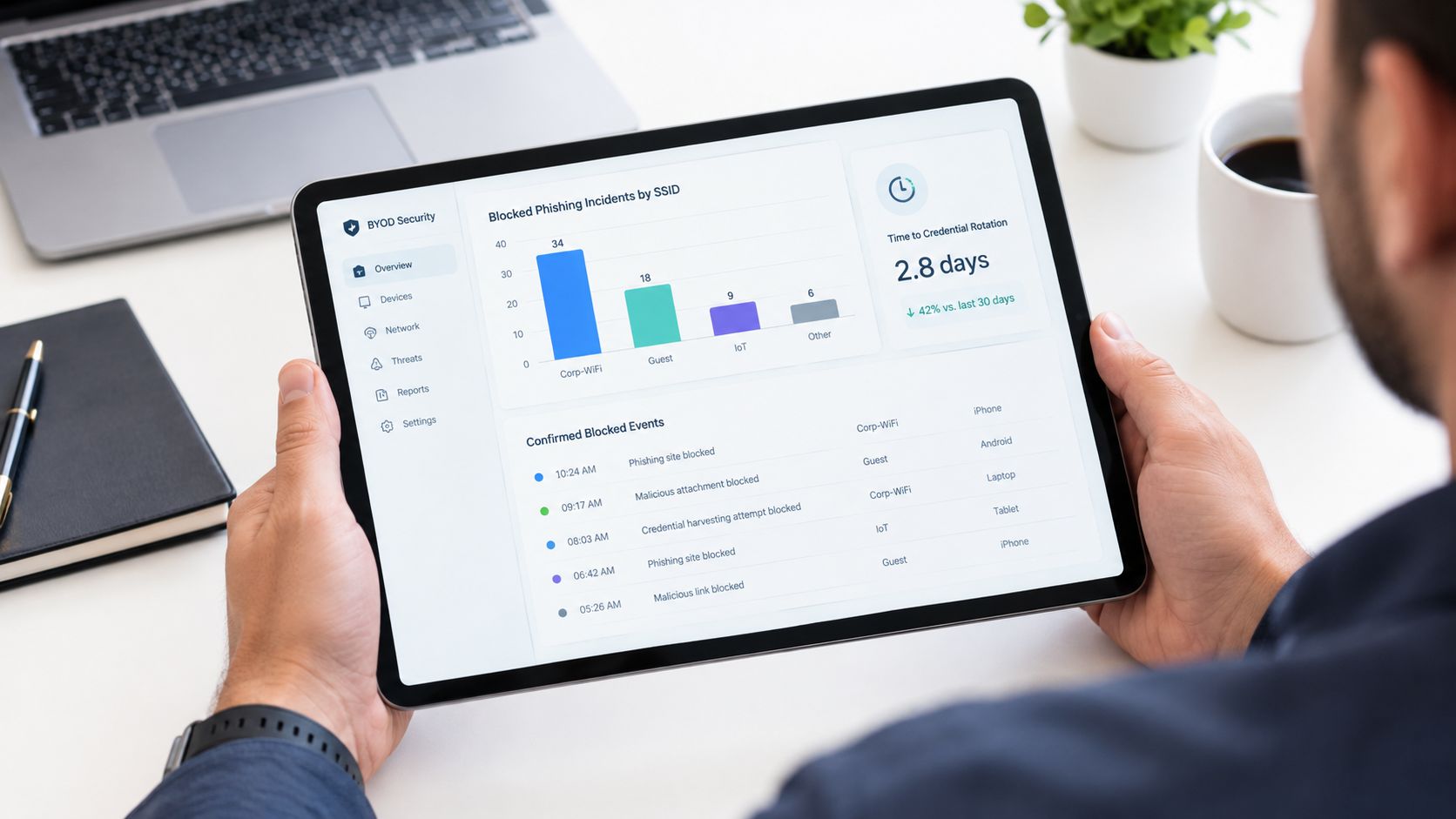
A good dashboard doesn't celebrate volume. It shows what was blocked, where it happened, and whether the policy reduced exposure. The numbers that matter are the ones that prove your controls are doing work, not the ones that make a chart look busy.
Measure blocked risk, not just activity
A useful BYOD monitoring layer reports on blocked phishing and malware destinations by SSID, risky sign-in patterns on managed apps, time-to-credential-rotation after suspected infostealer exposure, confirmed data-loss events, and coverage of unmanaged device populations by network policy. Those are the signals that let you answer auditors, stakeholders, and incident responders with evidence instead of guesswork.
A vanity metric like raw traffic volume won't tell you whether the network stopped anything. A block log with timestamps, network names, and policy reasons will. That distinction matters most in public WiFi and mixed-use estates, where one blocked domain on a guest SSID may be the early warning you needed.
Use evidence to close the loop
A clinician once asked for the “proof” that the guest network was safer after the policy change. The answer came from the block report, not from a sentiment survey. It showed which categories were stopped, on which SSIDs, and at what times the stricter rules were doing work. That's the layer that turns a security control into a defensible operating practice.
Monitoring also helps you spot policy drift. If unmanaged devices keep hitting the same blocked destinations, you may need a clearer block page, better user education, or tighter SSID separation. If sign-in risk keeps showing up in managed apps, the identity side needs attention.
For teams that need a single place to tie these controls together, Purple Shield's reporting and access integration are designed to show what was blocked and where, alongside the network context that made the decision Purple Shield access reporting.
Your BYOD Security Checklist for This Week
Start with the controls that move the needle fastest. Turn on phishing-resistant MFA for the apps that matter, separate guest and staff SSIDs, and make sure sensitive traffic can't ride the same path as casual browsing. Then enable protective DNS, because blocking phishing and command-and-control lookups before a connection starts is a practical win on unmanaged devices.
Tighten the schedule next. If your environment has predictable quiet periods, use stricter evening and weekend policies for public or shared networks. Finish by instrumenting the dashboard that proves what was blocked, where it was blocked, and how fast you can revoke access after a suspected compromise.
Purple Shield gives you protective DNS and content filtering for guest and public WiFi without installing agents on devices. If you're trying to reduce BYOD blast radius on shared networks, visit Purple Shield and look at how its per-SSID policies, threat defense, and reporting fit into that model.