
Threat Intelligence Feeds: A Practical Guide for 2026
Learn how threat intelligence feeds improve early detection and response. Explore types, use cases, and tips for choosing the right feeds for your security
Published 17 October 2026
A guest taps a link on hotel WiFi, and nothing loads except a clean block page. That small moment is the visible end of a much larger chain, where a feed spotted a risky domain, a policy engine checked it, and the connection never got a chance to start. For venue and IT managers, that job of threat intelligence feeds turns outside warnings into a decision at the moment of lookup, not after the damage is done.
Table of Contents
- What Threat Intelligence Feeds Do
- The Main Types of Threat Intelligence Feeds
- Commercial and Open Feeds Compared
- How Feeds Are Collected and Exchanged
- Why Feed Freshness Decides Their Value
- How Feeds Drive Early Detection on Guest and Public WiFi
- Choosing Fewer Feeds and Using Them Better
- Key Takeaways and Practical Next Steps
What Threat Intelligence Feeds Do
A threat intelligence feed is a living stream of indicators, domains, URLs, IPs, file hashes, and behaviour patterns that point to malicious activity. The feed itself stops nothing. Its value comes from the controls that consume its signal and act on it fast enough to matter. In a venue network, that usually means DNS filtering, a firewall, or a response workflow that can block a risky lookup before it turns into a connection.
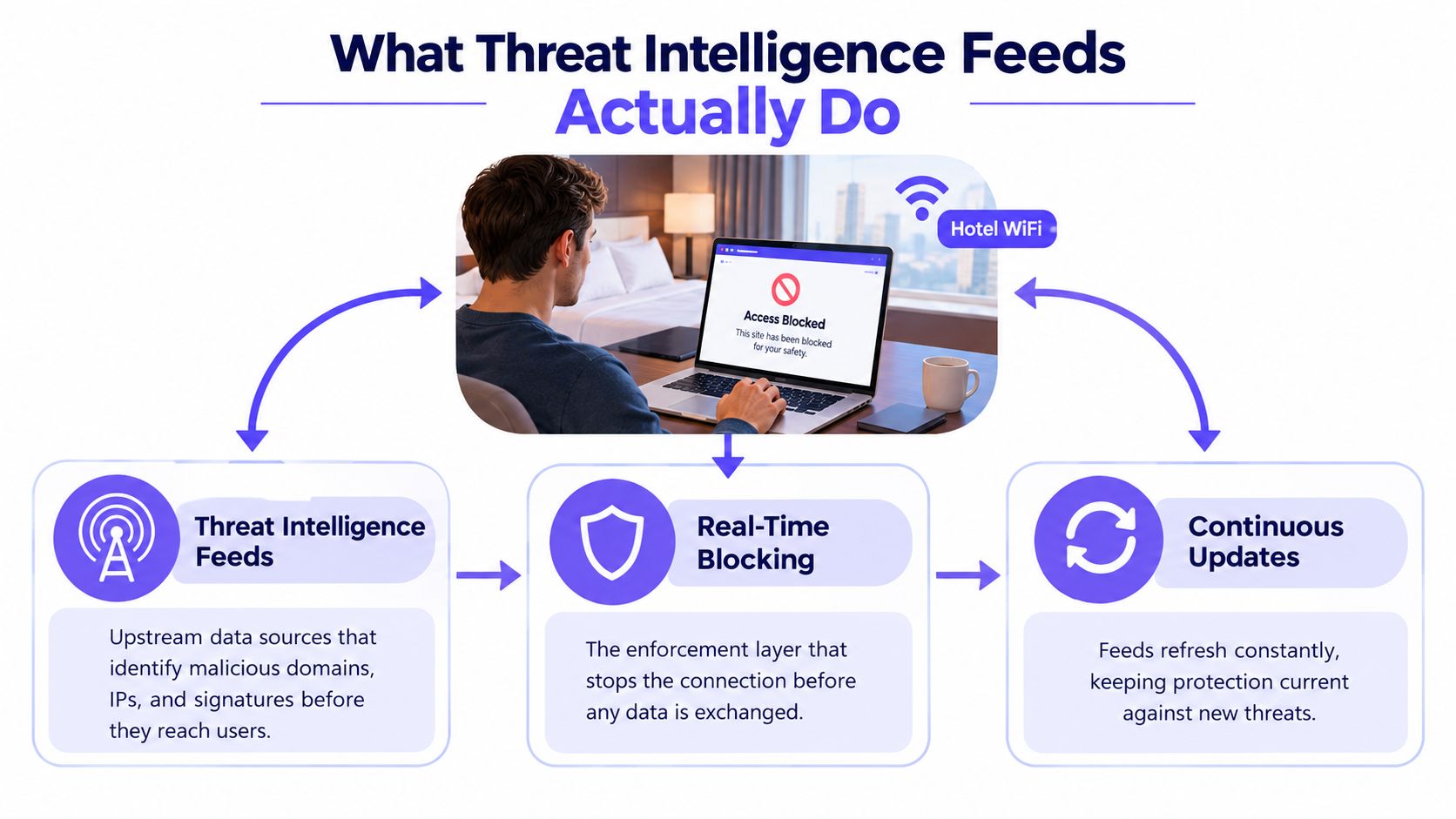
Indicator, intelligence, and control action
The cleanest way to separate the layers is indicator, intelligence, and control action. An indicator is the raw clue, such as a suspicious domain. Intelligence adds context, confidence, and timing, so someone can judge whether the clue matters right now. The control action is the block, alert, quarantine, or investigation.
A food safety analogy makes the sequence easier to follow. An indicator is a contaminated-ingredient alert, intelligence is the kitchen deciding which supplier or recipe needs attention, and the control action is the chef refusing to serve the dish. A list of bad ingredients only helps if the kitchen has a process that uses it.
Practical rule: if a feed does not reach a control point, it is just information with a cybersecurity label.
That is why the same feed can work well in one organisation and do very little in another. One team may ingest it into DNS policy, deduplicate it, and expire stale entries. Another may archive it in a console and call that visibility. For a plain explanation to a colleague, use this wording, the feed is the input, intelligence is the interpretation, and enforcement is the outcome. Purple Shield's network protection overview shows what that looks like when DNS lookup decisions are tied directly to policy.
The Main Types of Threat Intelligence Feeds
Think of feed types as different lenses on the same problem. Some are broad and cheap, some are narrow and highly relevant, and some come from your own network. The right mix depends on whether you're running a hotel, a school estate, a hospital guest network, or a corporate environment with a staffed SOC.
Where each feed type fits
Open source feeds are usually run by communities, researchers, or CERT-style groups. They're useful because they're visible, widely shared, and easy to test. Their blind spot is consistency, since update cadence and curation can vary.
Commercial feeds are subscription services that blend telemetry, analysis, and packaging into something you can ingest directly. Their strength is speed, coverage, and delivery consistency. Their blind spot is dependence on one vendor's model, terms, and prioritisation.
Sector-sharing communities such as ISACs are built around common exposures in healthcare, finance, education, or public-sector environments. Their strength is relevance, because members face similar threats. Their blind spot is that the feed may be narrower than a broad commercial source.
Government and CERT feeds usually publish advisories, indicators, or campaign details tied to active incidents. Their strength is trust and public-interest reach. Their blind spot is that publication can lag the attacker's pace.
Internal telemetry comes from your own SIEM, EDR, DNS logs, and incident history. Its strength is precision, because it reflects your actual estate. Its blind spot is obvious, it only sees what touched your network.
A few indicator classes show up again and again. Domains and URLs point to web destinations, IP addresses point to hosts, file hashes identify known malware samples, and rule formats such as YARA or Sigma describe patterns defenders can match inside files or logs. TTPs, tactics, techniques, and procedures, describe how an attacker behaves rather than only where they showed up.
Practical rule: the closer a feed is to your actual decision point, the more value it usually has.
Commercial and Open Feeds Compared
Commercial and open feeds aren't opposites, they're operating models. One is bought, curated, and packaged for speed. The other is shared, inspectable, and often easier to justify in cost-sensitive environments. Mature programmes usually use both because neither one solves every problem by itself.
Commercial feeds tend to include aggregated telemetry from large sensor networks, human-reviewed analysis, and structured delivery through API or STIX/TAXII. That usually means easier integration and faster updates, but it can also bring cost, licensing limits, and vendor dependence. Open feeds, by contrast, are often community blocklists, CERT advisories, public MISP instances, or research projects like abuse-style reputation datasets. They're transparent and low-cost, but they usually need more tuning and more care with false positives.
| Dimension | Commercial Feeds | Open Feeds |
|---|---|---|
| Cost | Subscription-based | Usually free or low-cost |
| Update speed | Often faster and more consistent | Varies by project and maintainer |
| Transparency | Limited by vendor packaging | Usually high and inspectable |
| Coverage | Broad, with curated aggregation | Uneven, but sometimes very targeted |
| Tuning effort | Lower at the start, still needs validation | Higher, because quality varies |
| Best fit | Teams that need dependable delivery | Teams that want visibility and control |
Commercial feeds often win when a team needs faster operationalisation and broader coverage. Open feeds often win when budget is tight and transparency matters. The practical answer for most venues and multi-site operators is to use a small number of each, then tune them around actual enforcement decisions rather than buying for breadth alone.
How Feeds Are Collected and Exchanged
A feed becomes useful only after it moves through a pipeline. Raw indicators come in, they get cleaned, standardised, enriched, and then shipped to the tools that can act on them. That's why people keep talking about STIX and TAXII, even though the names sound abstract.
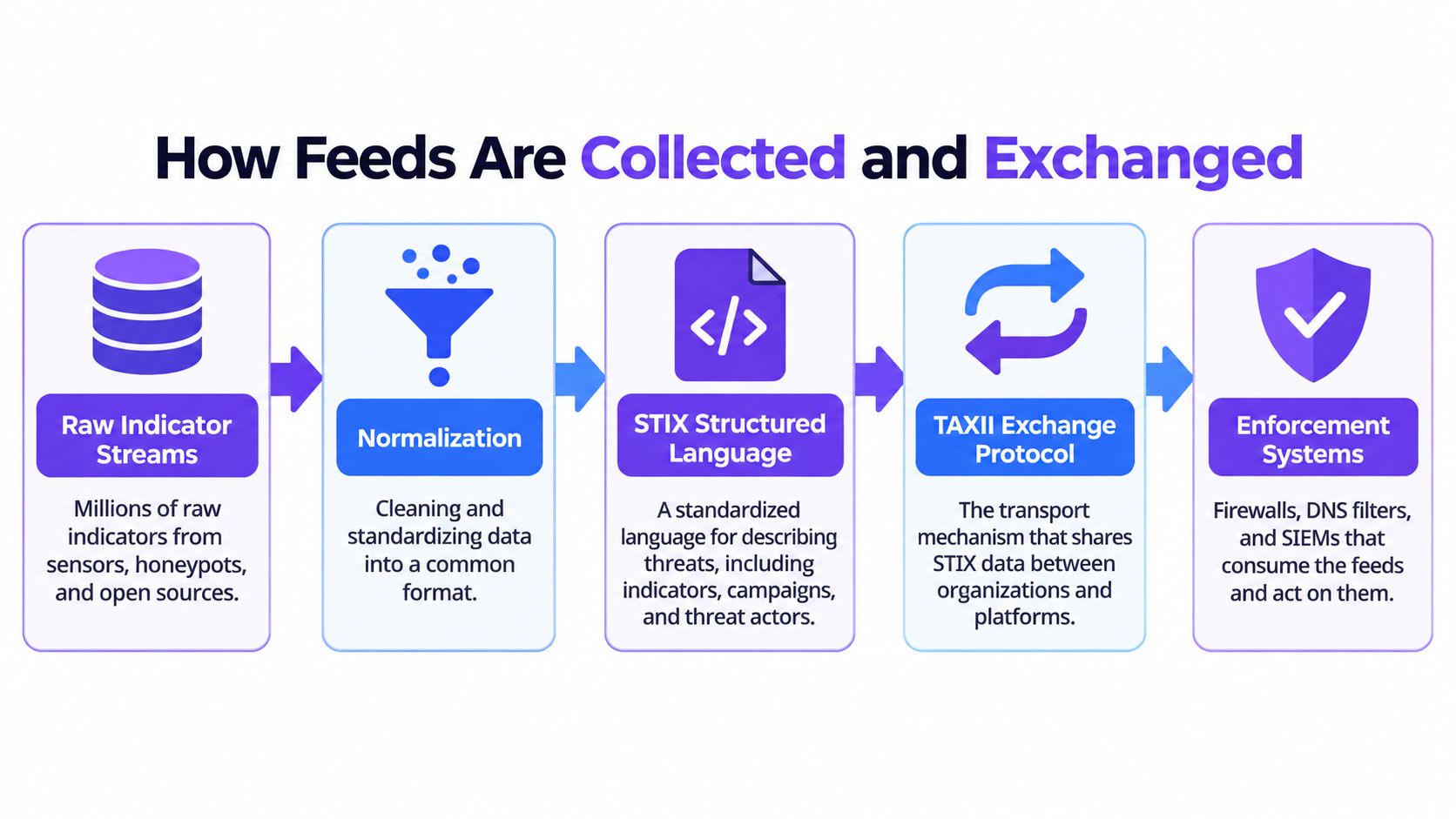
From raw stream to usable policy
STIX is the common language for describing threat information in a structured way. It lets one system describe indicators, campaigns, or related objects in a format another system can understand. TAXII is the transport layer that moves that data between platforms. Together, they matter because nobody wants to rebuild every integration by hand when multiple providers are involved.
Enrichment usually happens next. Teams add geolocation, autonomous system data, passive DNS history, WHOIS or registration context, sandbox results, and a confidence score. That extra context is what turns a raw list into something a DNS filter, firewall, or analyst can use without drowning in noise.
Feed delivery can happen in different ways. A push feed arrives on a schedule, a pull feed is queried on demand, and a hybrid model subscribes to a channel while still allowing on-demand retrieval. The best choice depends on how quickly the indicator changes and how much you trust the source.
One-way consumption underperforms because defenders learn from their own observations too. Good programmes feed incidents, sightings, and local context back into ISACs or vendor ecosystems so the next update is better than the last.
Why Feed Freshness Decides Their Value
A feed is only useful if it arrives before the attack has moved on. A peer-reviewed evaluation found that most indicators stayed active for at least 20 days before appearing in tested feeds, while DShield's sensitivity was 1.5 to 2 orders of magnitude lower than other sources because it generally listed indicators after major malicious activity had already happened. Late intelligence can still be accurate, but it may arrive after the moment a DNS policy needs it. For a plain-language view of why timing changes decisions, see what data freshness means for decisions.
Freshness is a control, not a slogan
Measure freshness directly. Check ingest timestamps, compare first observation against detection time, and give rapidly rotating domains a shorter time to live. If those checks are missing, a venue can end up blocking yesterday's infrastructure while today's phishing kit gets through.
Faster feeds also bring a trade-off. The quicker a source moves, the more corroboration and confidence scoring you need to avoid bad blocks. Slower feeds can still help, but they are usually better for retrospective hunts and enrichment than for first-line blocking. That difference matters in public and guest WiFi, where a false positive can frustrate visitors just as much as a missed detection can expose them.
Practical rule: treat feed freshness like a service level, not a procurement checkbox.
Daily snapshots of new domains miss at least 1% of newly registered or short-lived domains that were described as almost always malicious, and researchers found about half of newly registered domains within 45 minutes and roughly 30% within 15 minutes. Rapid monitoring clearly outperforms stale snapshots when attackers are spinning up disposable infrastructure. For operators, the practical decision is straightforward, define how quickly a domain must become visible, then choose sources and TTLs that match that target.
How Feeds Drive Early Detection on Guest and Public WiFi
Guest WiFi is where feed mechanics become visible to non-specialists. A device connects, it asks for a domain, and protective DNS checks that request before a browser opens a connection. That lookup-stage decision is the key control point for unmanaged laptops, BYOD phones, kiosks, and visitor devices that can't carry agents.
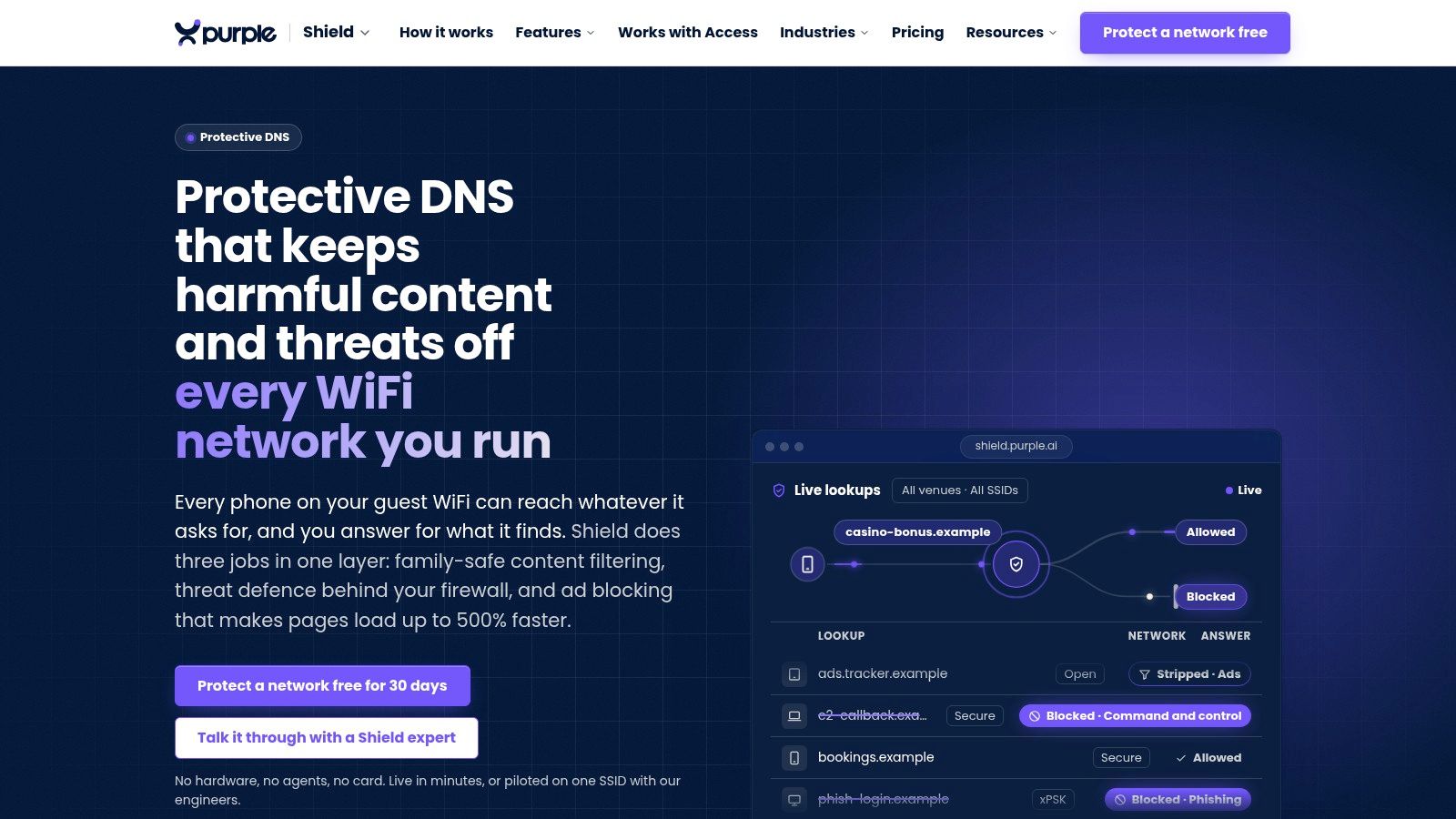
What the operator sees
On the operator side, the useful output isn't a raw feed dump. It's a list of blocked lookups, the SSID or VLAN they came from, the feed source that matched, the age of the indicator, and the evidence needed for a block page or audit trail. That is the practical difference between a threat feed and a venue control.
The strongest setups don't rely on one signal alone. They combine newly registered domains, certificate transparency, passive DNS changes, and incident-confirmed indicators so emerging infrastructure can be flagged before standard blocklists catch up. That early-signal approach is especially useful in guest networks, where compromise often starts with a single tap and where a DNS deny response is the only control that works before the connection opens.
For teams that need a reference point on how unmanaged devices behave, OSINT workflows for evidence gathering is a helpful complement because it shows how investigators corroborate suspicious activity without relying on a single sensor. The operator-facing version of that same discipline is simple, capture the source, the time, the network segment, and the reason for the block, then keep that evidence available for staff, safeguarding teams, or auditors.
The same layer can improve performance too. DNS-layer ad and tracker blocking can make pages feel lighter because fewer unwanted requests get through. That matters in hospitality and education just as much as in security, because slow browsing turns protection into a support ticket.
Purple Shield's BYOD guidance aligns with that model, since it treats unmanaged devices as a policy problem at the network edge rather than a software install problem on the device.
Choosing Fewer Feeds and Using Them Better
The hardest part of a feed programme is deciding which feeds deserve a place in the policy path, not expanding the portfolio. A 2025 survey of senior technology and cybersecurity leaders found that many felt overwhelmed by feed volume, many cited a shortage of skilled analysts, and many struggled to verify whether threats were valid or relevant. That is a clear sign that more intake does not automatically create more value. the latest feature set matters here because feed value only appears when a platform can turn it into a decision at the network edge.
A simple rationalisation method
Start by mapping each feed to a decision. If a source cannot tell you whether to block, alert, enrich, or investigate, it probably belongs in a lower-priority tier.
Then add confidence and expiration rules. Indicators that rot quickly should age out quickly, while slower-moving reputation data can stay in place longer. After that, deduplicate against your internal telemetry so you are not keeping the same signal in different places.
A practical procurement checklist helps too:
- Which decision does this feed enable? If the answer is vague, the feed will be hard to operationalise.
- What is its measured latency? You need a real number from your environment, not a promise.
- How does it expire indicators? Stale blocks create avoidable noise.
- What reporting does it produce? Auditors and non-technical stakeholders need evidence, not a dashboard tour.
One well-scoped commercial feed, one community feed, and your own DNS telemetry often outperform a ten-feed portfolio with no prioritisation. The reason is simple. The most useful feed is the one that can drive a decision, especially in places like guest WiFi, schools, and hospitals where there are no analysts on duty and no agents on devices.
Key Takeaways and Practical Next Steps
Threat intelligence feeds only matter when they reach an enforcement control in time. Freshness and context matter more than raw volume, and DNS-layer enforcement is the cleanest way to use feeds in environments where you can't install agents. The strongest programmes also log enough evidence to explain what was blocked, where, and why.
For hospitality venues, focus on feeds that catch fast-moving phishing domains and disposable infrastructure before guests touch them. For schools and hospitals, insist on reporting that can support safeguarding, incident review, and compliance evidence. For multi-site operators, demand per-SSID and per-VLAN policy control so guest, staff, and resident traffic aren't treated as the same risk.
A few common questions come up again and again:
- How often should feeds update? As often as the threat type demands, with faster update cycles for short-lived infrastructure.
- What happens when a feed goes down? Good designs fail gracefully, keep prior policy state, and don't strand the network.
- How do you prove a block to an auditor? Keep the blocked domain, timestamp, policy source, affected network segment, and block-page evidence.
- Where do you start with no analyst on staff? Begin with DNS-layer controls, one or two well-scoped feeds, and simple reporting your operators can read.

If you're responsible for guest WiFi, school connectivity, or a hospital visitor network, Purple Shield gives you a practical way to turn threat intelligence feeds into DNS-level decisions without agents or appliances on user devices. Visit Purple Shield to see how venue-aware policy, reporting, and protective DNS fit together in one control layer.