Skip to content
Shield

Protective DNS that stops threats on every network

Phishing, malware and ransomware all start with a DNS lookup. Shield checks every one on your offices, branches, guest WiFi and IoT, and blocks threats before they connect.

What Shield does

Stop the attack at the lookup

Phishing, malware, ransomware and command-and-control callbacks are blocked before a connection starts.

  • New threats flagged up to 10 days before standard blocklists
  • Rules for newly registered, country and top-level domains
  • Fails closed, on a dual anycast network built for 100% uptime
See everything Shield stops
Live lookupsAll sites · All networksLive
  • news.exampleGuestAllowed
  • casino-bonus.exampleGuestBlocked · Gambling
  • ads.tracker.exampleGuestStripped · Ads
  • c2-callback.exampleHQ LANBlocked · Command and control
  • bookings.exampleBranchAllowed
  • phish-login.exampleBranchBlocked · Phishing
  • video.exampleBranchAllowed
  • malware-cdn.exampleGuestBlocked · Malware
241k
threats blocked a week at St George's
10 days
earlier warning than standard blocklists
500%
faster page loads with ads stripped
Command-and-control callback blocked
Start your 30-day free trial

The gap

The lookup your firewall never sees

Every device makes a DNS lookup before it connects. Three gaps stay open until something checks every one.

  • One infected device calls home

    Shield blocks the command-and-control callback at the lookup, so the attacker never hears back.

  • Encrypted traffic hides where it goes

    A firewall sees little inside HTTPS, but the lookup still names the domain, so Shield blocks a bad one first.

  • Devices that can never run an agent

    Guest phones, printers, cameras, tills and building systems are covered at the network, with nothing to install.

What Shield does

Three jobs, one layer

Shield answers every DNS lookup, so one layer covers every device on every network you run.

  • Threats

    Stop the attack at the lookup

    Phishing, malware, ransomware and command-and-control callbacks are blocked before a connection starts.

    • New threats flagged up to 10 days before standard blocklists
    • Rules for newly registered, country and top-level domains
    • Fails closed, on a dual anycast network built for 100% uptime
  • Content and apps

    Decide what every network can reach

    Filtering meets the Internet Watch Foundation bar and the Friendly WiFi standard.

    • 40+ categories, set per network, site or Entra ID group
    • One-click app blocking, from generative AI tools to VPNs and file sharing
    • Safe Search enforced on Google, Bing and YouTube
  • Ads

    The only safety layer that makes networks faster

    Ads, trackers and bloatware are stripped at the DNS layer, so they never load and metered backhaul costs fall.

    • 500% faster page loads
    • 44% less data used
    • 62% fewer DNS queries

Policy

A policy for every network and team

Each network, VLAN and directory group carries its own rules, set once and left to run.

  • Staff: threat defense firstOffice LAN and staff WiFi get threat-first rules per Entra ID or Active Directory group.
  • Guest WiFi: strict and family-safeFamily-safe categories, Safe Search and ad blocking, with nothing to install on visitors' phones.
  • IoT and branches: locked downTills, cameras and building systems sit behind a relay, allowed only the domains they need.
  • Paid and free WiFi kept apartA paid tier carries its own rules, and streaming can be limited at busy times.
  • Policies that change by the hourStricter in the evening, different at the weekend, per site.

See and control

One dashboard for every site and network

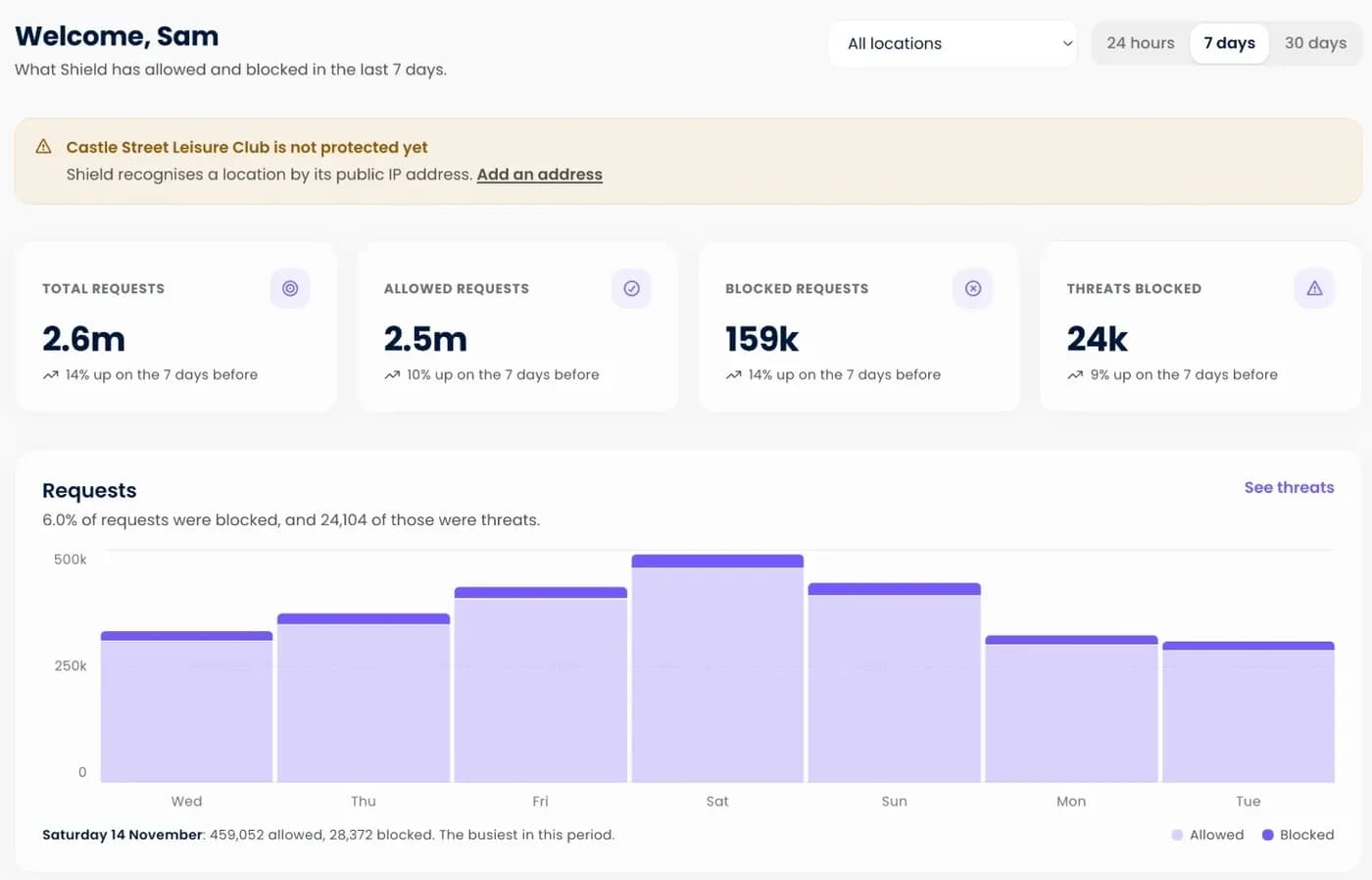
See what was blocked, which threats were stopped and who looked them up, then drill from a domain to each device that asked for it.

  • Blocked domainsSee what was blocked, on which network, at which site and for whom.
  • Threat analysisTrack the threats Shield stopped, including devices calling home.
  • User behaviorSee shadow IT and the AI tools people use, by user and group.
  • Policy per network and groupChange a policy, a list or a schedule from the same screen.

Logs stream to Splunk, Microsoft Sentinel, Elastic, IBM QRadar, CrowdStrike, Amazon S3 or syslog.

Proof

Proven at St George's, Whitbread and AGS Airports

10 days
earlier warning of new threats than standard blocklists
500%
faster page loads with ads stripped
80,000+
venues on the Purple platform
  • 241kthreats blocked a week

    St George's Healthcare NHS Trust

    241k threats blocked a week on its guest WiFi: malware, phishing and command-and-control lookups.

  • Whitbread

    Protects its hotel guest WiFi with Shield.

  • AGS Airports

    Protects passengers at Aberdeen, Glasgow and Southampton.

  • ISO 27001
  • SOC 2
  • GDPR
  • CCPA
  • Cyber Essentials
  • Friendly WiFi
  • Internet Watch Foundation

Filtering meets the Friendly WiFi and Internet Watch Foundation standards. SOC 2 covers the DNS network Shield runs on.

Purple customers

  • Chase
  • McDonald's
  • Whitbread
  • Manchester Airports Group
  • Harrods
  • University of Sheffield
  • Walmart Canada
  • AGS Airports

Pricing

Prove it on one network first

Run Shield on its own or add it to Purple Access. Every plan starts with a 30-day free trial.

FAQ

What IT and security teams ask before switching

We already have a firewall. Why add Shield?

Shield sits behind your firewall, not in place of it. It blocks the lookup before a connection starts, sees the domain behind encrypted traffic and covers guest and IoT devices no agent reaches. New threats are flagged up to 10 days before standard blocklists.

Can people get round it with a VPN or encrypted DNS?

Block VPN, proxy and anonymizer apps in one click, and add a firewall rule so DNS can only leave your network through Shield. A Shield expert shows you how your network handles encrypted DNS before you trial.

How is Shield different from Cisco Umbrella?

Both stop threats at the DNS layer, with directory-group policy and SIEM logs. Umbrella also sells an endpoint client for devices off your network. Shield covers every device on the networks you run, and adds ad blocking and a policy per SSID, VLAN and time of day.

Will Shield slow the network down?

No, it speeds it up. Stripping ads and trackers at the DNS layer makes pages load up to 500% faster and cuts web traffic by 20 to 40%.

How long are DNS logs kept?

Raw DNS query logs are kept for 9 days, and Purple pulls the data in every night for its own reporting. To keep them longer, stream them to your SIEM or Amazon S3 under your own retention policy.

Do I need Purple Access to run Shield?

No. Shield runs standalone on any network, wired or wireless. With Purple Access it adds a policy to every open, secure and xPSK network. Either way, you start with 30 days free.

Do we need hardware or an agent on each device?

No. You point a network's DNS at Shield, and every device on it is covered, guest phones, printers and cameras included. Shield works at the network only, so it has no roaming client: a device is protected while it is on a network you run.

Where do Shield's logs go?

To the Shield dashboard, and on to your SIEM: logs stream to Splunk, Microsoft Sentinel, Elastic, IBM QRadar, CrowdStrike, Amazon S3 or syslog. Raw DNS query logs are kept for 9 days.

Decide what your network reaches, free for 30 days

Tell us your networks and who uses them, and we map a policy to each. Point one at Shield and see what it stops for 30 days.

Tell us your networks. We map a policy to each one.