
Network ad blocker for venues: DNS filtering Explained
Learn how a network ad blocker works at DNS level, what it speeds up on venue WiFi, and how to deploy it safely across guest networks.
Published November 2, 2026
It's Saturday evening in a busy bar. A guest opens a news page on the free WiFi, watches it stall, then asks the bar staff whether the internet is broken. The connection may be working perfectly well while the cell phone fetches advertising, tracking scripts and other page content through the same shared wireless network.
A network ad blocker can cut some of that unnecessary traffic. But choosing one also means deciding what happens when filtering breaks a legitimate service, who can inspect browsing records and whether guests should remain online during a filtering outage.
Table of Contents
- What a Network Ad Blocker Does for a Venue
- Deployment Options Compared at a Glance
- How DNS-Layer Blocking Works Across a Venue
- Speed and Data Savings You Can Expect
- Limits DNS Blocking Cannot Cover
- Privacy and Fair Use Rules for Guest Networks
- Go-Live Checklist Before You Switch On
What a Network Ad Blocker Does for a Venue
A network ad blocker applies filtering to the WiFi connection, rather than relying on software installed on each guest's device. With DNS-layer filtering, the network checks requested domain names and blocks those classified as advertising or tracking destinations.
For the guest reading the news, the article can still load while requests to separately hosted advertising domains are stopped. The filter doesn't edit the article or inspect everything displayed on screen. It controls whether the device can resolve particular destinations.
Why venues use it
A browser extension protects the browser where it's installed. Network filtering can serve cell phones, laptops, smart TVs, and unmanaged guest devices, including requests made by apps, provided those requests use the venue's resolver.
That distinction matters when the venue doesn't own the equipment. Asking every hotel guest to install an extension isn't a workable operating model.
Practical rule: Put the control where you have administrative authority, on the network, rather than on guests' personal devices.
Venue operators have several reasons to consider filtering:
- Guest experience: Pages burdened by unwanted third-party requests can feel sluggish even when basic connectivity works.
- Shared capacity: Advertising and tracking traffic competes for wireless airtime and internet capacity. Staff services need proper segmentation and prioritization, not just fewer ads.
- Network governance: Operators need deliberate rules for acceptable use, threat protection and access to legitimate services.
The limit is important: domain filtering complements browser-level controls rather than replacing them. Choose it for the coverage it provides, then judge it against measurable savings, compatibility requirements, and a clear operating policy.
Deployment Options Compared at a Glance
| Option | Where it applies | Covers every device | Install needed | Typical fit |
|---|---|---|---|---|
| Browser extension | One browser on one device | No | Yes, on each device | Personal use |
| Device app or profile | One phone or laptop | No | Yes, on each device | Managed company devices |
| Router or firewall ad filter | Gateway hardware or firmware | Only clients routed through the enabled filter | Hardware or firmware change | Venues with a centrally managed gateway |
| DNS-layer network filter | Resolver serving the whole WiFi network | Yes, all clients on the SSID using that resolver | No client install | Bars, hotels, schools, hospitals |
Browser extensions suit people controlling their own browsing environment. They can apply page-level rules that DNS filtering can't, but a venue can't assume visitors have installed them or configured them consistently.
Device apps and profiles make sense for managed company laptops or school-owned equipment. An administrator can enforce settings through device management, but that doesn't provide a deployment route onto a visitor's personal phone.
Follow the actual traffic path
A router or firewall filter can work well when every relevant connection crosses the gateway where filtering is enabled. Check guest tunnels, secondary internet connections and IPv6 paths rather than assuming a setting on the main router reaches the entire property portfolio.
A DNS-layer filter suits mixed-device networks because the venue distributes resolver settings centrally. Coverage still requires validation: a device using its own resolver or a tunnel may follow a different path.
A secure web gateway belongs in the comparison when requirements extend beyond domain decisions to deeper web controls. That's a different scope of inspection and administration, not just a stronger advertising blocklist.
If guests bring their own cell phones and you can't install software on them, choose a network-level control. Then verify its coverage rather than assuming it.
Before selecting a service, establish the peak-hour device count, who owns those devices and which networks need different treatment. A school's student network, a hotel's guest network and an operational network shouldn't inherit the same rules merely because they share an internet connection.
How DNS-Layer Blocking Works Across a Venue
Think of a hotel front desk clerk checking a caller's destination before connecting the call. The resolver performs a similar gatekeeping job for domain names, although it uses policy rules and domain classifications rather than judging the contents of a conversation.
The flow separates permitted destinations from blocked ones before a new connection begins.
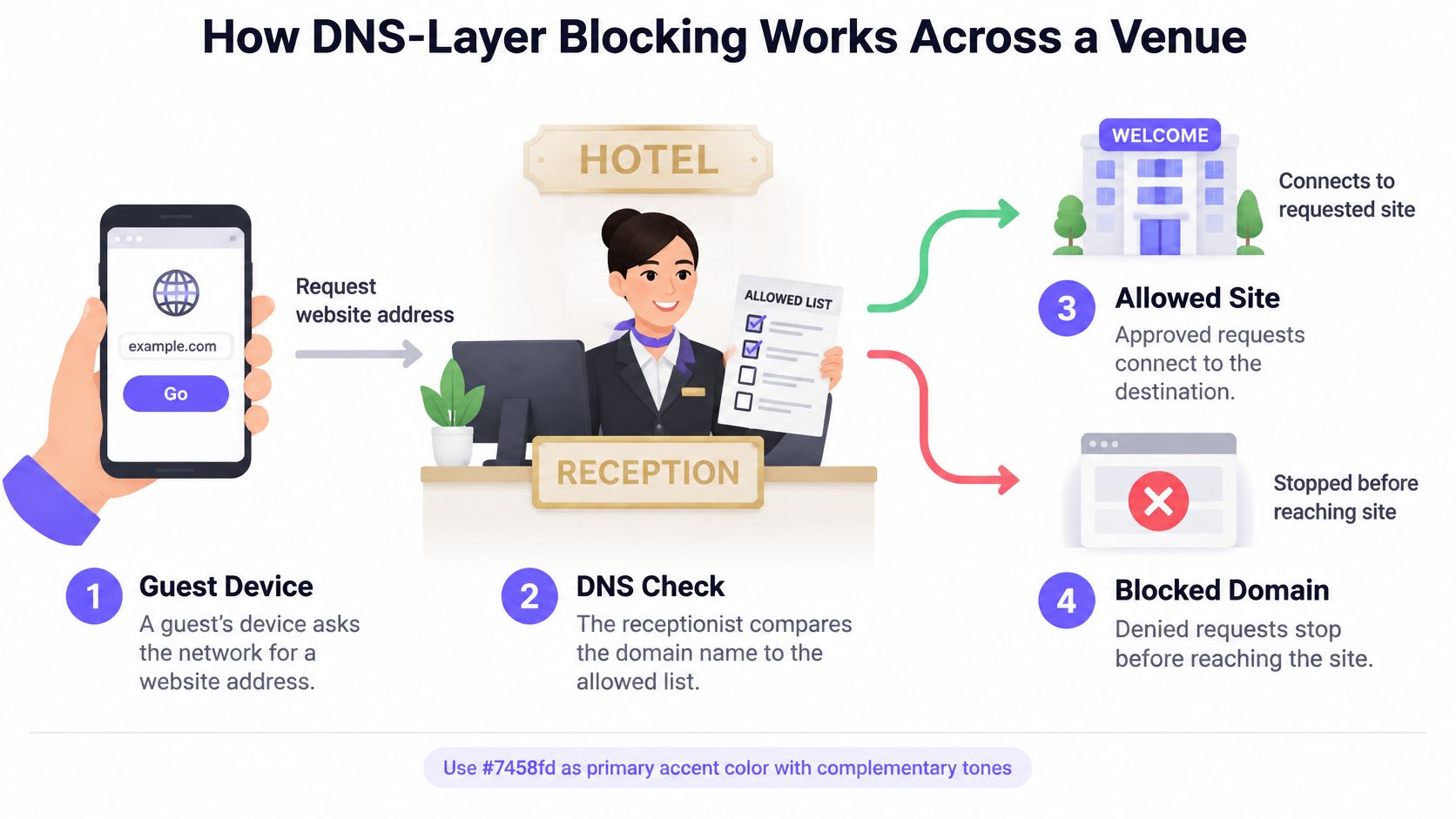
- The device requests an address. A guest's cell phone asks the resolver for the address associated with a website, app service or advertising domain.
- The resolver checks classification. It compares that domain against the advertising, tracking, malware and content categories enabled for the network.
- A blocked destination receives a blocking response. The device doesn't receive the normal destination address, preventing the intended connection through that lookup.
- An allowed destination resolves normally. The device receives an answer and can proceed with its connection.
- The correct network policy applies. Rules can be selected by SSID, VLAN, venue or schedule when the platform supports those distinctions.
- Reporting records the decision where configured. Operators can review blocking activity without treating indefinite, device-level query retention as a requirement.
Make policy boundaries explicit
An SSID is the WiFi network name guests select. A VLAN separates traffic logically behind that connection. Neither automatically guarantees that the resolver can identify which policy should apply.
During deployment, confirm how network identity reaches the filtering service. Separate SSIDs that ultimately appear under the same undifferentiated policy won't provide the separation the administrator intended.
Also check how resolver settings reach clients. DHCP changes may require devices to renew their network configuration, while cached answers and existing connections can delay the visible effect of a policy change. Test newly connected devices as well as devices already online.
Treat resolution as a dependency
The resolver becomes part of the venue's critical connection path. Slow responses can delay new lookups; unavailable resolution can make a healthy internet connection appear broken.
Use resilient resolver infrastructure, monitor response latency, and test upstream connectivity. Caching helps with repeated lookups, but it isn't a substitute for a functioning service or a documented outage procedure.
Speed and Data Savings You Can Expect
| Measure | Without DNS filtering | With DNS filtering | Source note |
|---|---|---|---|
| Average page load time | Approximately 11.3 seconds | Approximately 7.4 seconds | AdGuard's controlled Puppeteer test |
| Traffic saved per website | Unfiltered baseline | Approximately 1.67 MB | The same test reported approximately 198.52 MB saved across its test set |
| Extra data transmissions caused by web tracking | Tracker requests remain in the workload | Reduction not quantified for a venue deployment | Separate large-scale academic analysis, discussed under filtering limits |
The benchmark demonstrates a useful mechanism: when a browser doesn't fetch blocked third-party resources, it transfers less content and may finish loading sooner. It does not establish a guaranteed improvement for your bar, hotel or campus.
Page composition matters. A news page with separately hosted advertising presents a different opportunity from a booking service whose resources mostly come from permitted domains. Cache state, resolver latency and advertisement delivery methods also affect the result.
Measure savings without inflating them
Blocked queries aren't saved bytes. A blocked lookup might have led to a substantial download, a tiny request or a failed connection. Don't multiply the dashboard's block count by an assumed resource size and present the result as measured bandwidth savings.
Start with a quiet-week baseline, but include representative busy periods before making a capacity decision. Compare similar occupancy, connected-device counts and usage patterns after activation. A Saturday evening can offer greater absolute savings than a quiet afternoon, but only if the traffic mix contains more blockable requests.
Track these operational measures:
- Blocked-query rate: Shows how often the enabled policy acts, not how much content it removes.
- Resolver response latency: Reveals whether filtering introduces a lookup delay.
- Cache-hit ratio: Helps explain changes in resolver workload and response behavior.
- Per-SSID traffic: Shows whether guest traffic changes independently of staff or operational activity.
Keep the comparison fair
Use the same page set and device conditions for repeatable browser tests. Record whether the cache was warm, whether the device was on the same access point and whether other guests were competing for airtime.
For network-wide assessment, compare traffic alongside connected-device counts and venue activity. A lower total after a quiet business day proves little about filtering effectiveness.
Measure user-visible performance and transferred traffic separately. A faster page and a smaller payload are related outcomes, but they aren't interchangeable.
If resolver latency rises or guests report broken services, investigate those problems before expanding the rollout. Savings don't justify an unreliable browsing experience.
Limits DNS Blocking Cannot Cover
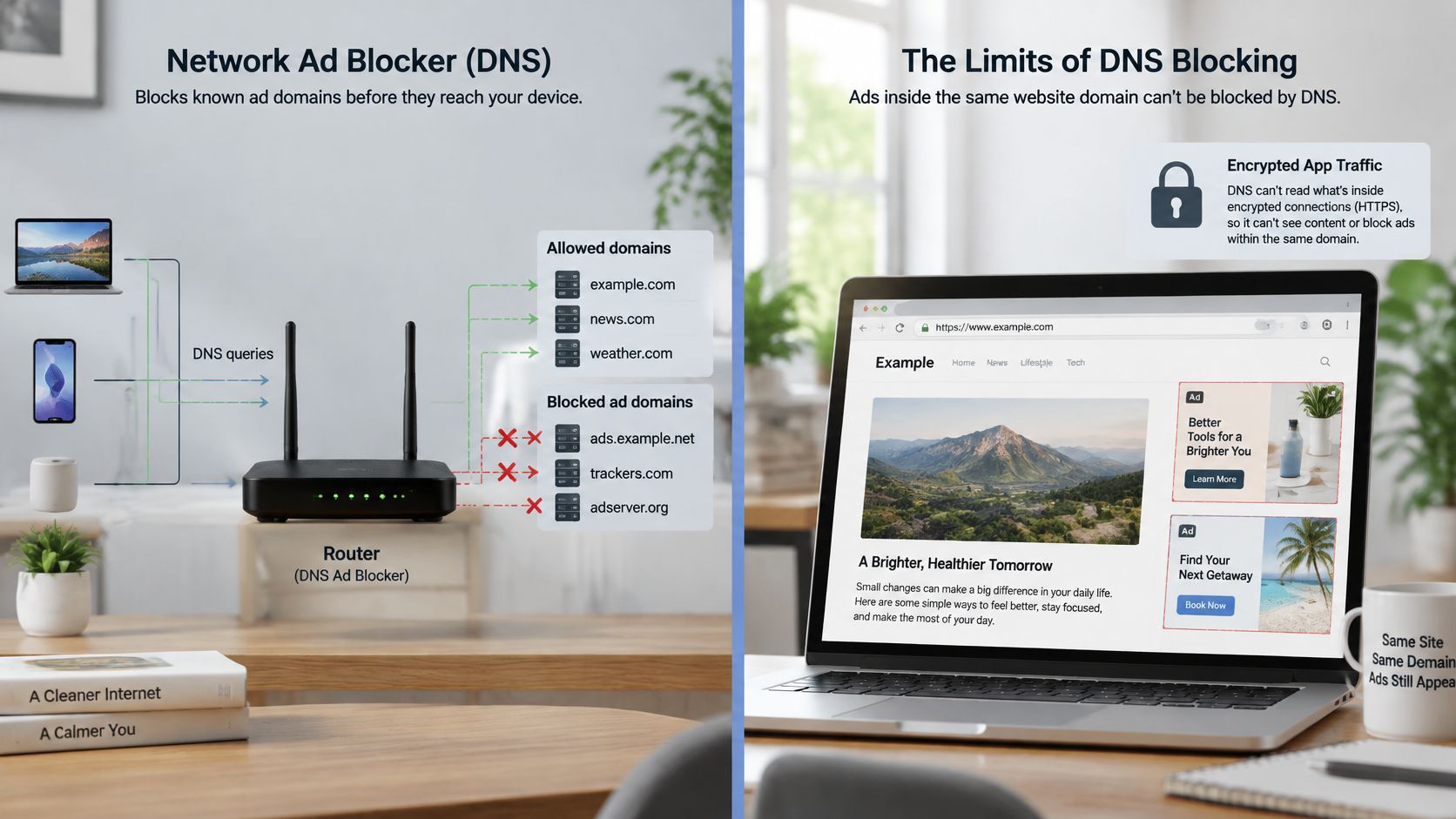
A network ad blocker isn't a universal advertisement remover. It makes hostname decisions, not a complete assessment of everything an encrypted application delivers.
The illustration highlights the difference between controlling a destination and filtering its contents.
A large-scale academic analysis of web tracking, combining telemetry from 100,000 users with crawling of 2.7 million websites, found that tracking increased data transmissions by up to 21%. That establishes the potential overhead, not the proportion a DNS filter can eliminate.
The main gaps are specific:
- First-party delivery: Advertising or tracking sharing a required hostname can't be selectively removed through DNS.
- Embedded or multiplexed content: Permitted responses may carry both useful content and advertising.
- Hard-coded addresses: Connections that don't require a lookup evade that decision point.
- Alternative resolution: Applications using their own DNS over HTTPS service may bypass the venue resolver.
Choose outage behavior deliberately
Fail-closed preserves filtering by refusing unfiltered resolution when the filtering service is unavailable. It can prevent new browsing connections, so safety requirements must be balanced against access to essential services.
Fail-open permits an unfiltered fallback. A bar or hotel may accept that compromise for guest continuity, but it shouldn't become the default for every network in a school or hospital.
An ordinary unfiltered secondary resolver isn't necessarily an outage-only fallback. Clients may use it during normal operation, weakening enforcement.
This video provides an additional explanation of DNS-based blocking.
Test captive portal login, device onboarding, a system update and representative websites on each device type. Pair DNS filtering with managed browser or proxy controls where the remaining gap matters, and watch resolver health alongside compatibility complaints.
Privacy and Fair Use Rules for Guest Networks
DNS logs become sensitive records. Domain requests associated with a device, room, account or session can reveal browsing patterns, even though they don't contain a complete page history.
Blocking advertising doesn't make a guest anonymous. The encrypted DNS traffic-analysis study explains why encryption alone doesn't settle privacy questions: the resolver's visibility, retention practices and ability to associate requests with users still matter.
Use the following governance controls before enabling detailed reporting.
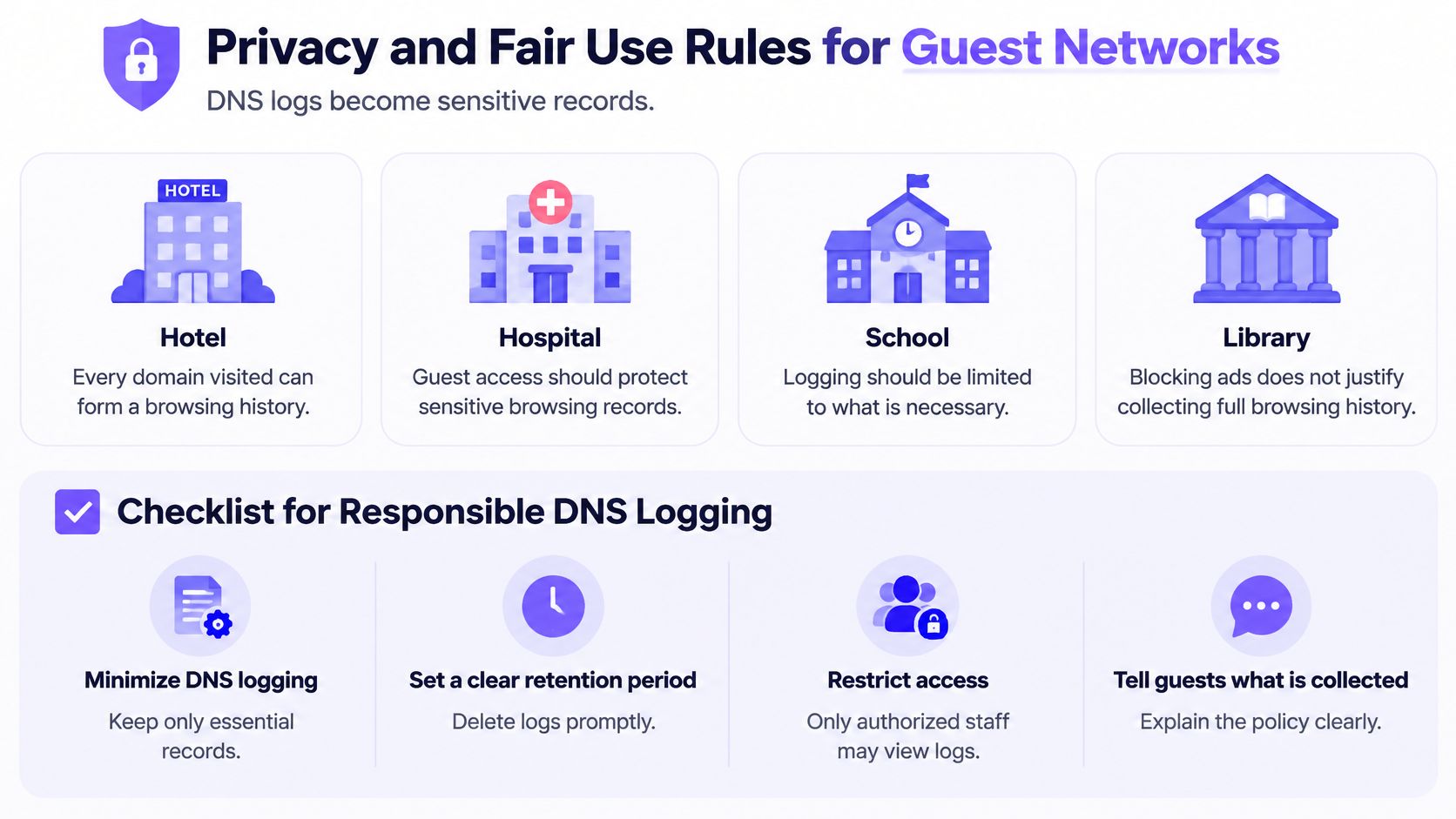
- Document retention limits. Decide what records are necessary, why they're retained and when deletion occurs. Keep aggregate service metrics separate from identifiable query histories where possible.
- Restrict access to named roles. Front desk and bar staff don't need browsing records to resolve ordinary WiFi complaints. Limit detailed investigation access and record administrative use.
- Publish a clear notice. Explain filtering, collection and contact routes on the splash or captive portal page before guests begin normal browsing.
- Provide an unblock procedure. Give users a practical way to report a mistaken classification, with an owner who can review it rather than leaving requests in an unattended inbox.
- Test blocked categories. Check legitimate healthcare, education, accessibility and support resources before launch. A category label isn't proof that every included domain is inappropriate.
- Separate network purposes. Guest, staff, student and operational policies should reflect their users and risks, not administrative convenience.
Fairness includes access
A hospital visitor seeking support information has different needs from a student using a supervised learning network. Applying the strictest available category set everywhere can deny legitimate access without improving the protection that matters.
Keep exceptions narrow, documented and reviewable. Don't disable an entire protection category to fix a single misclassified destination.
Collect enough evidence to operate the service, not enough to reconstruct every guest's browsing.
The venue should be able to explain each rule to a guest or auditor in ordinary language. If nobody can explain why a category is blocked or a log is retained, review the decision.
Go-Live Checklist Before You Switch On
Use a staged rollout with a named owner and an agreed rollback decision. Don't make the production DNS change first and settle the operating rules afterwards.
- Map the networks. Record each SSID's purpose, device mix and peak-hour device count using the selection criteria in the deployment comparison. Include operational equipment, not just guest cell phones.
- Confirm policy separation. Check how each SSID and VLAN receives its rules. Review network segmentation alongside filtering so that a guest exception doesn't change staff protections.
- Approve outage behavior. Assign fail-open or fail-closed deliberately for each network, using the availability and exposure trade-offs under filtering limits.
- Capture the baseline. Record the performance measures described under speed and data savings, with occupancy and connected-device context.
- Pilot a test SSID. Change its resolver settings through the gateway or DHCP service, renew client configuration and run the compatibility tests on representative devices.
- Rehearse rollback. Restore the previous resolver settings and verify that devices reconnect. Keep the procedure available to whoever handles an evening outage.
- Publish the notice and appeal route. Apply the privacy checklist before collecting production logs, then confirm who reviews false-positive reports.
Purple Shield runs standalone on any WiFi network or on Purple Access networks, with separate network policies. It needs no hardware or agents and covers iOS, Android, Windows and guest devices through the network's DNS configuration; its filtering meets the Friendly WiFi and Internet Watch Foundation standards.
Return to the options table and match the deployment model to device ownership. Make the final decision with measured performance, tested recovery and approved governance in hand.
Purple Shield combines protective DNS, content filtering and DNS-layer ad blocking without installing software on guests' devices. Visit Purple Shield to assess it against your SSID policies, compatibility tests and guest-network requirements.