
How to Build a WiFi Content Filter for Your Network
Build a WiFi content filter with per-SSID rules, schedules, block pages, reporting, and practical checks for DNS, VPN, and bypass issues.
Published 21 October 2026
It's 7 p.m. in a busy hotel bar. A family is on your free guest WiFi, staff tablets are taking orders, and a conference group is sharing files in the next room. Someone's unmanaged phone tries to open a phishing link, a teenager searches for something explicit, and a compromised laptop starts calling out to a command server. You can't install software on any of those devices, and you can't watch every screen. That's the operating reality a WiFi content filter has to handle, and it's why treating it as a simple blocklist will let you down. A dependable setup is a policy and verification system, built per network segment, tested from the guest's seat, and honest about where DNS control stops.
Table of Contents
- Why Shared WiFi Needs Network-Level Filtering
- Prepare the WiFi Policy Before You Configure It
- Deploy the Core WiFi Content Filtering Workflow
- Choose Where DNS Filtering Ends
- Separate SSIDs, VLANs, and Time-Based Rules
- Design Useful Block Pages and Reporting
- Test Coverage, False Positives, and Bypass Paths
Why Shared WiFi Needs Network-Level Filtering
Take that hotel as your template, even if you run a school, clinic, library, or transport hub. You've got at least three audiences sharing the same radios. Guests need open, family-safe browsing. Staff need business tools, payment services, and admin systems. Meeting or IoT devices need narrow access to a small set of destinations. One flat policy either annoys staff or leaves guests exposed.
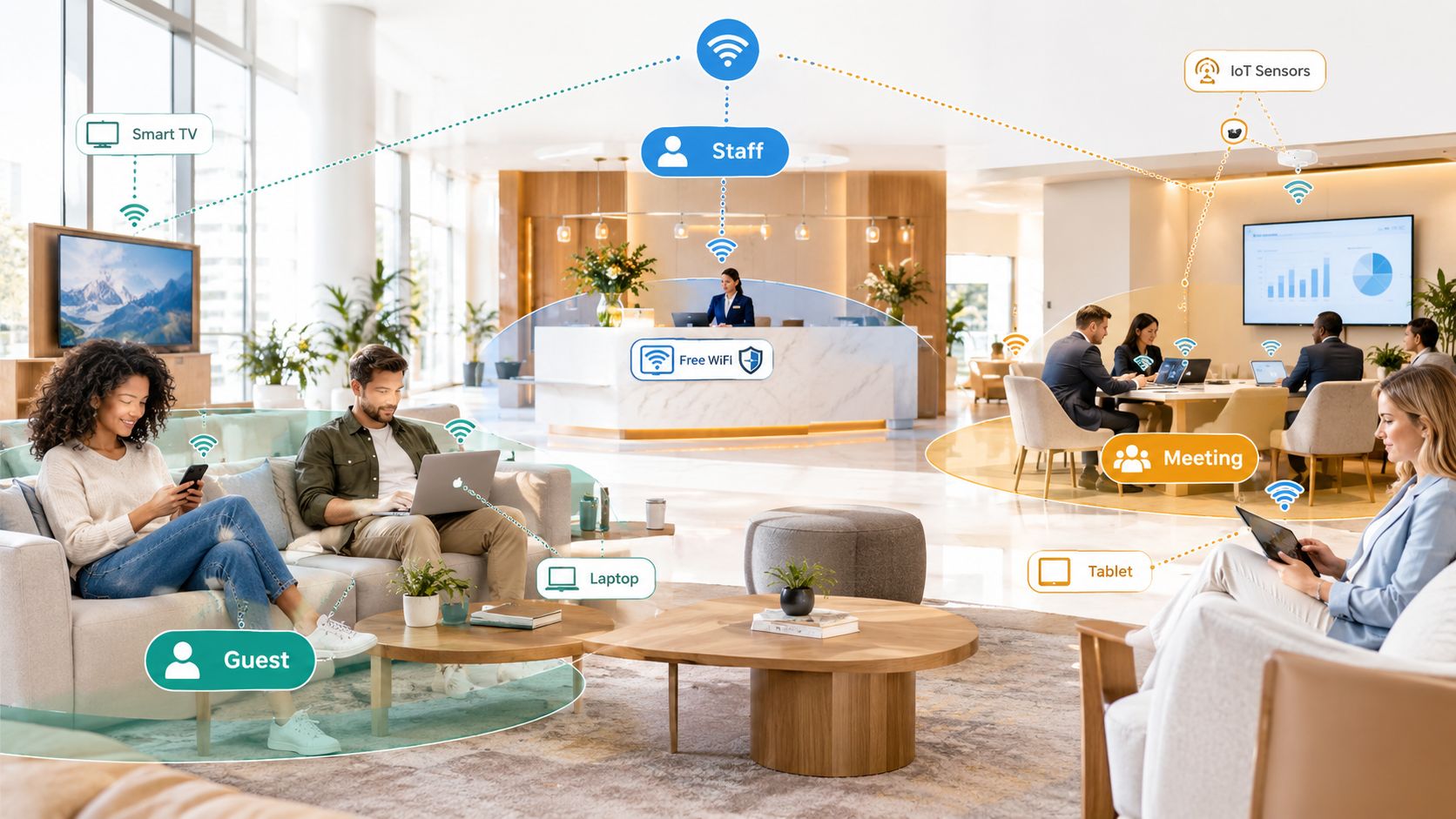
Endpoint agents don't solve this. Visitors arrive with phones, laptops, tablets, e-readers, and consoles you don't own and shouldn't try to manage. Asking them to install certificates or filtering apps creates support queues and breaks trust. You need a control that works before a connection begins, regardless of device type.
Filtering at the DNS lookup
DNS-layer filtering fills that gap. When a device asks to resolve a domain, your approved resolver checks that request against category and threat policies. If the domain hosts malware, phishing, botnets, pornography, or violent content you've chosen to block, the resolver returns a controlled block response instead of the address, as described in DNSFilter's overview of public WiFi filtering at scale. That same source, citing U.S. hotspot data, put the country at more than 410,000 public WiFi networks in 2022, spanning parks, libraries, public transportation, and train stations.
The number matters less than the pattern. Those networks serve temporary users on unmanaged devices, so enforcement has to sit at the network boundary. Done well, you can apply different rules per SSID or VLAN while keeping compatibility across every guest device. That covers safeguarding, acceptable-use enforcement, and threat defense in one pass.
It doesn't replace everything else. DNS filtering won't inspect an encrypted page after a domain is allowed, and it won't clean an already infected device. Treat it as your first, broad gate. Firewalls, segmentation, and endpoint protection on staff kit still have jobs to do.
Prepare the WiFi Policy Before You Configure It
Don't start in the resolver dashboard. Start with a map of your estate you'll still understand in six months. List every venue, SSID, and VLAN. Note who uses each one, whether devices are managed, and which captive portal and payment flows must never break.
That inventory forces useful arguments early. A family attraction might run a permissive paid visitor tier alongside a stricter free tier for children. A school needs very different answers for students, teachers, and IoT sensors. Copying another organisation's category list skips those local judgements.
Build a policy map by audience
- Guest networks: Block threats plus adult, illegal, and other harmful categories. Decide explicitly whether gambling, social media, or streaming fits your venue.
- Staff networks: Keep threat blocking strict, but allow the business services people need. Document who approves exceptions.
- IoT and operational networks: Allow only known update, telemetry, and management destinations where possible. Don't give a printer a general browsing policy.
- Time-sensitive networks: Note where evening, weekend, or lesson-time rules should differ from daytime defaults.
Category choices aren't purely technical. In 2024, an analysis of organisational filtering policies found adult content in more than 84% of policies, while peer-to-peer and illegal content appeared in 81%, terrorism and hate in nearly 66%, and gambling in 51%, according to TitanHQ's published WiFi filtering policy data. Those figures show filtering doing duty-of-care and bandwidth work, not just malware blocking.
Write down the owner, purpose, and review date for each policy. If you're also aligning controls with a baseline such as Cyber Essentials certification requirements, record which requirement each setting supports. You'll translate this map directly into resolver zones next, and auditors will thank you for the paper trail.
Deploy the Core WiFi Content Filtering Workflow
The deployment sequence is straightforward, but order matters. If you enable categories before you control where DNS queries go, you'll chase inconsistent results for days.
First, force guest, staff, and IoT VLANs to use your approved recursive resolvers. Block or redirect attempts to use arbitrary external DNS from those segments, then confirm DHCP hands out the right resolver addresses. This is the enforcement point. Without it, everything else is advisory.
Next, attach a separate response policy zone, or the equivalent category policy in your chosen service, to each SSID and VLAN. NIST describes protective DNS as deployable through on-premises response policy zones, cloud secure recursive DNS, or a combination, and recommends encrypted DNS where feasible, DNSSEC for integrity, dedicated DNS infrastructure, and fault-tolerant designs in its NIST protective DNS deployment guidance. Use that choice deliberately. Local zones give you tight control and low latency. Cloud resolvers simplify multi-site updates and reporting. Hybrid setups suit estates with mixed connectivity.
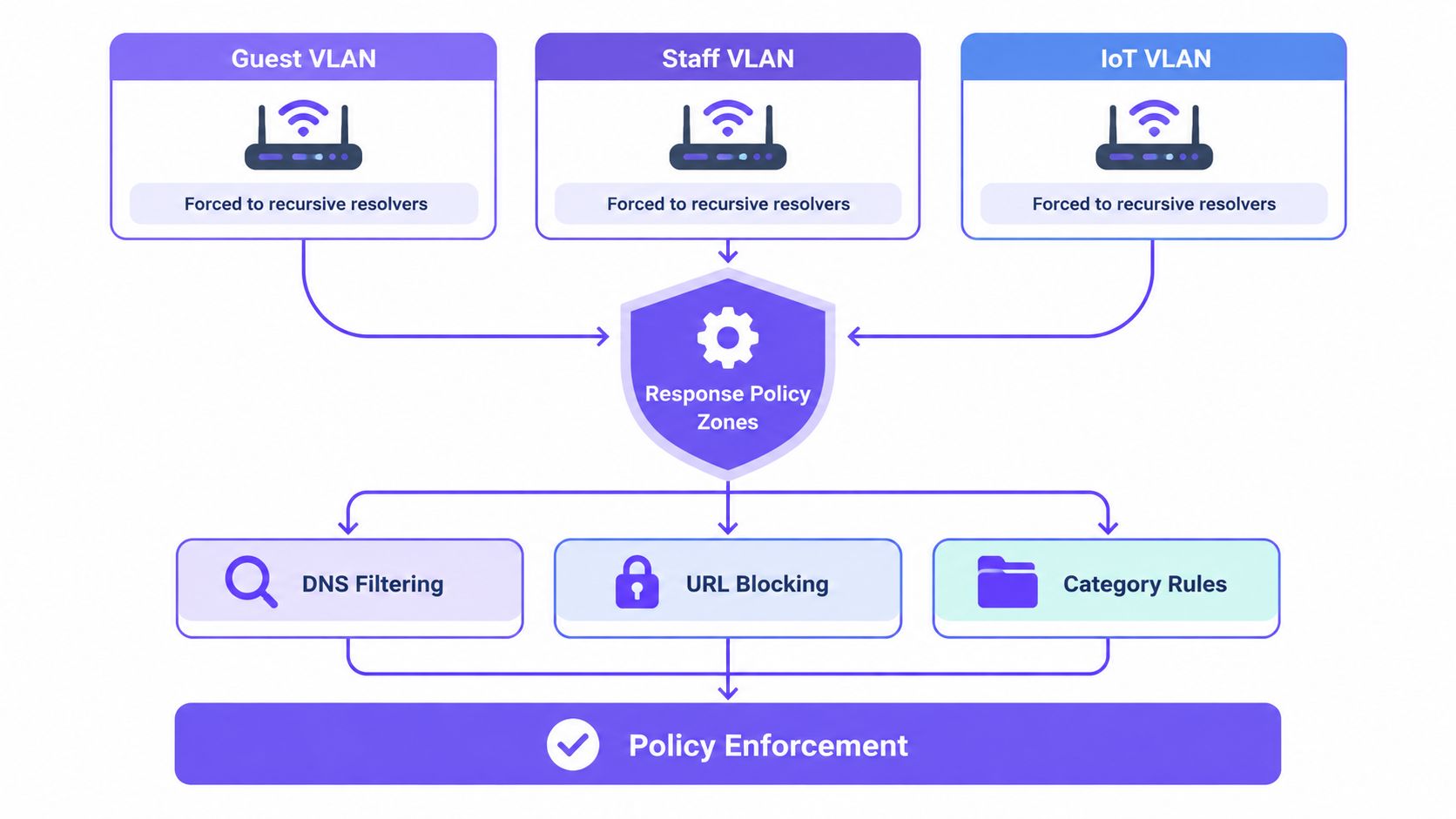
When a query matches a blocked category or threat feed, return a controlled block response that lands the user on an explanatory page. Don't just drop the query or return a generic failure. Log the requesting network, category, timestamp, and queried domain for every decision. You'll need that evidence for tuning and for disputes.
Validate before you enforce widely
Test from real devices on every SSID. Confirm allowed business and guest destinations resolve normally. Confirm prohibited domains hit the block page. Check your captive portal, social login providers, and card payment flows twice, because category filters love to break authentication domains that look like social media.
Watch for caching and fallback. A device holding an old DNS answer can make a blocked site appear reachable until the cache expires. A misconfigured secondary resolver can bypass your policy during an outage. Set acceptance targets before go-live, such as 100% interception of test DNS traffic from each policy segment and zero unintended resolver fallback during simulated outages. That target language turns a vague rollout into a testable one.
Practical rule: If you can't reproduce a block, an allow, and a portal login from a guest phone on each SSID, you're not ready to enforce.
Platform matters less than this discipline, though a managed cloud service can remove appliance maintenance and client software from the picture. If you're reviewing the underlying switching and wireless kit at the same time, network and wireless solutions from ATEK Distribution are a useful reference point for how access infrastructure and segmentation choices fit together. Whatever you choose, stage the change, monitor, and only then tighten.
Choose Where DNS Filtering Ends
Operators get into trouble when they buy DNS filtering and expect full web inspection. Be clear about the boundary before stakeholders assume more coverage than you've delivered.
DNS filtering classifies a requested domain. It can stop a connection to a known phishing host or an adult site before traffic flows. It generally can't distinguish every page on a shared domain, inspect URL paths, or judge the content of an encrypted session after resolution. A single platform can host harmless and harmful material under the same hostname, and DNS alone can't split that neatly.
| Approach | Best fit | Per-SSID control | Main limitation |
|---|---|---|---|
| Router-native filtering | Small, single-site networks | Basic, often device or network wide | Coarse categories and weak reporting |
| Local DNS filtering | Sites wanting on-site control | Strong with per-VLAN zones | You own updates, availability, and tuning |
| Cloud protective DNS | Multi-site guest and public WiFi | Strong per SSID, VLAN, and venue | Domain-level decisions only |
| Endpoint or HTTPS inspection | Managed staff devices | Per device or user | Needs agents or certificates, poor fit for guests |
Match the layer to the risk
For unmanaged guests, cloud or local DNS filtering gives you coverage without touching their devices. For staff laptops handling sensitive data, pair it with endpoint controls and consider a secure web gateway for deeper web inspection where page-level visibility is justified. Router-native tools from vendors such as Cisco Meraki can be adequate for simple estates, but test category quality and reporting before you rely on them across venues.
Document what you've chosen not to inspect. Say plainly that you're blocking categories and known threats at lookup, not reading guest web pages. That honesty protects you legally and helps guests understand the service. It also stops internal teams asking DNS logs to answer questions they were never designed for.
Separate SSIDs, VLANs, and Time-Based Rules
Segmentation decides which policy a device gets. Filtering decides what that policy allows. Confusing the two leads to networks that are neatly separated but identically exposed, or heavily filtered but impossible to manage.
Start with the SSIDs people already recognise. A hotel keeps Guest separate from Staff and Conference. A school separates student, staff, and IoT traffic. Student accommodation separates residents from visitors and building systems. Each SSID maps to a VLAN, each VLAN points at its resolver policy, and each policy carries its own categories, allowlists, and schedules.
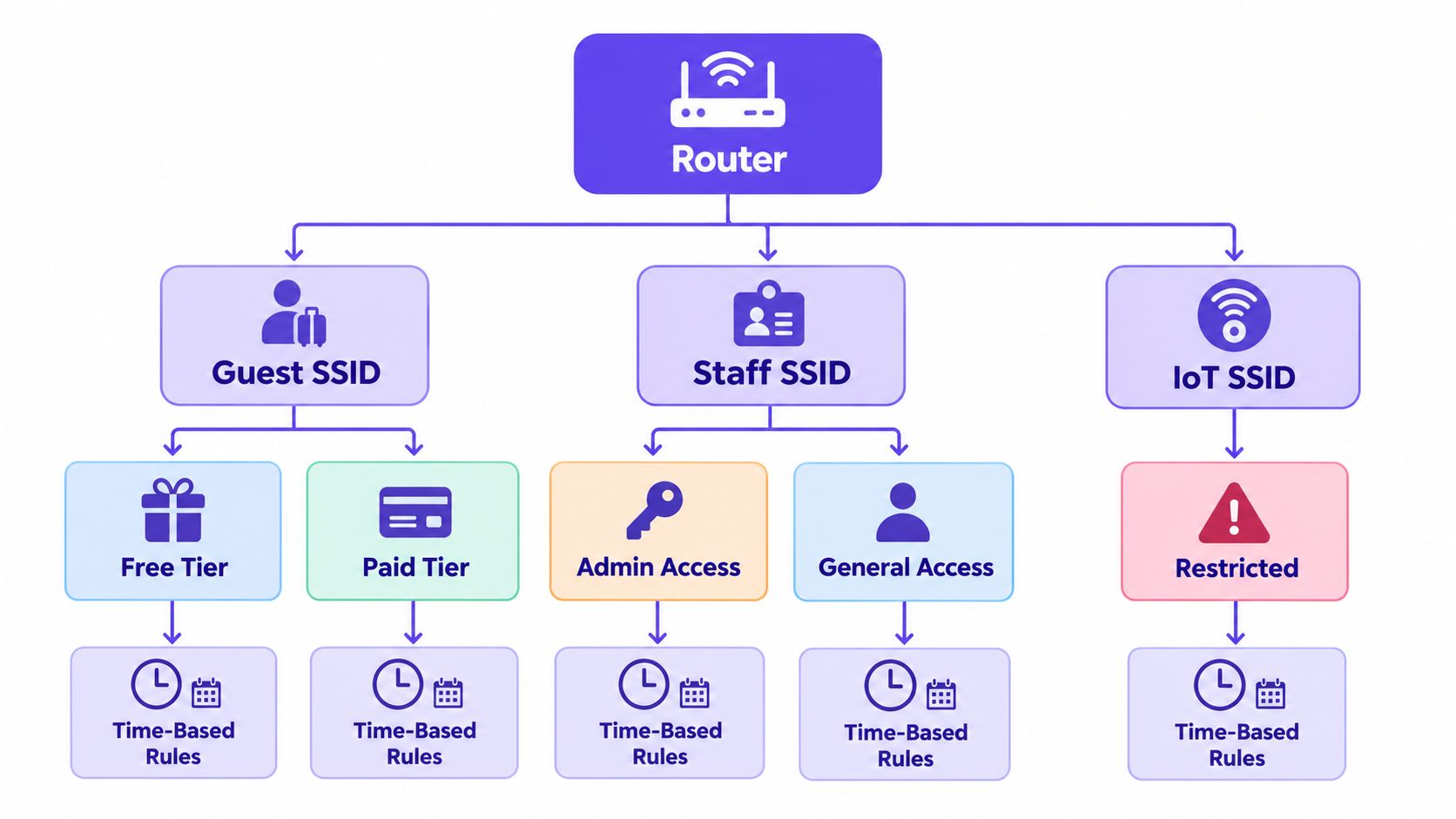
Free versus paid tiers are a good example of policy, not just bandwidth. Paid guests might get streaming and broader browsing. Free users still get threat and adult blocking, but perhaps tighter peer-to-peer and high-bandwidth controls to protect capacity. Staff on a separate SSID shouldn't inherit guest restrictions that block supplier portals or maintenance tools.
Use schedules sparingly and own them
Time-based rules help when a network changes purpose. You can tighten guest categories during specified evening hours, restrict gaming during lessons, or apply stricter weekend safeguarding in a family venue. Schedules also create quiet failures if nobody owns them.
- Named owner: Assign a person or team for every schedule. No orphan rules.
- Time zone clarity: Confirm whether the resolver applies venue local time or a central setting. Test across daylight saving changes.
- Exception path: Record how a conference organiser, teacher, or duty manager requests a temporary change, and when it expires.
Bring-your-own-device networks deserve their own policy too, rather than borrowing the staff one by default. Our guidance on BYOD security for shared networks covers why personal devices need separate trust assumptions. The pattern is the same here. Personal phones on a staff SSID blur reporting, complicate exceptions, and widen access beyond what the job requires. Give them a segment with internet access, strong threat blocking, and no route to internal systems.
Keep the model small enough to explain on one page. If front-desk staff can't tell a guest which network to join and what to expect, your segmentation is too clever for the venue.
Design Useful Block Pages and Reporting
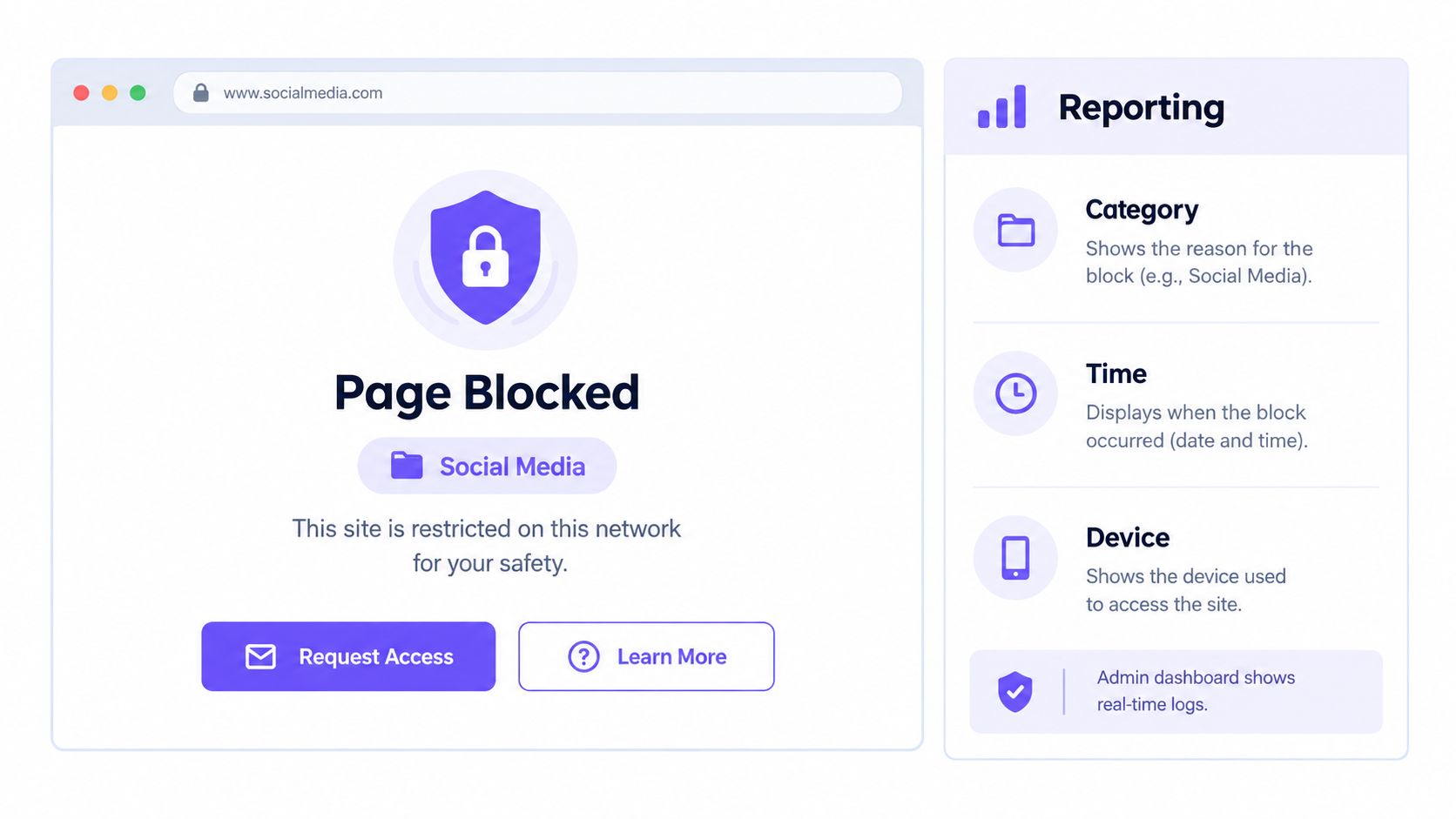
A block page is where your policy becomes visible. A generic browser error tells guests the WiFi is broken. A clear, branded page tells them a rule applied, which category triggered it, and what they can do next.
Keep the language plain. Name the venue, state the category in everyday words, and explain that the site is restricted on this network. Offer a route to request a review if you can support one. Don't imply you're reading every HTTPS page or capturing all browsing. DNS-layer filtering records requested domains and categories. It does not automatically provide page-level visibility, and it doesn't make users anonymous.
That distinction matters for trust. A 2025 study of public WiFi security awareness reported that 81% of participants believed their data could be stolen on public WiFi, only 34% expressed concern about phishing, and 64% believed information might be collected or monitored by governments or corporations, according to the 2025 public WiFi security awareness study. An opaque block can feed that anxiety. A transparent one can evidence duty of care.
Report what you can defend
Useful reporting records blocked domains, threat type, category, network, and time. That lets you show what was stopped, where, and when, spot a misclassified business tool, and notice repeated attempts to reach command-and-control domains from one segment.
Enforce Safe Search on Google, Bing, and YouTube where your service supports it, especially on family, school, and public networks. Test it from a guest device rather than trusting a dashboard toggle.
Publish the basics for guests and staff:
- What's logged: Domain, category, network, and timestamp, not page content by default.
- Retention and access: How long you keep reports and who can view them.
- Appeals: How a false positive gets reviewed and how quickly.
A block page guests understand will generate fewer support calls than a silent failure, even when they disagree with the rule.
Treat reporting as evidence for safeguarding and audits, not as a browsing history product. Restrict dashboard access, review retention periodically, and remove reports you no longer need.
Test Coverage, False Positives, and Bypass Paths
Counting blocked queries proves the resolver is busy. It doesn't prove the policy is right. You need a verification routine that measures blocking quality and collateral damage separately.
Build a test corpus for each venue policy. Include prohibited domains, benign sites with similar terminology, newly registered domains, CDN-hosted services, internationalised domains, and destinations that must stay available, such as payment, portal, and learning platforms. Resolve every item repeatedly from each SSID and VLAN. Record the policy result, response latency, block-page behaviour, and whether classification changes over time.
Report true-positive, false-positive, false-negative, and resolver availability as separate measures. Don't collapse them into one success rate. One experimental DNS-blocking study reported 95% blocking success across 1,000 requests but also a 3% false-positive rate, while another content-blocking experiment reported maximum classification accuracy of 84% using an N-gram machine-learning approach, as summarised alongside NIST's secure DNS deployment guide. Those results are a warning against celebrating a headline block rate while legitimate users hit walls.
Audit the ways around you
Encrypted DNS is the blind spot most explainers understate. Browsers and operating systems can send lookups over DNS over HTTPS or DNS over TLS to an external resolver, bypassing your configured service. VPNs, proxies, direct-IP access, and hard-coded DNS in apps create the same problem. Recent 2025 research on router parental-control systems found tested products relied primarily on DNS filtering and did not perform HTTPS-based filtering, as noted in Rotten WiFi's complete router blocking guide.
You have a trade-off to decide, not a perfect fix. Blocking known encrypted DNS endpoints and outbound DNS to unapproved resolvers preserves enforcement on guest networks. It can also reduce privacy and break legitimate device security features. Allowing encrypted DNS freely makes category, malware, and Safe Search policies inconsistent. Make the choice explicitly per segment. Stricter fail-closed behaviour usually fits schools and family venues. Managed staff networks may justify documented exceptions.
Check the mundane failures too:
- Shared CDNs: Blocking one abusive hostname shouldn't take down an entire content delivery network.
- Captive portals and payments: Test login, social authentication, and card flows after every category change.
- Cached answers: Flush caches and retest, or you'll certify a policy that isn't live yet.
- Resolver outage: Confirm the network fails as designed, and that guests get a clear message rather than silent unfiltered access if you've chosen fail-closed.
Stage new policies in monitor-only mode where available. Sample blocked events, review false positives with venue staff, and use time-limited allowlists instead of permanent exceptions. Retest after taxonomy, resolver, or firmware changes. Categories shift, sites move hosts, and yesterday's clean classification can age badly.
Your production sign-off should be a short, evidenced checklist. Policy map approved. Each SSID tested from a real device. Bypass paths audited. Block page and appeal route live. Reporting retention agreed. Exceptions time-limited and owned. That's a wifi content filter you can operate, not just a setting you once enabled.
If you're building this for guest, student, patient, or public WiFi, Purple Shield offers cloud protective DNS with per-SSID, VLAN, venue, and time-based content filtering, Safe Search enforcement, branded block pages, and reporting that shows what was blocked, where, and when, without agents on guest devices. Visit Purple Shield to see how it fits your existing WiFi and to plan a monitored rollout for your venues.