
How to block adult websites on guest WiFi
How to block adult websites on guest WiFi with DNS filtering, per-SSID policy, Safe Search, branded block pages and a test plan.
Published 13 November 2026
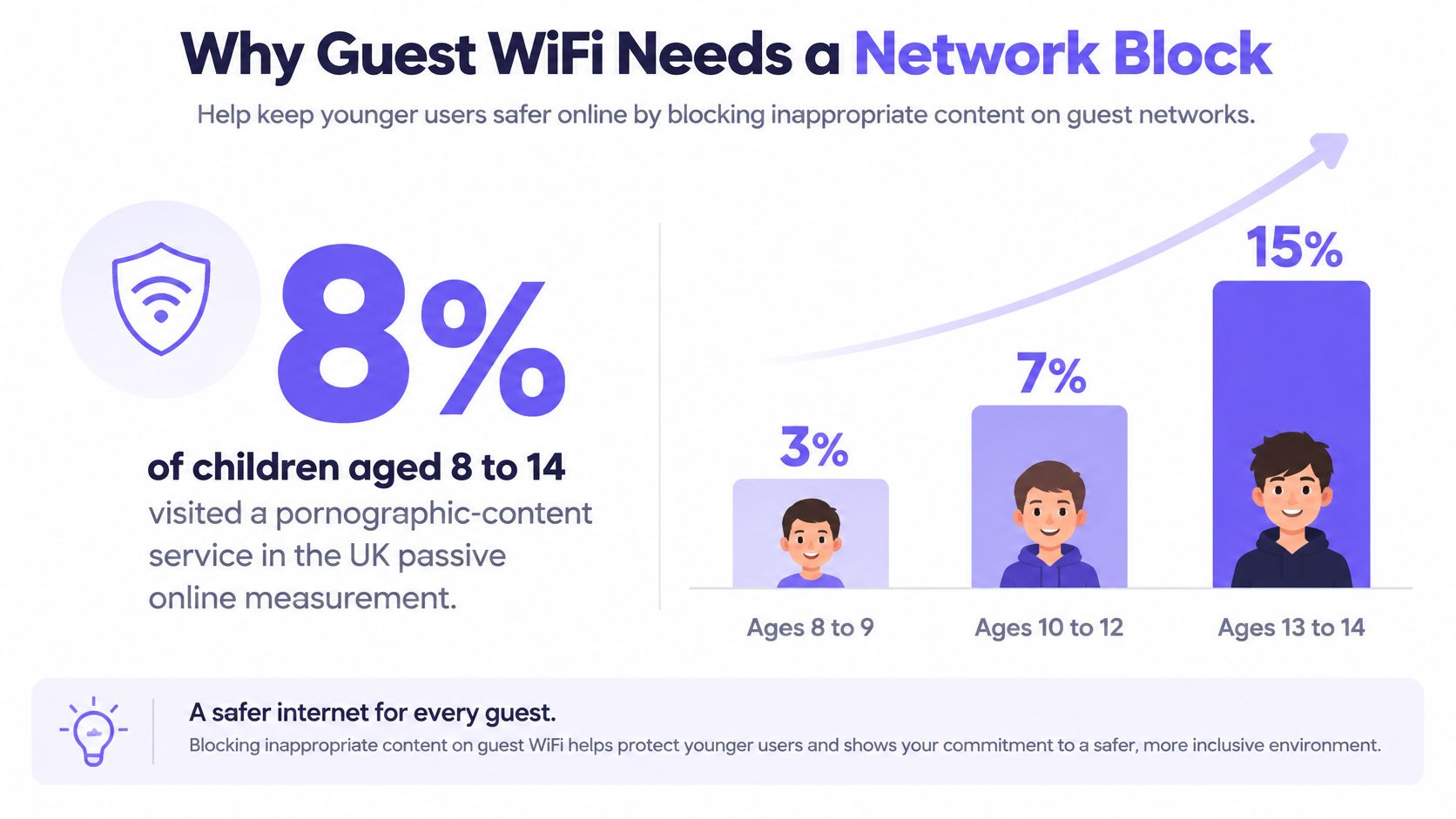
8% of children in the UK aged 8 to 14 visited a pornographic-content service during Ofcom's passive online measurement, and reach climbs steeply with age: 3% at 8 to 9, 7% at 10 to 12, and 15% at 13 to 14, where boys recorded 19% against 11% for girls (Ofcom's children's passive online measurement). That curve belongs to operators, not just parents. A hotel, a library, a hospital waiting room and a student hall each hand an SSID to children whose devices nobody manages, and none of those venues can install an agent on a guest's phone.
The only control that covers an unmanaged device is the one the network owns: the resolver, the DHCP scope, the VLAN and the block page. What follows is the build order for how to block adult websites on a shared network, including the parts that fail.
Table of Contents
- Why Guest WiFi Needs a Network Block
- Policies by SSID VLAN and Time of Day
- How to Force DNS Through the Filter
- Safe Search Block Pages and Reports
- Test the Block and Fix the Misses
- Put the Guest Policy Live
Why guest WiFi needs a network block
The guest SSID is where the estate stops being under your control. A hotel lobby hands out access to a family whose ten-year-old is on an iPad. A hospital waiting room sees phones belonging to visitors. A library issues a portal login to a teenager with a laptop and a VPN client already installed. None of those devices carry your endpoint agent, none are enrolled in device management, and in most cases nobody at the venue knows who is holding them.
Self-declared age fails as a control. Ofcom's Online Nation research found that 22% of 8 to 17-year-olds with a social-media profile had an adult user age, against 20% for 8 to 15-year-olds (Ofcom Online Nation 2023). A platform that trusts the profile treats a twelve-year-old as an adult, and so does any filter leaning on the same signal.
The network doesn't need to establish how old the guest is. It needs to know which SSID they joined, which policy that SSID carries, and what happens when a lookup matches a blocked category.
Bypass is the part most checklists skip. Independent testing published in 2025 found DNS filtering can be circumvented through DNS-over-HTTPS, a VPN, or moving to another network (AV-Comparatives DNS evaluation 2025). Cellular data does it with no effort at all.
Here is the shape of a real network block rather than a home-router checkbox:
Every client gets a DHCP scope that advertises one resolver, yours. Outbound lookups on port 53 are redirected to it, so a device with a hard-coded public resolver still lands on policy. The adult category is denied before an address is returned, and the device receives a branded page explaining why. The exchange takes milliseconds and leaves an audit record.
The limit belongs in the same breath. DNS stops a domain from resolving. It cannot classify every image on a shared platform, cannot stop a direct fetch by address, and cannot stop traffic that leaves through a tunnel. It's the network layer of a duty of care, not a claim of zero exposure.
Policies by SSID VLAN and time of Day
Write one row per SSID before you touch a single DHCP scope. Get the segmentation right first, because a guest SSID sharing a VLAN with anything operational will eventually break something you can't reboot remotely. This primer on guest network security covers why that split matters more than the category list itself.
| Network | Adult category | Safe Search | Schedule | Exception rule |
|---|---|---|---|---|
| Guest or captive-portal SSID | Block | On for Google, Bing, YouTube | Always, tighter evenings at family venues | No user bypass; venue allow list only |
| Staff or corporate VLAN | Block | On | Business hours | Named role exceptions with a ticket |
| Student or resident VLAN | Block | On | Stricter evenings and weekends | Education and health domains on the allow list |
| Paid or premium SSID | Block, same as guest | On | Same as guest | Bandwidth changes, content policy does not |
| IoT or building VLAN | Do not apply | Off | Always separate resolver | No shared resolver with guest |
| Clinical or research VLAN | Block with curated allow list | On | Always | Pre-approved health and research domains |
Most rows survive review without argument. Three don't.
Staff exceptions need a ticket, not a toggle
A hospital employs counsellors, a university employs public-health researchers, and both will hit a block on a legitimate page within a week. The wrong fix is loosening the category across the staff VLAN, because the staff VLAN is usually where the portal vendor gets parked when guest access misbehaves. Issue a named exception instead: one domain, one role, one expiry date, recorded in the ticket system and reviewed monthly.
Provenance rule: if an exception can't be traced to a named person and an expiry date, it isn't an exception. It's a hole with paperwork.
Keep IoT and building systems on a separate resolver
Printers, door controllers, energy meters and CCTV recorders don't browse, and they don't tolerate a policy landing on them mid-shift. Give them their own resolver label and no content category at all. When a controller drops offline at 9pm, the label tells your help desk in seconds whether the guest policy landed in the wrong place.
Paid WiFi changes bandwidth not policy
Some venues sell a premium tier for faster throughput or longer sessions. The tier changes bandwidth and support, never the content category. If a paying guest gets a different content policy from a free guest, the venue now runs two duties of care and one evidence trail, and the second one is the reason the first gets questioned.
Scheduling is where family venues and student halls earn their keep. Occupancy skews younger in the evening and at weekends, so tighten the adult category, Safe Search and the ad rules inside those windows. A 24-hour airport or a ward has no quiet hour, so keep the policy flat around the clock.
Each venue also keeps its own allow list. Sexual-health charities, LGBTQ+ support services and education domains that category engines over-block go on it, while known proxies and newly observed adult domains go on the block list. Pick one row per SSID before anything else.
How to Force DNS through the filter
The build takes an afternoon per site and is unglamorous throughout. Work in this order, because every step closes a hole the previous one leaves open.
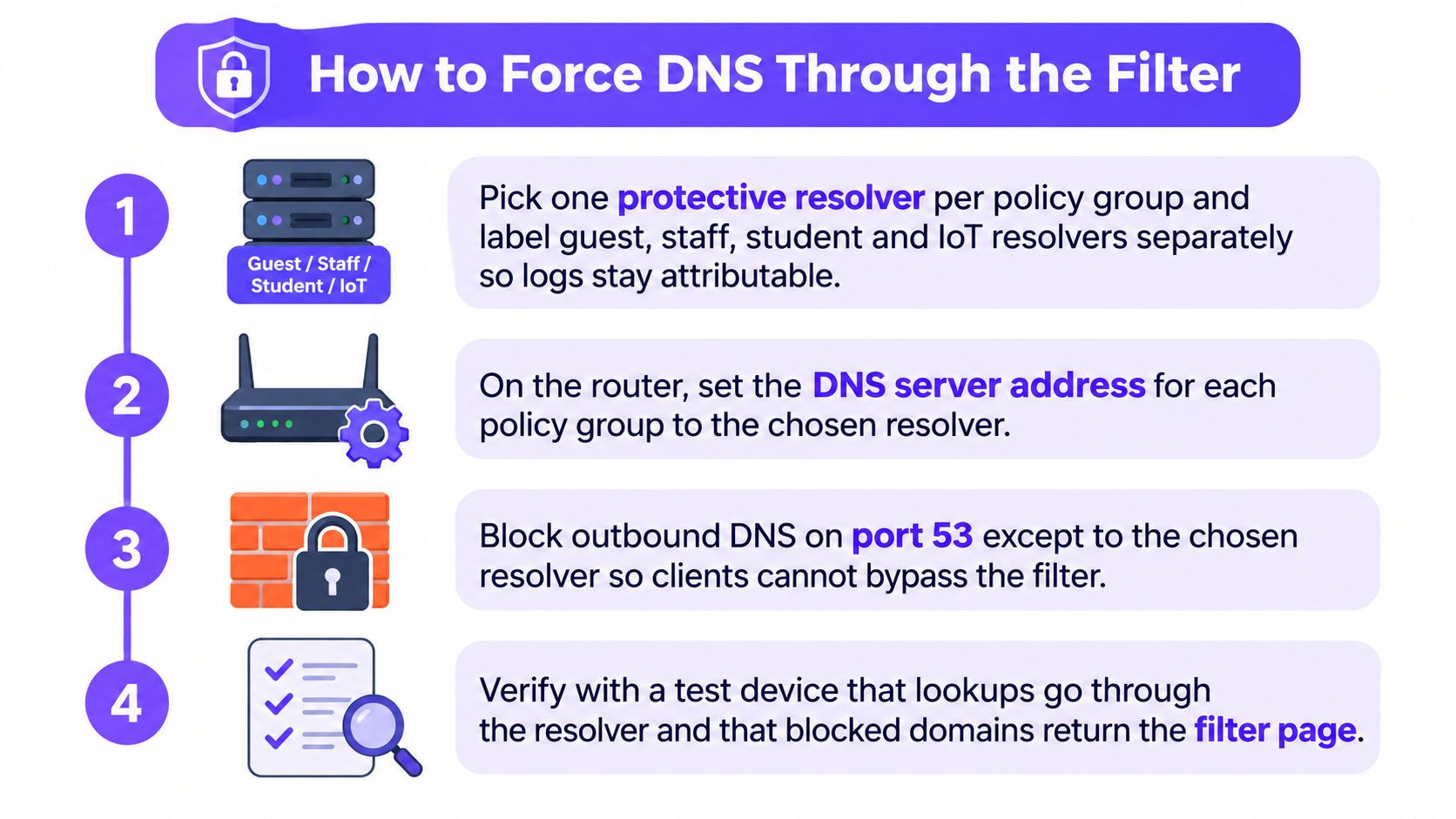
Pick one protective resolver per policy group. Guest, staff, student and IoT each get their own resolver identity and a label naming the VLAN it serves. Six weeks later, that label is the only thing making a query record attributable to a network.
Advertise only that resolver in the DHCP scope. Strip every public resolver out of the scope options. A device that receives two will use whichever answers first, and half your policy disappears.
Redirect outbound DNS on UDP and TCP port 53 to the approved resolver at the gateway. DHCP only covers clients that ask politely. A device with a hard-coded resolver, or an app shipping its own, ignores the scope entirely.
Disable root hints and close routes to unauthorised resolvers. CISA's Encrypted DNS Implementation Guidance recommends disabling mechanisms that bypass protective DNS, naming root hints and unauthorised routing paths specifically. This step is what turns a suggestion into an enforcement point.
Decide encrypted DNS explicitly. Block or sinkhole the DNS-over-HTTPS endpoints you don't operate. Leaving them open hands the guest a working bypass in a browser menu. If you're unsure which clients will try it, how DNS-over-HTTPS bypasses a filter covers the discovery paths they use. Document that a full VPN still leaves your network, because no on-network control follows a tunnel.
Order the policy layers. Adult category first, then Safe Search, then the venue allow and block lists, then the schedule. The order matters when two rules disagree, and you want the disagreement resolved in favour of the safeguarding rule every time.
Set fail closed. A resolver outage must not become open browsing on the guest SSID. Failing closed means guests see a block page during an incident, which is a support call rather than a safeguarding incident.
Cover IPv6 with the same redirect. Plenty of estates redirect IPv4 traffic carefully and leave a parallel IPv6 path untouched, so a modern phone reaches the site on the protocol nobody configured.
Test from a clean device. A phone that has never had an agent installed, joined to the guest SSID, resolving a known adult domain. No address should come back and the branded page should appear.
The pitfall worth repeating at every handover is that a block page proves little on its own. A client holding a cached answer, or reaching the same host over IPv6, can still complete a connection while your screenshot looks perfect.
Safe search block Pages and reports
Force Safe Search at the resolver
Safe Search is a browser setting until you make it a network rule. Point the search and video hostnames at the provider's enforcement records by DNS CNAME on the resolver that already runs the adult category, then apply the equivalent setting for the second search engine on the same resolver. The rule then holds for every device that resolves through your filter, in any browser and inside private windows, none of which a user toggle achieves. It stops holding the moment a device routes around that resolver: encrypted DNS to an outside provider, a VPN tunnel, or a fallback to cellular data all carry the search request past your policy.
Image and video results are how explicit material arrives when the domain itself is a search engine. Safe Search strips explicit results from those surfaces and does not replace the adult category, so run both. The mechanics of Google SafeSearch enforcement are worth reading once before you claim the setting is live.
Write the block page once
Venue name, one sentence of reason, a reception or help-desk contact. No login wall, no countdown timer, and no list of the other categories you block, because a category list is a probing guide for anyone curious about what else is filtered. Use the same page for category blocks and threat blocks so reception runs a single script.
A guest who understands the block calls reception. A guest who meets a generic browser error calls nobody and tries another network instead.
Read three reports not one
Split the dashboard three ways: adult-category blocks, allow-list hits, and phishing or malware lookups. Merging them turns a duty-of-care question into an infected-laptop question, and the two have different owners and different fixes. A blocked phishing lookup means the connection never started and the device still needs pulling off the network. A blocked adult domain means the policy worked and nothing else is owed. Review weekly rather than after the first complaint, because a guest SSID showing zero category blocks for a fortnight usually means the redirect isn't logging.
Write the query retention period before go-live and keep it as short as the venue's privacy notice allows. Pull the per-venue and per-SSID usage figures into the same review so a policy change can be tied to a change in traffic.
Ad and tracker blocking is optional on a congested guest estate and should be justified as a capacity measure, never as the reason the adult policy exists. Keep the two arguments separate when you present them to a venue manager.
Test the block and fix the Misses
A filter that is switched on is not a filter that works. Build the test set once, run it from every network, and score the result in numbers you can put in front of a stakeholder.
UK government guidance requires schools and colleges to test that filtering blocks adult content and to review the effectiveness of their filtering and monitoring provision, alongside recognised illegal-content blocklists (filtering and monitoring core standard). That's the right standard for every operator, not just schools.
The 2025 comparison of seven parental-control products shows how far an enable switch sits from reality: some systems failed to block up to 96% of sensitive domains, one allowed more than 95% of gambling sites, and another left about a third of domains accessible under a stricter child setting (IFIP TMA 2025 study).
Build the test set once
- Known adult domains, including a handful that were registered in the last quarter.
- A sexual-health page that must stay open, so over-blocking gets measured alongside blocking.
- A CDN-hosted URL, because shared infrastructure defeats naive domain lists.
- Image search on the major engines, which is where explicit material appears when the domain is a search engine.
- A public resolver address and a DNS-over-HTTPS client, to prove the redirect works.
- A VPN session, to remind everyone where the control stops.
Run the set from every SSID and VLAN and once inside each schedule window, on HTTP and HTTPS, over IPv4 and IPv6.
Score it in two numbers
Category recall is blocked prohibited cases divided by all prohibited cases. False-positive rate is wrongly blocked permitted cases divided by all permitted cases. Report both together, because recall on its own rewards a filter that blocks everything.
| What you see | Usual cause | Fix |
|---|---|---|
| Adult site still loads on guest WiFi | Cellular data, VPN, or DNS-over-HTTPS | Confirm the device is on the SSID; block unauthorised encrypted DNS; state the VPN limit in the guest terms |
| Site loads for a few minutes then blocks | Cached DNS answer | Flush on the client and retest after the TTL expires; retest over IPv6 |
| Staff VLAN blocked, guest is not | DHCP scope still advertising a public resolver | Advertise only the policy resolver and redirect port 53 |
| Sexual-health or education site blocked | Category over-block | Add the domain to that venue's allow list; do not disable the category |
| IoT or door controller offline | Guest policy applied to the wrong VLAN | Separate resolver and label; remove the adult policy from IoT |
| Block page shows but logs are empty | Redirect without query logging | Turn on resolver logs and check retention |
| Evening policy never applies | Schedule tied to the wrong timezone or SSID | Bind the schedule to the guest SSID and retest inside the window |
Measure twice: zero blocked queries on a busy guest SSID is a logging fault until proven otherwise.
Re-test after every resolver, browser, firmware or policy change, because a cached answer hides a new rule for hours. Log exceptions with a ticket number, an expiry and the SSID, then review them monthly. A screenshot of the block page proves nothing about whether the underlying connection can start.
Put the guest policy live
Go live on the guest SSID first. Apply the strict adult category, run the full test set from a personal phone that has never carried an agent, and only then extend the policy to staff or IoT networks. Hold the venue allow list back until the first genuine false positive appears, so every entry on it is earned rather than guessed. Publish the branded block page before anyone meets it, and book the scheduled-policy retest for the same week so the evening rule is proven inside its own window.
An estate with many SSIDs, VLANs and venues needs the policy held in one place rather than in a spreadsheet per site. A cloud protective DNS layer does that. Purple Shield checks each lookup against content categories, allow and block lists, the network's schedule and threat intelligence, and it runs standalone on any WiFi network or on Purple Access with no appliance and nothing installed on guest devices. If a domain is blocked, the connection never starts and the device sees the venue's branded block page instead.
Threat defence comes from the same lookup, blocking command-and-control callbacks and known phishing and malware domains before a connection begins. It does not replace the adult-category test. Run both, score both, keep the evidence.
Purple Shield is protective DNS and content filtering built for guest, public and student WiFi, so the adult category, Safe Search enforcement and branded block page live on one layer across every SSID, VLAN and venue you run, with no appliance and nothing installed on a guest's device. Purple Shield gives you per-network reporting of blocked URLs, threats and usage in one dashboard.