
The best protective DNS for guest and public WiFi
Decide which protective DNS fits your estate by comparing Shield, DNSFilter and Cisco Umbrella on agentless per-SSID deployment, hardware, family-safe filtering, ad blocking, multi-site management and pricing. You will be able to match each tool to the devices it was built for, close DNS bypass routes on the guest VLAN, and run a four-week pilot before rollout.
Published October 28, 2026 · 14 min read
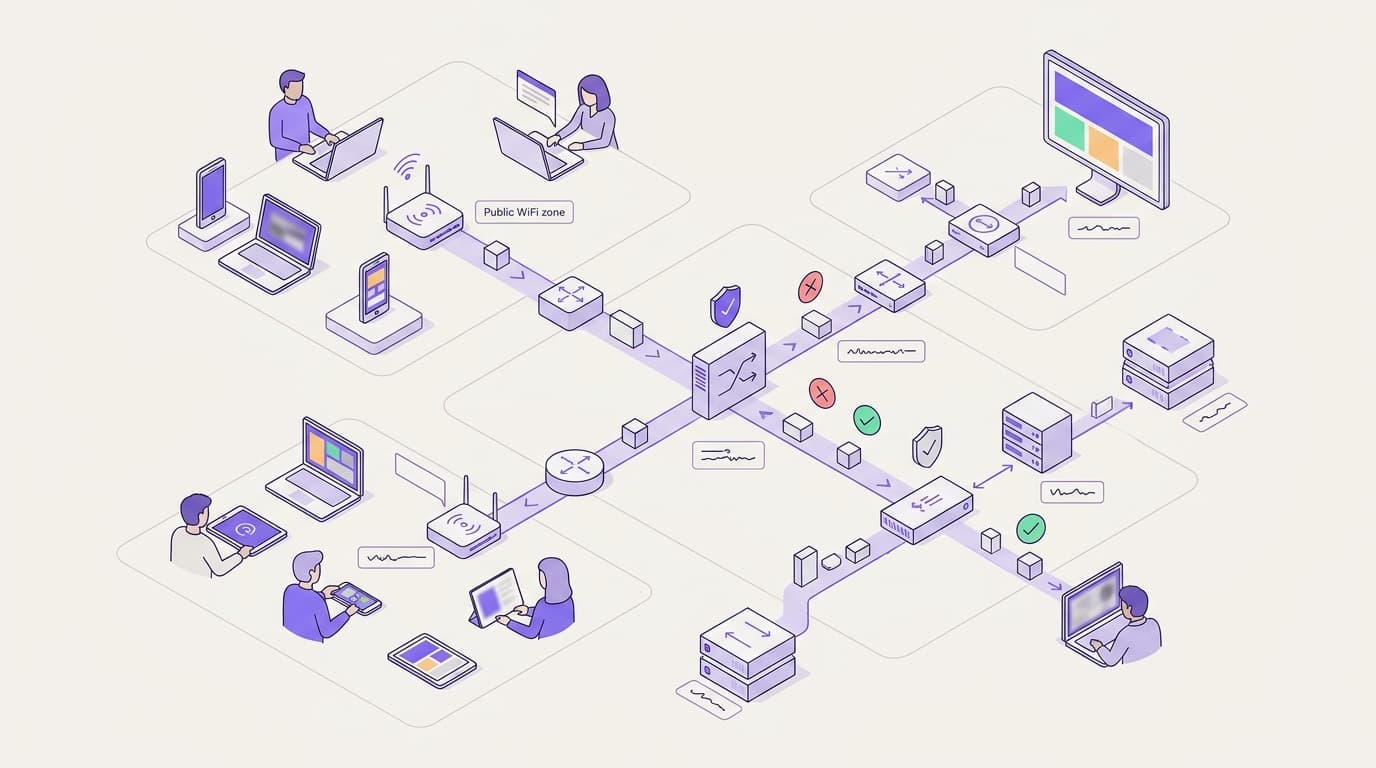
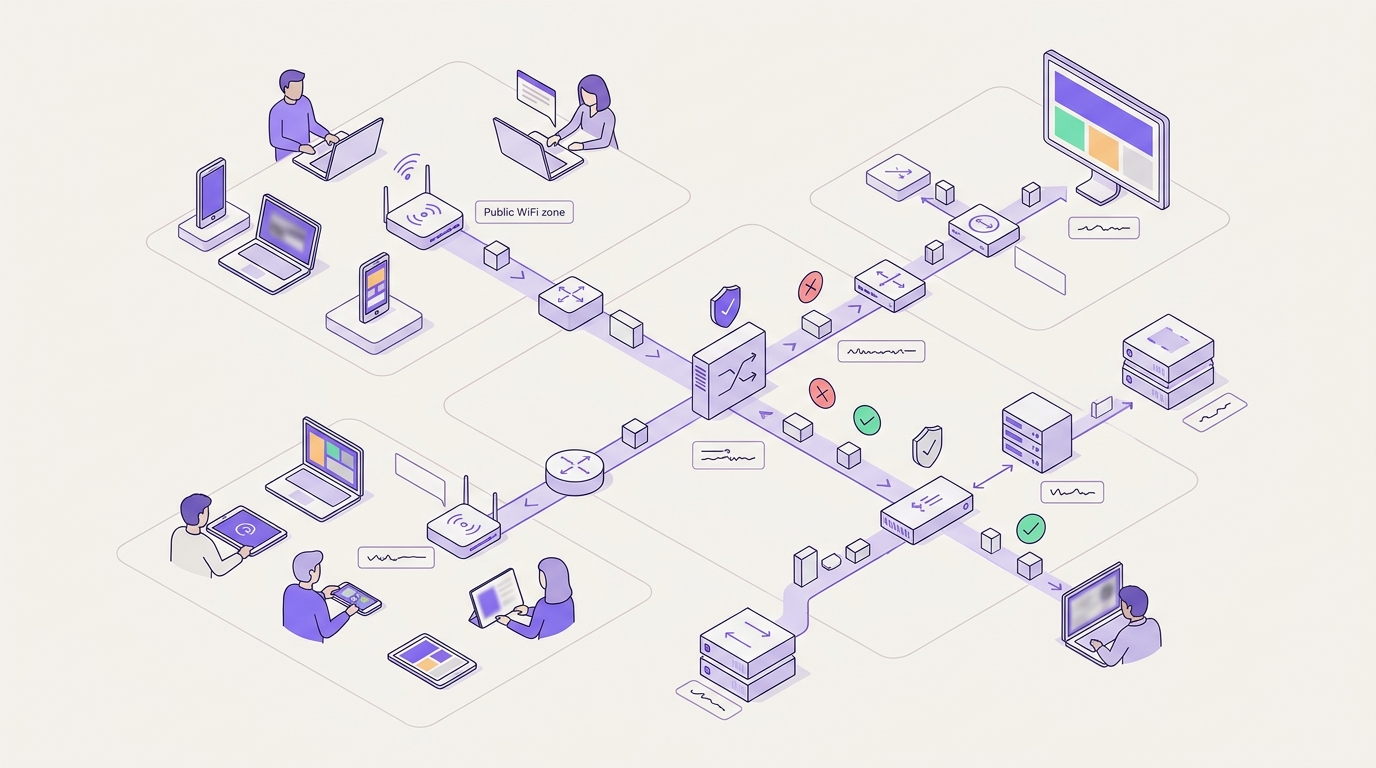
For guest and public WiFi across 80,000+ venues, Shield provides agentless, per-SSID protective DNS without new hardware. It integrates with networks such as Cisco Meraki MR while meeting CIPA filtering and monitoring standards under CIPA compliance. Shield filters threats and content at the DNS lookup directly within the platform managing your guest network.
Which protective DNS should you choose for guest WiFi?
Start with who you are protecting, not with resolver benchmarks. Guest networks carry cell phones and laptops you do not own and will never manage. That single fact decides most of this comparison.
Protective DNS is a resolver that refuses to answer lookups for malicious or unwanted domains. Cybersecurity agencies use the same term for the service run for public sector bodies. On a guest network, it is the most practical place to filter, because every device makes DNS lookups whatever software it runs.
This guide judges three options on six criteria a WiFi operator actually cares about:
- Agentless, per-SSID deployment. An SSID is the network name a device joins. Can you set policy per network without installing anything on the device?
- No new hardware. Does it run on the access points you already own?
- Family-safe filtering. Can you meet the standard your sector answers to, such as CIPA filtering and monitoring standards for schools?
- Ad blocking. Does it cut ad traffic, which eats shared bandwidth?
- Multi-site management. Can one team run 10, 100 or 1,000 venues from one console?
- Pricing model. Does the license make sense when the people connecting change every day?
Here is the short answer, mapped to the situation you are in.
| Your situation | Best fit | Why |
|---|---|---|
| Guest WiFi across hotels, stores, stations or venues, no agents possible | Shield | Per-SSID policy, no hardware, managed alongside your guest WiFi |
| Cisco Meraki estate with Cisco security already protecting staff | Cisco Umbrella for staff, Shield or Umbrella for guests | Native Meraki integration and Cisco Talos threat intelligence |
| MSP protecting small-business laptops on and off site | DNSFilter | Roaming agents and a multi-tenant MSP dashboard |
| School or school district with visitor and student networks | Shield on visitor SSIDs, checked against CIPA standards | Agentless filtering for devices the school does not manage |
| Mixed estate of managed staff laptops and public WiFi | Umbrella or DNSFilter on endpoints, Shield on guest SSIDs | Each tool covers the devices it was designed for |
Where does protective DNS filter, and what does a firewall miss?
Every connection starts with a DNS lookup. A device asks a resolver for the address behind a domain name, then connects to that address. Protective DNS intervenes at that first step. If the domain is malicious or blocked by policy, the resolver returns a block page or no answer. The connection never starts.
What a firewall misses
A traditional firewall sees IP addresses and ports. That creates three gaps on a guest network:
- Shared addresses. Content delivery networks host thousands of domains behind the same IP address. Blocking one address can break legitimate sites, while leaving the harmful domain reachable elsewhere.
- Encrypted traffic. HTTPS hides the page path from anything in the middle. TLS 1.3 encrypts more of the handshake, and Encrypted Client Hello hides the site name too.
- New domains. Phishing and malware campaigns register fresh domains constantly. A list of bad addresses goes stale faster than a domain-reputation feed.
DNS filtering closes these gaps because it judges the name, not the address. It also catches malware on a guest device that tries to call home to a command-and-control domain. Shield identifies emerging threats early before connections take place.
What DNS filtering cannot do
Be honest about the limits. DNS filtering sees domains, not full URLs, so it cannot block one page on an otherwise allowed site. It cannot inspect file downloads. A device that connects to a hard-coded IP address, or tunnels out through a VPN, skips the lookup entirely.
Browsers that use DNS over HTTPS (DoH) are the most common gap. DoH sends lookups inside encrypted web traffic to a resolver of the browser's choosing. Firefox checks the canary domain use-application-dns.net and turns off default DoH when your resolver blocks it. Chrome upgrades to DoH only when your configured resolver supports it. For the full picture, read DNS over HTTPS explained: privacy vs public WiFi filtering.
On the guest VLAN, block outbound DNS to every resolver except your protective one. A VLAN is a virtual LAN that separates traffic on shared switches. Pair this with the segmentation steps in How to Set Up Network Segmentation for Guests and Staff.
How do Shield, DNSFilter and Cisco Umbrella genuinely differ?
All three filter at the DNS layer, and none needs new hardware in network mode. They differ in who they were built for. Cisco Umbrella and DNSFilter grew up protecting staff devices, on and off the network. Shield was built for networks full of devices you will never manage.
| Criterion | Shield (Purple) | DNSFilter | Cisco Umbrella |
|---|---|---|---|
| Where it filters | DNS lookup, per SSID | DNS lookup, per network or per agent | DNS lookup, per network, identity or agent |
| Agentless guest deployment | Yes, the default model | Yes, by network | Yes, by network |
| New hardware needed | None | None | None |
| Per-SSID policy | Yes, set in the Purple platform | Yes, where each SSID is identified separately | Native on Cisco Meraki MR, otherwise where each SSID is identified separately |
| Ad blocking | Core feature | Not the core use case | Not the core use case |
| Off-network devices | Not covered, protects devices on your WiFi | Roaming client agent | Cisco Secure Client roaming module |
| Threat intelligence | Early threat identification | Own AI-driven domain categorization | Cisco Talos |
| Multi-site management | Every venue in one platform, alongside captive portal and analytics | Multi-tenant dashboard built for MSPs | Multi-org console for partners |
| Pricing model | Security add-on to a Purple plan | Per-seat subscription | Per-seat license via Cisco or a partner |
| Strongest fit | Guest and public WiFi across many venues | MSPs and roaming endpoints | Cisco-led staff and hybrid estates |
Agentless, per-SSID deployment
A guest network needs filtering that applies to every device that joins, with no installation. All three products can do this by identifying the network. The difference is effort. When guest and staff SSIDs share one public IP address, DNSFilter and Umbrella need a way to tell them apart, such as a local relay or separate egress. Cisco Umbrella avoids this on Cisco Meraki MR, where per-SSID policy is native. Shield sets policy per SSID inside the platform that already runs your guest network.
Family-safe filtering
K-12 schools must meet CIPA filtering and compliance standards. Hotels, libraries and entertainment venues face reputational, not statutory, pressure. Whichever applies, ask each vendor three questions. Does it block the Internet Watch Foundation child abuse list? Can it enforce SafeSearch on major search engines? Can you show an auditor a policy and its logs? Our guide Web filtering for schools: Policies that work goes deeper on school policy.
Ad blocking
Ad blocking looks like a convenience feature until you measure a congested guest network. Ads and their scripts generate lookups and traffic that compete with every guest. Shield strips ad requests at the lookup layer, reducing unnecessary DNS queries and overall web traffic to improve page load speeds. DNSFilter and Umbrella focus on security and content categories rather than ad removal.
Multi-site management
Multi-site means different things to different buyers. An MSP serves many separate businesses, each wanting its own tenant and report, and DNSFilter's dashboard is designed for exactly that. A hotel group or retailer runs one brand across many locations. For that buyer, managing filtering beside the captive portal, the sign-in page guests see first, removes a second console. DNS filtering for MSPs and multi-site estates covers both models.
When is Shield the right protective DNS?
Choose Shield when the devices you need to protect belong to guests, shoppers, passengers, patients or visitors. That covers most public WiFi in hospitality, retail, transportation, healthcare and venues.
Shield is the right call when:
- You cannot install anything on the device. Agentless filtering per SSID covers every cell phone and laptop that joins.
- You own mixed hardware. Purple is hardware-agnostic and runs as a cloud overlay on Cisco Meraki, HPE Aruba, Ruckus, Juniper Mist, Ubiquiti UniFi, Cambium, Extreme and Fortinet. There is no appliance to rack.
- Bandwidth is the guest complaint. Ad blocking at the lookup reduces unnecessary web traffic on busy networks.
- You run many venues with a small team. Purple runs guest WiFi at 80,000+ live venues and handled 440 million logins in 2024. Shield sits in the same platform.
- Compliance teams need certified suppliers. Purple holds ISO 27001, Cyber Essentials and B Corp certification and is CCPA/CPRA compliant.
Shield is the wrong choice on its own when you must protect staff laptops on home broadband or hotel networks. It protects devices on your WiFi. When they leave, coverage stops. Pair Shield with an endpoint agent for those devices. See the product detail on the Shield page.
When is DNSFilter the right call?
DNSFilter earns its place in MSP stacks for good reasons. Credit it for three strengths.
First, its multi-tenant dashboard lets an MSP run separate policies and reports for dozens of client businesses. Second, its roaming clients cover Windows, macOS, iOS, Android and ChromeOS devices off the network. Third, its AI-driven categorization classifies new domains quickly, which matters against freshly registered phishing sites.
Choose DNSFilter when:
- You are an MSP selling filtering to many small businesses, each with its own billing.
- Most of the devices you protect are company laptops that work from anywhere.
- You want one agent-based policy that follows a device across networks.
It fits less well where the estate is mostly guest WiFi. Per-seat pricing assumes a known headcount. Per-SSID policy on a shared public IP address needs extra setup. If you are weighing it against Shield head to head, Purple's Shield vs DNSFilter comparison in our guides library covers the detail.
When is Cisco Umbrella the right call?
Cisco Umbrella is a mature DNS-layer security service, and it is strong in three ways. Cisco Talos, one of the largest commercial threat intelligence teams, backs its verdicts. It integrates natively with Cisco Meraki MR access points, including per-SSID policy. It also sits within Cisco's wider security portfolio, including Cisco Secure Access, so DNS protection can grow into a full security service edge.
Choose Cisco Umbrella when:
- Your staff network already runs on Cisco Meraki and Cisco security tools.
- You need staff laptops protected off-site through Cisco Secure Client.
- Your security roadmap includes secure web gateway and cloud access controls from one vendor.
It fits less well when your access points come from several vendors, or when guest WiFi is the main job. Licensing is built around staff seats, and features beyond DNS add cost you may not need for guests. Our detailed head to head is Shield vs Cisco Umbrella: choosing protective DNS for guest WiFi.
What does each protective DNS cost to run?
The license is only one cost line. Count hardware, agents, admin time and the bandwidth you buy.
| Cost line | Shield | DNSFilter | Cisco Umbrella |
|---|---|---|---|
| New hardware | None | None | None |
| Agents on guest devices | None | None in network mode | None in network mode |
| Agents on staff devices | Not offered | Optional roaming client | Optional Secure Client module |
| License basis | Security add-on to a Purple plan | Per seat | Per seat |
| Extra console to run | No, same platform as guest WiFi | Yes, unless already used | Yes, unless already used |
| Bandwidth offset | Reduced ad traffic | Not a stated aim | Not a stated aim |
The guest licensing problem
Per-seat pricing works when you know your headcount. A hotel knows its staff numbers. It does not know how many guest devices will connect next month. Before comparing quotes, ask every vendor in writing how it counts guest devices, and what happens when numbers spike during a conference or a game day.
The admin time problem
A second console costs time at every site. When a venue manager reports a blocked site, someone must find the policy, check the logs and change it. With Shield, that happens in the same Purple platform that runs the Guest WiFi. With a separate DNS service, it means a second login and a second set of site records to keep in step.
The bandwidth offset
Ad traffic consumes backhaul you pay for. Shield reduces web traffic by stopping ad requests before content loads. On a congested site, that headroom can defer a line upgrade. Measure your own traffic before and after a pilot rather than relying on vendor averages.
How does the choice play out in real venues?
These worked scenarios use assumed site figures to show the method. Apply the same arithmetic to your own traffic data.
Scenario 1: a 12-hotel group with mixed hardware
Situation. A hotel group runs 12 properties of around 200 rooms each. Older hotels use Cisco Meraki and newer ones use HPE Aruba. Guests complain about slow evenings, and corporate office wants malware and adult sites blocked. No hotel has on-site IT.
What was done. The group ruled out Umbrella's native integration because it covers only the Meraki sites. It enabled Shield on the guest SSID at all 12 hotels from one Purple dashboard. Staff stayed on a separate VLAN with their existing policy.
Outcome. The group enabled Shield across all sites to block unwanted content and ad traffic at the DNS layer. By stripping ad traffic before it loads, the hotels reduced network congestion during evening peak hours. Head office tracks blocked threats and DNS query volume across all 12 properties from one central dashboard.
Scenario 2: a shopping center with open guest WiFi
Situation. A regional shopping center offers open WiFi to shoppers. It has moved to WPA3 Enhanced Open (OWE, defined in RFC 8110), which encrypts traffic over the air without a password. The team realizes encryption does not stop a shopper tapping a phishing link.
What was done. The center added Shield to the guest SSID, with threat protection and ad blocking on. It blocked outbound DNS to other resolvers on the guest VLAN.
Outcome. OWE protects the radio link and Shield protects the lookup, so each closes a different gap. Shield identifies threat domains early and speeds up browsing by blocking ad network connections. The center reviews weekly blocked-domain reports for repeat phishing campaigns.
Scenario 3: a city library service
Situation. A city runs public WiFi in 25 libraries used by children and adults. Staff laptops already use Cisco Umbrella. The IT team considered extending Umbrella to the public SSIDs.
What was done. The team kept Umbrella on staff laptops, where off-site roaming matters. It deployed Shield on the public SSIDs, with family-safe categories and SafeSearch enforcement as policy requirements.
Outcome. Public devices never count against the staff license. Each branch needed one change, made centrally, with no visit. The city now reports blocked categories per branch to its safeguarding lead every month.
How do you choose protective DNS for your estate?
Work through these six steps before you shortlist.
- List the devices you protect. Split them into devices you manage and devices you do not. Unmanaged devices need agentless, per-SSID filtering.
- Map your hardware. If every site runs Cisco Meraki, Umbrella's native integration is a genuine advantage. If you run several vendors, favor a hardware-agnostic option.
- Name your standard. Schools answer to CIPA filtering and monitoring standards. Retailers taking card payments must keep guest WiFi out of PCI DSS scope through segmentation. Every venue handles DNS logs under CCPA/CPRA.
- Measure your bandwidth. If guest traffic congests your links, weight ad blocking heavily. If not, weight threat intelligence.
- Count your consoles. One brand across many sites suits a single platform. Many separate clients suit an MSP dashboard.
- Pilot one venue. Run four weeks, compare blocked-request logs and traffic, then decide.
Most estates end up with two tools: an endpoint agent for staff laptops and Shield for guest SSIDs. Browse All guides for setup and policy detail.
Frequently asked questions
What is the best protective DNS for guest WiFi?
Shield is the strongest fit for guest WiFi because it applies per SSID with no agents and no new hardware. It filters content, blocks threats and blocks ads at the DNS lookup, managed alongside your captive portal. Cisco Umbrella and DNSFilter are stronger where you also need to protect staff laptops off site through a roaming agent.
Do I need new hardware or software agents for protective DNS on guest WiFi?
No, protective DNS on a guest network needs neither. Filtering happens when a device looks up a domain, so you point the guest SSID at the protective resolver and every connected device is covered. Agents only matter for devices you own that leave the building. Guest cell phones will never carry your agent, so agentless deployment decides it.
Will Shield work with my existing access points?
Yes. Purple is hardware-agnostic and runs as a cloud overlay on Cisco Meraki, HPE Aruba, Ruckus, Juniper Mist, Ubiquiti UniFi, Cambium, Extreme and Fortinet. You keep your access points, controllers and switches. Shield works at the DNS layer of the guest SSID, so there is no rip and replace and no appliance to rack at each venue.
How is protective DNS for guest WiFi priced?
Pricing models differ, and the model matters more than the headline rate. Shield is a security add-on to a Purple plan. DNSFilter and Cisco Umbrella license per seat, which suits a known staff headcount. On a guest network the people connecting change daily, so ask each vendor in writing how it counts guest devices before you compare quotes.
Can I move from Cisco Umbrella or DNSFilter to Shield?
Yes, and you do not have to move everything at once. Protective DNS sits at the resolver, so switching a guest SSID means changing which resolver it uses and recreating your category policy. Many properties keep Cisco Umbrella or DNSFilter on staff laptops and run Shield on guest SSIDs. Pilot one venue, compare blocked-request logs, then roll out.
Can guests bypass protective DNS with DNS over HTTPS or a VPN?
Some can, so close the obvious routes. On the guest VLAN, block outbound DNS to any resolver except your protective one, and block known DNS over HTTPS endpoints. Firefox checks the canary domain use-application-dns.net and turns off default DNS over HTTPS when your resolver blocks it. A guest on a commercial VPN will still tunnel out, so your acceptable use policy covers that case.
Does protective DNS help with CCPA/CPRA and PCI DSS?
It supports both, but it does not replace either control set. PCI DSS cares most that guest WiFi is segmented from your cardholder data environment, which is a VLAN and firewall job. Under CCPA/CPRA, DNS logs tied to a device can be personal information, so check retention and processing terms. Purple is ISO 27001 certified and CCPA/CPRA compliant.
Which protective DNS is best for multi-site venues?
For guest WiFi across many venues, Shield is the best fit because every site's policy sits in the same Purple platform as its captive portal and analytics. DNSFilter's multi-tenant dashboard is built for MSPs serving many separate clients. Cisco Umbrella's multi-org console suits partners running Cisco estates. Match the console to whether your sites are one brand or many clients.