
What Is a DNS Lookup and Why Networks Use It
What is a DNS lookup, how the resolution stages work, and why that moment is a practical safety and performance control on shared WiFi.
Published 24 October 2026

A DNS lookup is how a resolver finds information associated with a human-readable domain name, most often an IP address. The classic process checks local information, finds the best servers, queries them for an answer, then returns and caches the result.
You may be reading this on hotel, school, or hospital WiFi after tapping a familiar site. Your device is connected, but before the page can load, the network needs to find where that site lives. Think of DNS as a distributed directory that helps your device locate services, not just as a phone book of websites.
That distinction matters on shared WiFi. The resolver that handles a lookup can affect how quickly a page opens, whether a domain is blocked, and whether the venue's network can see or manage the query. Encryption, authenticity, policy enforcement, and anonymity are separate properties, and confusing them can lead to poor security decisions.
Table of Contents
- What a DNS Lookup Actually Does
- Stages Inside a DNS Lookup
- The Hierarchy That Makes Lookups Scale
- Why a DNS Lookup Is an Enforcement Point
- What Encrypted DNS Really Changes
- When a DNS Lookup Fails on Shared WiFi
- How to Choose Protective DNS Next
What a DNS Lookup Actually Does
A guest taps a link on a hotel WiFi network. The browser knows the domain name, but network devices route traffic using IP addresses. A DNS lookup is the resolver finding information associated with that human-readable name, most often an IP address, so the device can begin reaching the service.
A phone book is a useful starting analogy, but DNS is more like a distributed, live directory. Different kinds of records support mail delivery, aliases, service discovery, reverse lookups, and other network functions. DNS doesn't just map website names to addresses. It helps applications find a range of network services.
The foundational DNS specifications appeared in November 1987, when the Internet Engineering Task Force published RFC 1034. That document described a four-stage algorithm: check local information, find the best servers, query them until a response arrives, and return and cache the result when appropriate (RFC 1034). Caching is important because a resolver may already have a usable answer from a previous request.
A directory query, not a page request
When your device asks for a name, it isn't asking DNS to deliver the web page. It's asking for information that helps the application reach the relevant service. The browser then uses the answer as part of its connection process.
On guest WiFi, this makes the lookup a useful shared decision point. The resolver sees the requested name before returning an address, so network operators can use that moment to apply policies. For a practical overview of how DNS issues can affect availability, see this guide to prevent downtime caused by DNS failures.
Understanding the process helps you trace where a lookup goes, see why cached answers can be faster, and recognize what DNS can and can't control on shared WiFi. Speed, policy, encryption, and lookup failure are related, but they aren't the same problem.
Stages Inside a DNS Lookup
A hotel guest types example.com into a browser and presses enter. The page has not loaded yet. Before it can, the name passes through a fixed sequence of lookups, and on shared WiFi each step gives the venue's network a fresh chance to observe or steer the request.
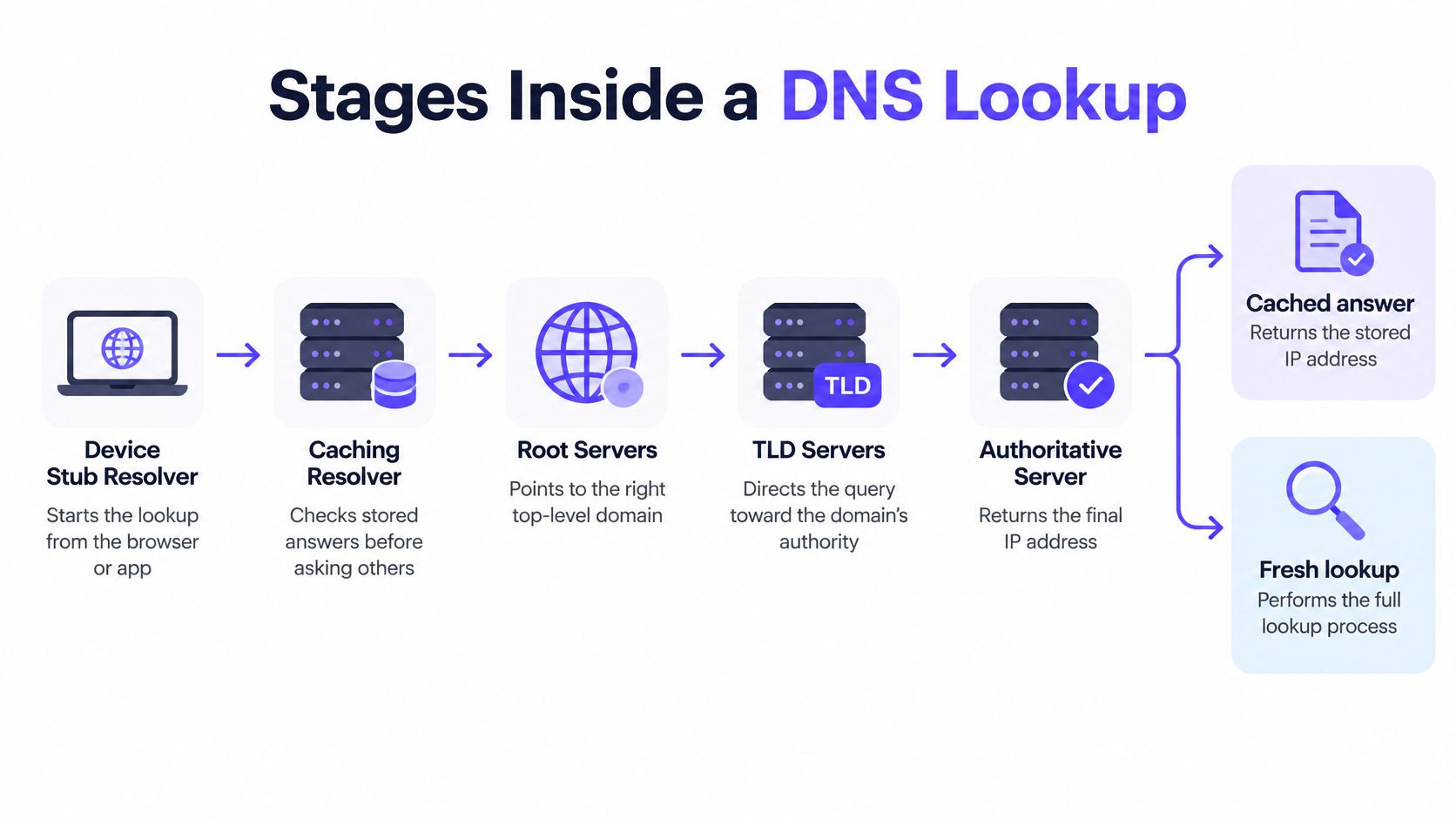
The device's stub resolver opens the sequence by handing a recursive query to a caching resolver. A venue, an internet provider, or a standalone DNS service may operate that resolver, and the choice matters because it decides who sees the query first.
Cache hit or cache miss
The caching resolver checks its memory first. A record that is still valid comes straight back, a cache hit that skips every upstream exchange. A missing or expired record is a cache miss, and the resolver then works through the DNS hierarchy: a root server points it to the right top-level domain, a TLD server points it to the domain's authoritative nameserver, and that nameserver returns the record.
For a website, the answer is usually an A record holding an IPv4 address or an AAAA record holding an IPv6 address. Other record types cover jobs such as mail routing and aliases.
The stages also raise distinct questions. Encryption decides who can read the query in transit. Authenticity decides whether the answer came from the domain's operator. Policy decides whether the resolver returns it at all. Anonymity decides which parties learned the name in the first place.
TTL keeps cached answers current
Every record set carries a time-to-live (TTL), the maximum time a resolver may retain it. The resolver must discard the record by expiry, which gives updated addresses and policies a path back into circulation.
One guest's cache miss warms the cache for the visitors behind them. Short TTLs let changes take effect sooner; long TTLs reduce repeated upstream lookups. Zone operators pick a point on that trade-off, and everyone on the shared network inherits the result.
Some networks insert a forwarding step inside this sequence, sending queries to another resolver rather than walking the hierarchy directly. This walkthrough of how DNS forwarding changes that path explains where the detour happens.
The Hierarchy That Makes Lookups Scale
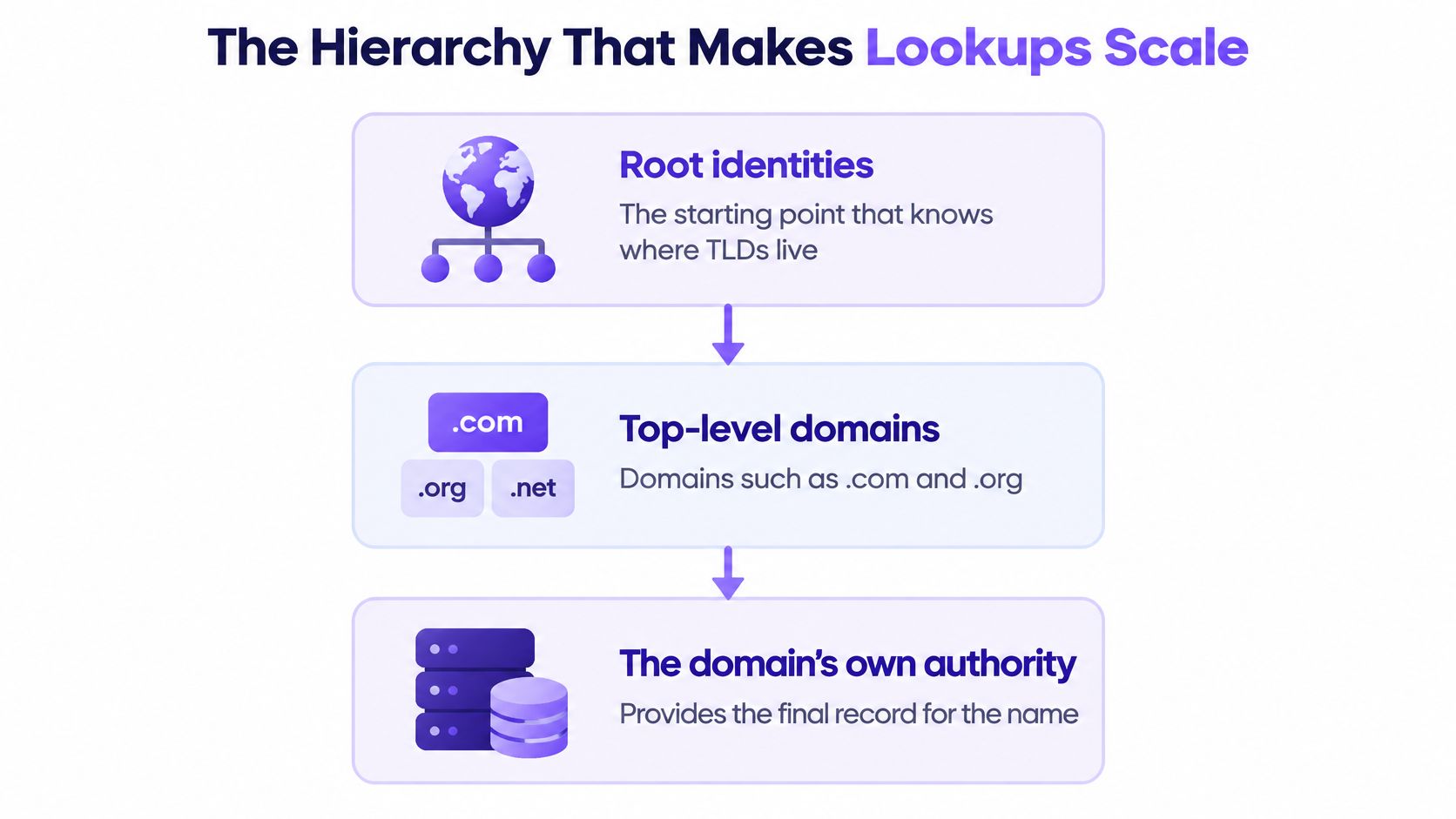
The DNS hierarchy divides responsibility. At the top are the root-server identities, which direct resolvers toward the right top-level domain. TLD servers handle domains such as .com and .org, while each domain's authoritative servers provide the records for names within that domain.
The common image of 13 root servers can be misleading. There are 13 historically defined identities, labeled A through M, operated by 12 independent organizations. They aren't just 13 physical computers. Anycast routing lets the same identities be served from more than 900 distributed instances worldwide, helping queries reach a nearby instance and supporting resilience (ICANN's overview of root servers).
How the root system developed
The root system grew as the network's needs changed. The first root server was established at the University of Southern California's Information Sciences Institute in 1984. The system had four servers by 1985, seven by 1987, nine by 1993, and 13 by 1997. Today, the root system uses both IPv4 and IPv6. One technical overview identifies 26 principal address endpoints, 13 for each protocol, alongside the distributed anycast instances.
These figures describe different parts of the design. The 13 identities are the recognizable root-server names; the address endpoints support IPv4 and IPv6; the distributed instances help provide service from locations around the world. Losing access to one instance isn't the same as losing a root identity everywhere.
That design is why a lookup can feel local even when it relies on a global, multi-level system. The resolver may reach an instance nearby, while the hierarchy continues to distribute responsibility across root, TLD, and authoritative operators.
Why a DNS Lookup Is an Enforcement Point
A laptop on hotel WiFi asks the network's resolver for a domain before it can reach anything at all. That request passes through equipment the venue controls, which makes the lookup the last shared decision point before the device heads off on its own. A protective DNS service can answer normally, refuse the query, or return a response that leads nowhere. If no usable address comes back, the connection generally never starts.
That position is what gives DNS policy its reach on guest networks. Visitors' phones and laptops rarely carry management software, so the venue cannot install controls on the device itself. The resolver is the one checkpoint every device already passes through. Policies applied there can block domains associated with phishing, malware, or command-and-control traffic, enforce categories such as adult content or gambling, and apply Safe Search settings.
Timing strengthens the case. Enforcement happens at the request stage, before the application receives an address through that resolver. For protections that operate at other layers of a network, see this guide to protect your Microsoft 365 business network.
What DNS policy can and can't cover
DNS enforcement governs name resolution, and connections can sidestep it. An application might reuse a cached address, contact an IP directly, reach a service that never used a DNS name, or send queries through an encrypted resolver the venue didn't assign.
Operators therefore weigh encrypted DNS behavior, application caches, and direct-IP traffic alongside filtering. DNS filtering works as one layer inside a wider set of controls. A guide to DNS filtering and how policies apply to lookups covers the filtering role in detail.
Policy is also only one axis of trust. Whether a domain is permitted, whether a response is authentic, and whether anyone can read the query in transit are separate questions, answered by different mechanisms.
Negative answers deserve attention too. A resolver can cache an NXDOMAIN response, which states that the requested domain doesn't exist, instead of asking upstream servers again for the same missing name. RFC 8020 describes an NXDOMAIN cut, where a validated negative answer also establishes that names below the missing domain don't exist (RFC 8020). Newer IETF guidance calls for caching resolution failures as well, reducing futile repeat queries.
What Encrypted DNS Really Changes
A guest opens a hotel's WiFi and visits a website. The DNS lookup is one of the last shared decision points before the connection: the device asks a resolver which address to use, and the resolver may apply venue rules. Encrypting that request changes who can read it in transit. It does not, by itself, change what the resolver can see or make the guest anonymous.
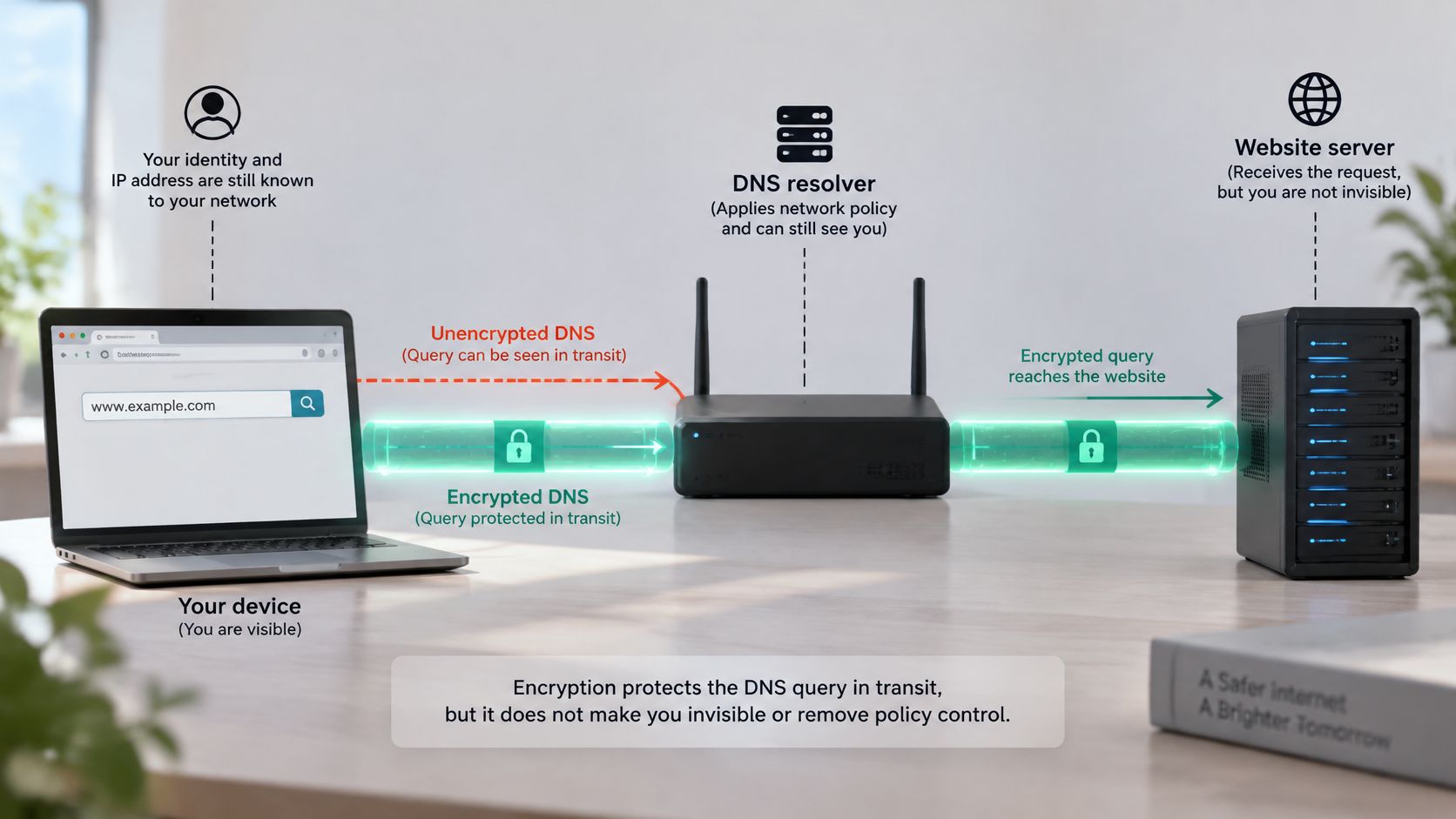
The device sends its query to a recursive resolver, which looks up the answer and returns it. DNS over HTTPS (DoH) encrypts the connection between the device and that resolver. Someone monitoring the WiFi may have a harder time reading or changing the query, but the resolver still receives the requested domain.
DNSSEC addresses a separate issue: it lets a validating resolver check the authenticity and integrity of signed DNS data. It does not encrypt the query. Encryption, authenticity, policy enforcement, and anonymity are different properties.
The trade-off on shared WiFi
A browser using DoH may send queries to a resolver chosen by the browser or user, rather than the resolver assigned by a hotel, school, healthcare provider, or public WiFi operator. That can limit what the venue sees and which DNS rules it can apply. It can also make troubleshooting harder if the venue's network depends on its own resolver.
The practical distinction is clear: DoH protects the query on its path to the resolver; it does not hide the query from that resolver. DNSSEC helps verify signed answers. A venue can enforce DNS policy only when the relevant queries pass through a resolver it controls or has integrated with, and neither technology makes a user anonymous.
When a DNS Lookup Fails on Shared WiFi
Two guests connect to the same hotel WiFi. One opens a familiar website; the other sees an error, even though both devices say they're connected. The difference may be in the lookup path, the device's cache, or the resolver each client uses.
A resolver may be unreachable, return an incomplete answer, or be unable to resolve a name that exists only inside an organization's network. A network may also block traditional DNS traffic over UDP or TCP port 53, or deliberately return a failure because policy blocks the requested domain.
Separate the symptoms before changing settings
Consider a school's internal portal that works through the school's designated resolver but not through an external public resolver. The school may use split-horizon DNS, where internal names are available only through the network's resolver. Changing a device's DNS setting might make a public website load while breaking access to the internal portal.
Encrypted DNS can add another failure point. A 2025 study reported that HTTPS DNS queries represented approximately 8% of observed DNS traffic, and incomplete responses increased query volume (study of encrypted DNS traffic). Separate resolver research found that one in three advertised encrypted resolvers failed to reply, as noted earlier. A client might therefore be using an encrypted resolver that doesn't respond as expected, even though the venue's assigned resolver is available.
Troubleshooting rule: Confirm which resolver the client actually uses before asking the guest to change DNS settings.
For operators, sort the likely causes rather than treating every lookup error the same way:
- Captive portal: The device hasn't completed the WiFi sign-in or terms page.
- Stale cache: The client or resolver holds an outdated answer.
- Upstream outage: The configured resolver can't complete the request.
- Blocked port 53: Traditional DNS traffic is blocked or cannot reach the resolver.
- Unsupported DoH or DoT: The client's encrypted DNS behavior isn't supported or managed by the network.
- Policy block: The resolver intentionally withholds an answer.
A DNS error can also signal a WiFi security problem rather than a resolver problem. For guidance on recognizing a deceptive access point, see RDE Technologies' evil twin prevention guide.
How to Choose Protective DNS Next
Every guest device that joins your WiFi still has to ask someone for directions before it connects. The operator's real choice is who answers that question: the resolver the device happens to carry, an ageing firewall's rule set, or a protective DNS service you control. Each option changes how much policy you can enforce and how much evidence you keep at that last shared decision point.
| Approach | Unmanaged devices | Decision point | Operator evidence |
|---|---|---|---|
| Client-selected resolvers | Often outside the venue's DNS policy | Resolver chosen by the device or browser | Limited network-wide visibility |
| Ageing firewall alone | Coverage depends on firewall rules and traffic path | Firewall controls available to that network | Firewall logs and alerts |
| Cloud protective DNS resolver | Can cover devices using the network-assigned resolver | Domain lookup before an address is returned | Lookup and block reporting from the resolver |
For hospitality, education, healthcare, public-sector, and multi-site networks, Purple Shield is one protective DNS option, as noted earlier. It evaluates lookups before connections start, applies content categories such as adult and gambling, enforces Safe Search on Google, Bing, and YouTube, and blocks command-and-control, phishing, and malware domains. The vendor also describes AI-assisted signals intended to flag emerging threats ahead of standard blocklists, plus ad and tracker blocking at the DNS layer that it says reduces page weight and traffic volume.
Compare policy and operational fit
The service supports policy by SSID, VLAN, venue, and schedule, alongside dashboards, branded block pages, and fail-closed operation. Its service description reports that it needs no client agent or firewall change, cites a published uptime SLA, and lists alignment with the Friendly WiFi and Internet Watch Foundation bar. Treat these as vendor claims and weigh them against your own reporting and resilience requirements.
DNS filtering also answers only part of the security question. Encryption hides the lookup from on-path observers, authenticity checks confirm the answer came from the right resolver, policy decides whether to answer at all, and anonymity depends on who operates that resolver. A secure web gateway may cover more of that stack, so compare where the two roles differ before committing.
Start with one guest SSID. Record which resolver its devices use today, then test Purple Shield on that network before extending policy across venues.