
What is BYOD policy? Rules, enforcement and DNS filtering
What is BYOD policy? Learn the core rules, enforcement options, privacy limits and how DNS filtering controls personal devices on work networks.
Published 3 November 2026
An employee's personal phone holds the work email app. Then they leave it on a train. Can IT block access immediately? Can it delete the work messages without deleting family photos? Who should the employee call?
Those answers shouldn't depend on whoever picks up the helpdesk ticket. A bring your own device policy, usually shortened to BYOD policy, sets the rules before a personal device becomes a business incident.
Table of Contents
- What a BYOD Policy Covers and Why It Exists
- Security Controls the Policy Must Mandate
- Enforcement Options Compared
- How DNS and Content Filtering Fit BYOD Controls
- Privacy Limits, Monitoring and Employee Consent
- Identity and Access Risk Beyond Device Compliance
- Lost, Stolen and Departing Device Procedure
- Choose Your BYOD Scope Before Writing the Policy
What a BYOD Policy Covers and Why It Exists
A BYOD policy is a formal set of rules for how personally owned phones, tablets and laptops may access an organization's systems and data. It connects permission to use a device with enforceable security requirements, privacy limits and responsibilities.
The employee still owns the phone. Installing a work app doesn't transfer ownership to the employer, and owning the phone doesn't give the employee unrestricted access to company information. The agreement must define both sides' authority.
The questions every policy must answer
A usable policy answers three questions: who may connect, what they may reach, and which security and privacy conditions apply. For the lost phone, those answers determine whether email access was authorized, which business files could be stored locally and which response IT may take.
BYOD became a workplace issue as personal devices spread beyond occasional exceptions. Destination CRM's account of Intel's experience identifies 2009 as a milestone in recognizing the trend. The important change wasn't just who bought the hardware. Employers had to protect identities, networks and information on devices they didn't own.
The practice remains widespread: 70% of organizations permitted employees to use personal devices for work in 2024, according to JumpCloud's IT Trends Report, as cited by Grand View Research. Permission alone isn't protection: JumpCloud's BYOD statistics report that, in 2024, more than 20% of organizations said digital assets had downloaded malware because of unmanaged device connections during the previous 12 months.
Core elements of a BYOD policy
| Policy element | Question it answers | Typical rule |
|---|---|---|
| Eligible devices | Which devices and operating systems may connect? | Supported OS versions only, with a minimum version set by IT |
| Authentication | How does the user prove identity? | Multifactor authentication, preferably phishing-resistant |
| Security controls | What must the device have in place? | Screen lock, encryption, current OS patches, no jailbreak or root |
| Access scope | Which systems and apps may the device reach? | Approved apps and a least-privilege resource list |
| Privacy and monitoring | What can the employer see or inspect? | Monitoring limited to the managed container, with notice to the employee |
| Lost, stolen or departing device | What happens to business data? | Selective wipe of the work container and revoked access |
| Support and cost | Who pays and who fixes problems? | Reimbursement rules and stated support boundaries |
Each row needs a specific rule, not a general promise to behave securely. Name the minimum supported operating system, identify the approved applications and define exactly what a wipe can remove. Employees shouldn't have to interpret technical ambiguity during an emergency.
Security Controls the Policy Must Mandate
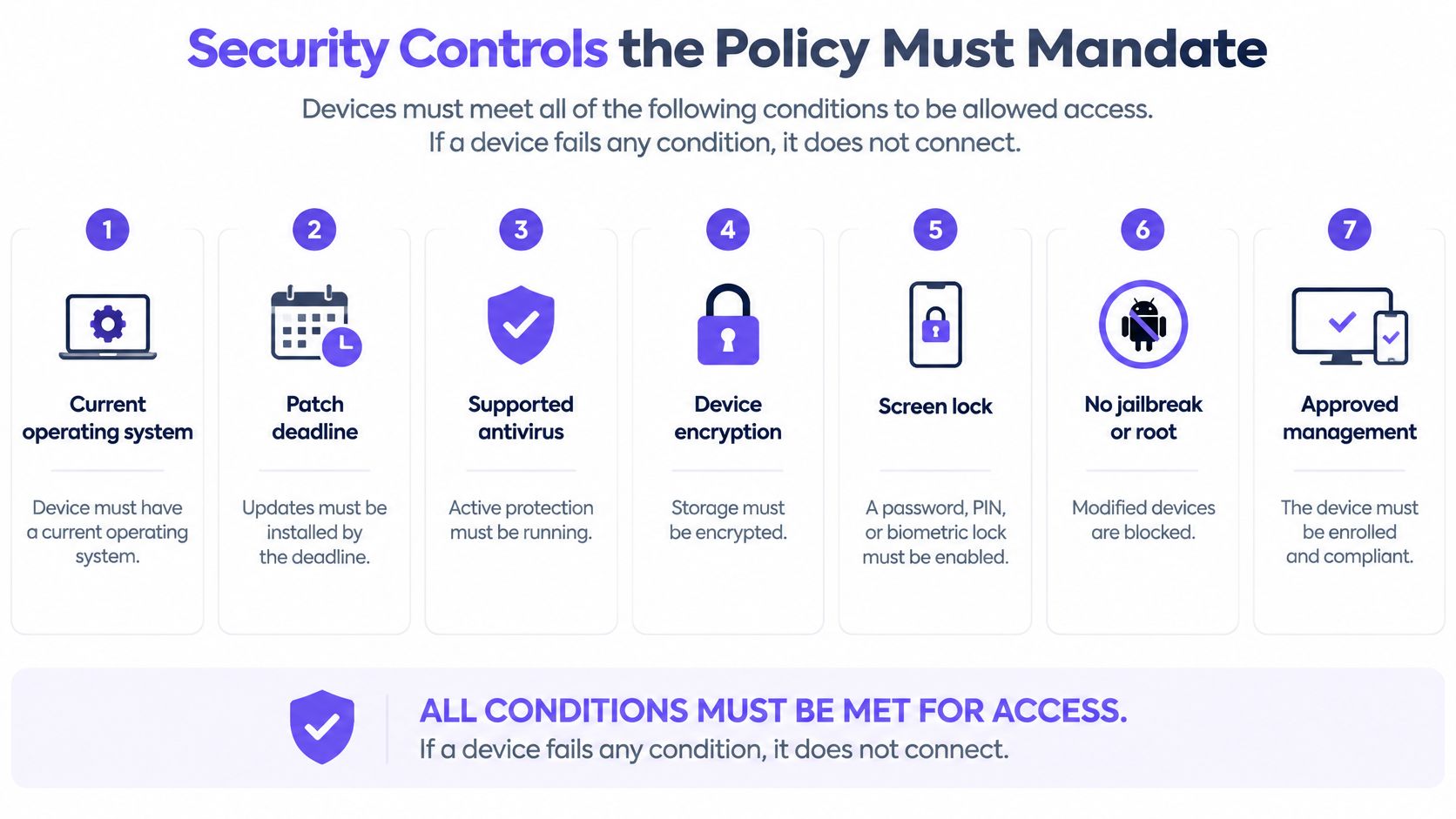
Security requirements should be conditions for access, not suggestions employees may ignore. If a device fails a mandatory condition, IT should block the affected access and explain how the employee can regain it.
NIST's mobile-device BYOD guidance supports enterprise mobility management, application vetting, device-integrity checks, protected work containers and encrypted transport. Treat a personal device as potentially untrusted until the relevant checks pass, rather than trusting it because its owner works for you.
Turn requirements into access checks
- Require a supported operating system and a patch deadline. Name the supported versions and require updates within a defined window, because missing patches can leave known vulnerabilities available to attackers.
- Require encryption and an effective screen lock. Specify the permitted methods to access the device, minimum credential requirements and inactivity timeout so a stolen, unattended phone doesn't offer immediate access to work email.
- Require strong authentication for work logins. Prefer phishing-resistant authentication where supported, and don't let an approved device substitute for proving the user's identity.
- Require approved enrollment or a protected work profile. Keep business information in managed applications or storage so IT can enforce business controls without treating personal apps as company property.
- Block rooted or jailbroken devices. These modifications can undermine the platform protections on which compliance checks depend.
- Permit approved work applications only. Review permissions and data-sharing behavior before approval, including whether an app can copy business files into personal storage.
- Require encrypted transport. Use secure application connections and a VPN where appropriate, with clear rules identifying which resources require that protected route.
This checklist visual highlights the device-level prerequisites that IT must validate.
Make the controls auditable
For laptops, name the supported endpoint protection and how IT verifies that it's active. The 247TechTeam guide to security software choices for Windows and Mac can help readers compare software choices, but IT must still define its own approved configuration.
Keep device requirements separate from network segmentation. A laptop passing its health checks shouldn't automatically receive unrestricted network access.
Audit test: Every mandatory control needs a named owner, an implementation deadline and a reliable way to check compliance.
If the policy says employees must keep devices secure but nobody can verify what that means, it isn't ready for enforcement.
Enforcement Options Compared
Return to the phone left on the train. With suitably configured full-device management, IT may have the technical ability to erase the whole phone. With a managed work profile, IT can instead target the business environment while leaving personal photos outside that action.
Technical capability and permission are different things. A management console offering a wipe button doesn't establish that using it is appropriate or authorized.
Enforcement options by control and privacy impact
The privacy ratings below are practical comparisons, not guarantees. Actual exposure depends on platform capabilities, configuration and the telemetry administrators enable.
| Option | What it controls | Main limit | Privacy impact |
|---|---|---|---|
| Full mobile device management | Whole-device settings, apps and full wipe where supported | Personal device owners may resist full control | High |
| Managed work profile or container | Work apps and work data | Doesn't protect personal apps on the same device | Low to medium |
| Mobile application management | Individual approved apps and their data | Cannot provide complete visibility into device-wide threats | Low |
| Conditional access | Whether a device or session may reach a cloud app | Requires accurate device-compliance signals | Low |
| Mobile threat defence | Malware and risky configurations on the device | Adds an agent and device telemetry | Medium |
Full management fits situations where the organization needs extensive control and employees understand the implications. Where regulated information requires that level of oversight, issuing company-owned equipment may be more appropriate than imposing it on personal hardware.
A work profile or container is often a better starting point for ordinary BYOD participation. It gives IT a defined business area to manage, although it doesn't make everything elsewhere on the device safe.
Choose controls for the resource, not the label
Application management can suit employees who need only a messaging app and a document viewer. Its usefulness depends on whether those applications can enforce the necessary restrictions, such as preventing business documents from opening in unmanaged apps.
Conditional access suits cloud services because administrators can make admission decisions at sign-in or during supported session checks. Mobile threat defence supplies additional risk signals, but detection doesn't replace an access decision or a response procedure.
These options aren't mutually exclusive. An organization might combine a work container, conditional access and threat detection, while using stricter management for a narrowly defined user group.
The more authority IT has over the whole device, the more privacy the employee may have to give up.
Start with the least intrusive method that still protects the most sensitive system. Add another control only when you can name the risk it addresses and explain why the existing controls don't handle it.
How DNS and Content Filtering Fit BYOD Controls
Personal devices shouldn't sit directly on the trusted corporate network. Put them on a separately controlled BYOD or guest network, then authorize access to business resources deliberately.
NIST's mobile-device security guidance recommends a separate BYOD network outside the enterprise DMZ, with no more internal access than users would receive through secured remote access. That means joining the WiFi isn't permission to reach payroll databases, building-management systems or administrative interfaces.
Contain devices before filtering their traffic
Say a hotel employee brings in a personal laptop with malware. Network isolation should prevent that laptop from directly contacting reservation infrastructure or other guests' devices. Filtering can then reduce which internet destinations it can contact.
The diagram illustrates that separation. Approved access to internal applications still requires its own secure, authorized route.
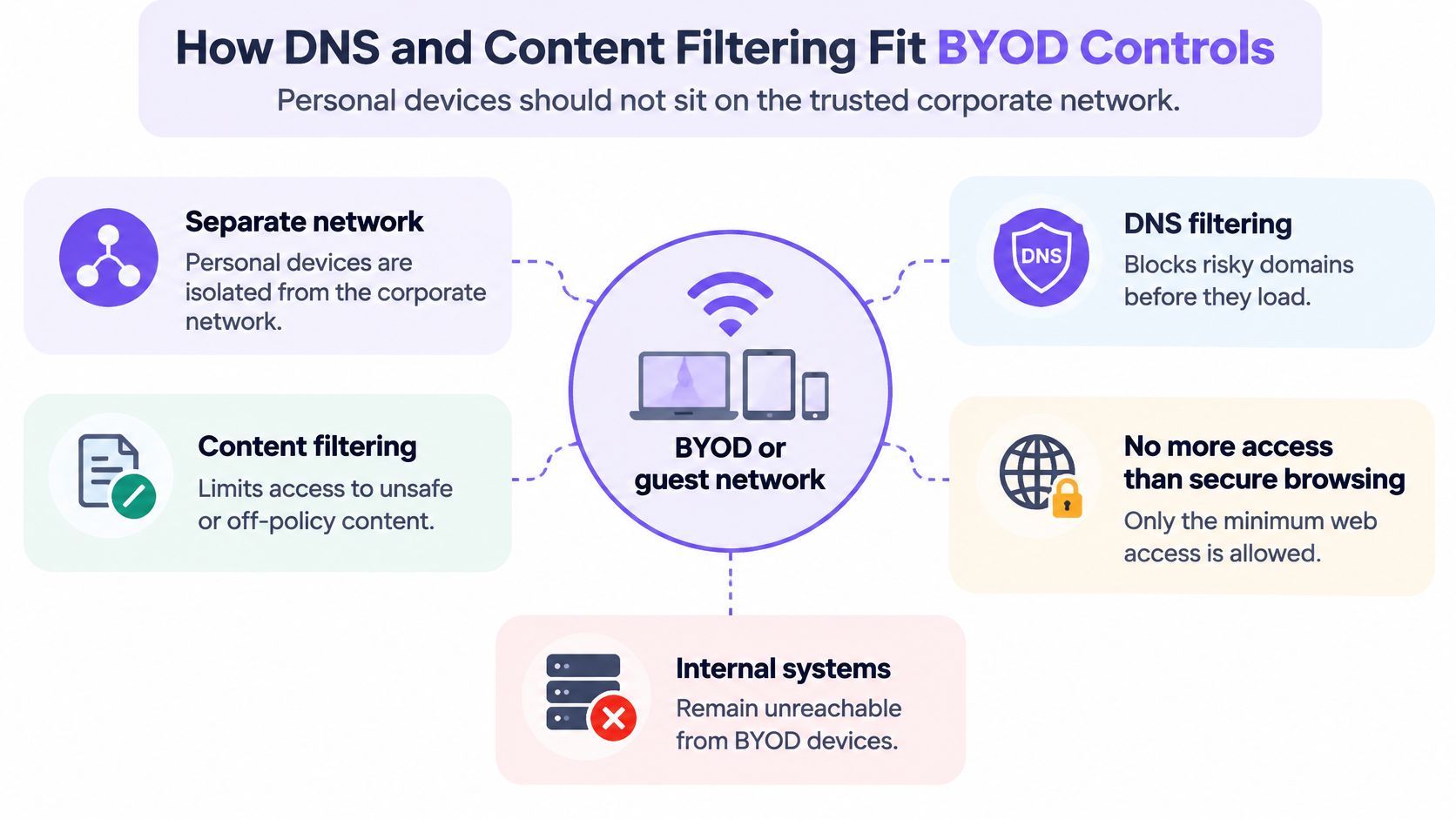
DNS filtering operates at the lookup stage. Before opening a site or contacting an app's service, a device normally asks DNS where to find the relevant domain; a filtering resolver can refuse a domain identified as malicious or prohibited.
A practical introduction to what DNS filtering does helps distinguish this from inspecting every page or file. The filter evaluates the domain request, not everything the user might do after a permitted connection begins.
What the DNS layer can and cannot do
DNS filtering can block identified phishing domains and command-and-control destinations. Content rules can also restrict categories such as adult content or gambling, with separate network rules for staff and public users.
For example, Purple Shield answers DNS requests using the policy for the network the device is on, without requiring an agent on each personal device. It complements device and identity controls rather than replacing them.
The boundaries matter:
- Unrecognized destinations can pass. A newly created malicious domain may not yet have a risk classification.
- A permitted domain isn't a clean-content guarantee. DNS alone can't inspect an encrypted download or distinguish every page hosted under the same domain.
- Off-network traffic needs separate consideration. A phone using personal cellular data won't use the venue's filtering merely because it previously joined the WiFi.
- Alternative resolution paths can bypass the intended control. Administrators need an explicit approach to devices that use a different resolver.
Finish the network portion of the policy with a short operational checklist: separate network, documented policy for each network, and logs reviewed on a set schedule. Assign an owner to each task so blocking rules don't become an unattended configuration.
Privacy Limits, Monitoring and Employee Consent
A BYOD policy is also a workplace privacy agreement. Employees need to know what the employer can collect, inspect and erase before they enroll a personal device, not after an administrator uses those powers.
The UK Government's 2025 BYOD mobiles policy requires a Data Protection Impact Assessment, a clear privacy notice and monitoring limited to the corporately managed app or container where feasible. That is a requirement of that policy, not proof that identical legal duties apply to every employer worldwide.
What a BYOD policy can reach on a personal device
These are sensible boundaries to specify, rather than universal descriptions of every management platform.
| Data type | Usual treatment | Why it matters |
|---|---|---|
| Work email and business files in the managed container | Accessible and wipeable by IT under defined authority | Core data the policy exists to protect |
| Personal photos and private messages | Outside routine policy scope | Personal privacy and legal exposure if inspected |
| Application inventory | Managed apps only, where feasible | A full inventory can reveal personal habits |
| Device location | Collected only with a stated purpose and authority | Sensitive information requiring a retention limit |
| Browsing on the work network | DNS requests may be logged, with notice | Logs must be proportionate to the security purpose |
| Remote wipe scope | Work container only, where a container exists | A full wipe can destroy unrelated personal data |
Put the boundaries in writing
The privacy notice should identify:
- Collection and purpose. List application inventory, location, network names and other telemetry collected, with a reason for each.
- Access and retention. Name the roles allowed to inspect records and specify when records are deleted.
- Management limits. Explain monitoring scope, remote-wipe authority and any exceptional investigation process.
- Employee safeguards. Provide a route to challenge mistaken blocks or deletion, and settle reimbursement and support responsibilities before enrollment.
Pebb's discussion of balancing employee privacy and communication oversight is useful context for explaining why oversight needs limits. Network notices should also explain how DNS over HTTPS affects DNS visibility rather than promising complete browsing surveillance.
Employee agreement shouldn't be treated as unlimited consent. Someone who needs a phone to do their job may have little practical bargaining power, so explain alternatives and obtain jurisdiction-specific privacy advice.
Consider a family photo library accidentally copied into managed storage before a selective wipe. A written promise alone won't restore those files, which is why technical separation and testing matter.
Can the organization achieve its security goal without reading personal content?
Identity and Access Risk Beyond Device Compliance
A device can pass its health checks while someone misuses an account on it. An infostealer may expose credentials, a family member may open an existing session, or an attacker may already control a cloud account.
This illustration separates a healthy-looking endpoint from the account risk behind it.
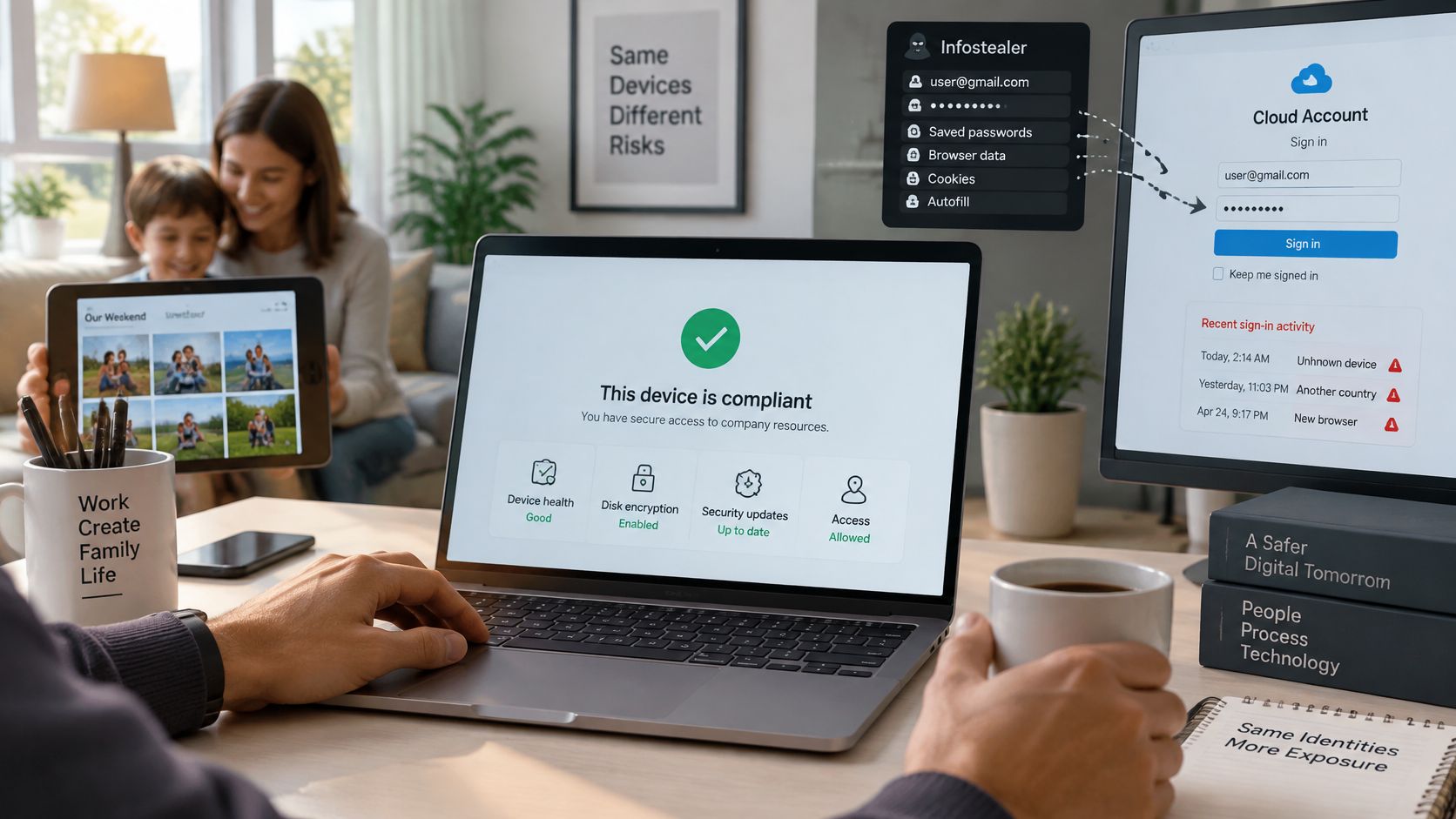
According to Beyond Identity's discussion of Verizon's 2025 Data Breach Investigations Report, 46% of systems compromised by infostealers containing possible corporate credentials were non-managed devices. The finding concerns those compromised systems, not all personal devices, but it demonstrates why endpoint ownership isn't a sufficient access boundary.
Define what happens after sign-in
An identity-focused policy needs rules for changing risk, not just initial enrollment:
- Risk-based access. Specify when a change in device posture, location or behavior triggers reauthentication, restriction or investigation.
- Resource-level permission. Limit users to the information their roles require, even when their devices pass compliance.
- Session visibility and revocation. Give responders authority to invalidate active sessions and tokens, not merely reset a password.
- Shared-device restrictions. Prohibit sharing work sessions and define whether family-shared devices are eligible.
- A workable fallback. Offer a managed loan device or an appropriately restricted browser route when personal hardware loses access.
Say a sales representative's tablet passes compliance, but a family member uses the same account. Location checks may not catch that situation because both people are at home. Separate user profiles, reauthentication for sensitive actions and a rule against shared work sessions provide more relevant safeguards.
For supporting employee guidance, HR teams can browse account security articles from HR Management 365 and turn relevant topics into role-specific onboarding material.
The accompanying video can support a team discussion about these access decisions.
Also define permitted access from hotel, café and home networks, including which sensitive tasks require a controlled route. BYOD is an identity and data-access decision, not just a device-ownership category: decide which business resources a personal device may safely reach.
Lost, Stolen and Departing Device Procedure
When a device disappears, employees need a reporting route and responders need an authorized sequence. For a planned departure, schedule the same access-removal work around the employee's agreed end time.
Helpdesk response sequence
- Employee reports. Provide an accessible reporting channel that doesn't require the missing phone. Require prompt reporting, and have the helpdesk record when the loss was noticed and reported.
- Identity administrator revokes access. Invalidate affected sessions and tokens, block the device and suspend the account where necessary. Distinguish a lost endpoint from an account-wide compromise.
- Device administrator initiates removal. Send the authorized selective-removal command. Escalate any proposed whole-device action for the required approval and employee notification.
- Helpdesk verifies the outcome. Check management acknowledgments and confirm access denial. If the device is offline, record removal as pending rather than claiming the data is gone.
- IT completes departure tasks. Remove enrollment, revoke device certificates and replace any shared credentials the departing employee could still use.
- Incident owner records actions. Preserve timestamps, approvals, command results and unresolved risks under the stated retention rules.
- Privacy or security reviewer handles disputes. Review mistaken blocks or deletion separately from the original responder, and document the authorized route to restoring access.
Operational safeguard: A remote command sent is not a remote command completed.
Give the helpdesk a one-page runbook containing this sequence, named role owners, escalation contacts, approval requirements and a completion checklist. Test it with an offline device so responders understand what they can verify and what remains uncertain.
Choose Your BYOD Scope Before Writing the Policy
Start with the access you intend to permit, not a template full of restrictions. A receptionist checking schedules and an administrator handling sensitive records shouldn't automatically receive identical permissions because both use personal phones.
Make the scope concrete
- Identify eligible hardware. Name the device categories and supported operating systems IT can assess and support.
- Classify required information. Map each user group to public, internal, confidential or regulated material and identify where local storage is unacceptable.
- Choose enforcement deliberately. Apply the least-intrusive-control rule to each group's most sensitive resource.
- Write the employee-facing terms. Put acceptable use, monitoring, costs, support and departure obligations into plain language.
- Pilot realistic incidents. Test enrollment, failed compliance, a missing device and an employee departure before wider rollout.
- Assign a review owner. Set a review date and require reassessment when applications, device support or business requirements change.
Map people to networks
Multi-site organizations also need to distinguish staff, guest, student and resident access. A school's visitor WiFi and its staff application access serve different purposes, even when the same access points carry them.
Don't assume a network name proves who is using it. Record how users join, what identity checks apply and which business resources remain reachable.
Before drafting the policy, list your three highest-risk user groups and the network each uses. Add the sensitive information each group needs and the person responsible for approving that access. That list is your practical starting point.
Purple Shield provides protective DNS and content filtering for guest and BYOD networks without agents on personal devices. Visit Purple Shield to request a trial and share your networks, venues and user groups so a Purple expert can return a policy map for every SSID you run.