
What is recursive DNS: How it works and why it matters
What is recursive DNS? See how a resolver answers lookups, uses caching, and where security checks fit, with clear examples.
Published 2 November 2026
A recursive DNS resolver is the server that takes a name lookup from your device and finds the matching IP address on its behalf by querying other DNS servers, then stores the answer for reuse.
Say you've changed a setting on your guest WiFi, but a visitor can still reach a site you meant to block. Before changing the firewall again, check which resolver their device uses and whether your policy applies to cached answers. Those details often explain the gap between changing a rule and seeing it work.
Table of Contents
- What a Recursive DNS Resolver Does for Your Device
- Recursive and Authoritative DNS Servers Compared
- How a Recursive Lookup Walks the DNS Hierarchy
- Caching, TTLs and How Long a Change Takes
- Filtering and Security at the Resolver
- Outages, Stale Answers and Common Misconceptions
- Confirm Which Resolver Your Network Uses Before You Change It
What a Recursive DNS Resolver Does for Your Device
A recursive DNS resolver finds DNS answers for a device, rather like a hotel concierge who contacts several departments instead of sending a guest from desk to desk. The guest asks a question and expects an answer, not directions for continuing the search.
Suppose a hotel guest opens their laptop and enters a website name. If the laptop doesn't already have a usable answer locally, it sends a lookup to its configured DNS service. That service may be supplied by the hotel network, the internet provider, or a separately configured resolver.
The roles behind a lookup
- Client: The device or application asking for a DNS answer.
- Recursive resolver: The service responsible for finding and returning that answer.
- Authoritative server: The server publishing the official DNS records for the requested domain.
The concierge analogy makes those responsibilities easier to separate.

For a successful address lookup, the device receives an IP address and a time-to-live, usually shortened to TTL. That value tells caching systems how long they may reuse the answer. The browser can then use the address to begin contacting the destination.
Recursive doesn't mean endless repetition. It describes the responsibility the resolver accepts: find the final answer for the client, or return an appropriate error if it can't.
The hotel guest usually knows none of this is happening. They don't need to choose root servers or understand who hosts the website's DNS.
A useful understanding check is simple: your device asks for an address, the resolver finds it, and your browser uses it to start a connection.
Recursive and Authoritative DNS Servers Compared
Recursive resolver versus authoritative server
| Criterion | Recursive resolver | Authoritative server |
|---|---|---|
| Main job | Finds answers for clients by querying other servers | Publishes the official records for the domains it is responsible for |
| Where answers come from | Its cache or upstream DNS servers | Its own zone records |
| Typical operator | Internet provider, public resolver service, network owner | Domain owner or hosting provider |
| Contacted directly by devices | Yes | Usually not; resolvers contact it |
| Caches answers for other domains | Yes, subject to TTL and local cache rules | No, not as part of its authoritative role |
The key distinction is retrieval versus authority. A recursive resolver retrieves information for someone else. An authoritative server publishes information for a domain under its responsibility.
That difference matters when troubleshooting. If everyone receives the wrong address for your organisation's website, check the authoritative records. If only visitors on a particular network have trouble, investigate that network's resolver, its cache, and its policy.
Operators can overlap without merging the roles
An internet provider might run recursive DNS for subscribers, while a hosting provider publishes authoritative DNS for customers. A network owner may also operate an internal resolver for staff devices.
The same organisation, and sometimes the same server software, can perform both jobs. A server could answer authoritatively for an internal domain while resolving unrelated internet names for employees. The role belongs to the request being handled, not just the company name on the service.
Forwarding adds another distinction. A local DNS server may pass requests to an upstream resolver instead of contacting the hierarchy itself. Understanding DNS forwarding helps you identify which service performs the external lookup.
An authoritative server isn't normally the visitor's content-filtering checkpoint. It publishes the domain's records, rather than applying the visitor's network rules.
Diagnostic question: Is this server answering from records it is responsible for, or finding records on a client's behalf?
That question is more useful than assuming every server labelled DNS does the same work.
How a Recursive Lookup Walks the DNS Hierarchy
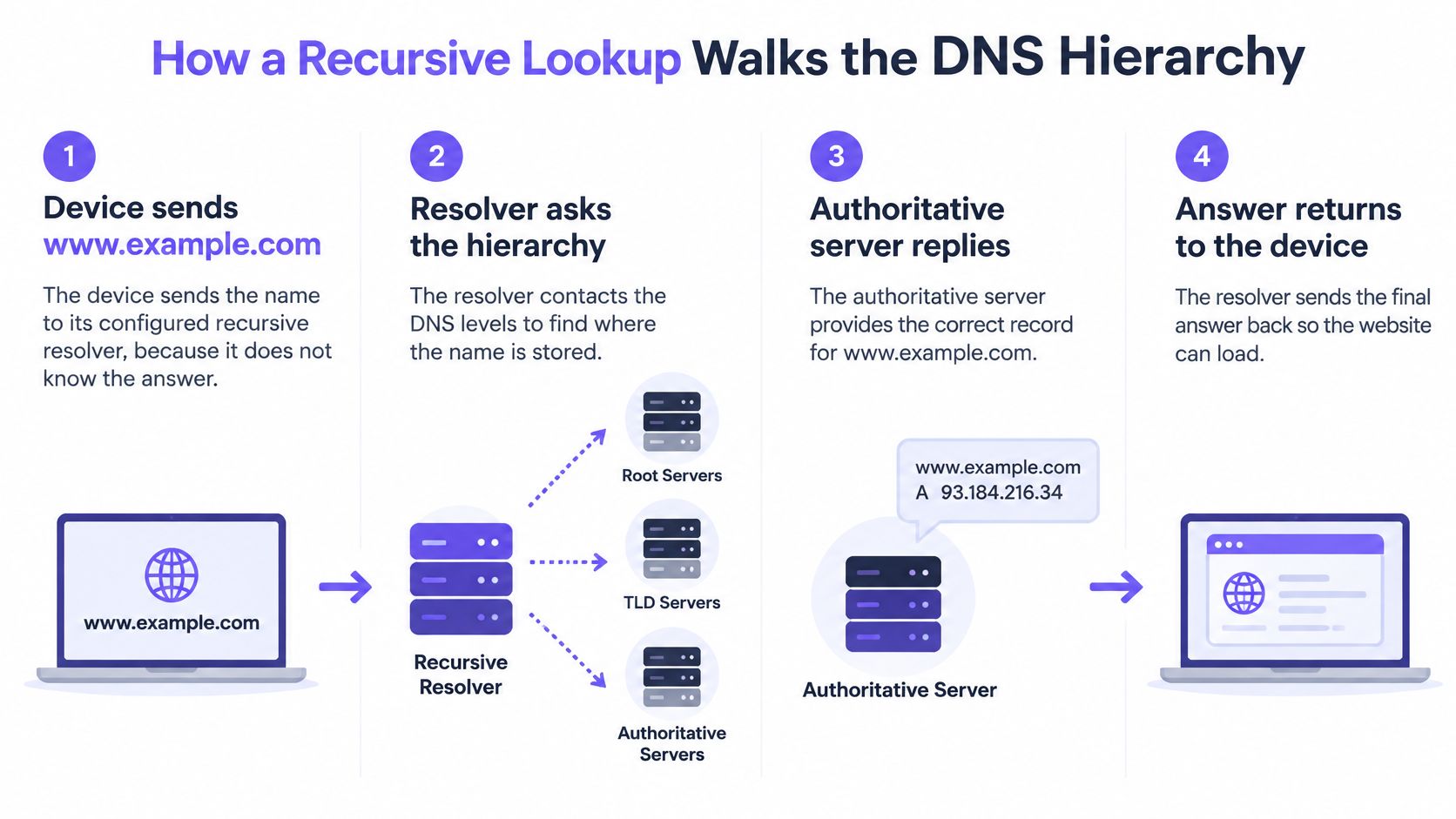
Consider a lookup for www.example.com when neither the device nor its resolver has the information needed to answer.
The device sends a recursive query, asking its resolver for a final result. The resolver normally makes iterative queries upstream: root and top-level-domain servers provide referrals, while the authoritative server provides the requested record.
This diagram shows the overall journey before the individual exchanges.
Follow the request and the answer
The device contacts its configured resolver. It sends the website name because it needs an address before it can contact the destination.
The resolver checks its cache. A usable cached answer ends the search immediately. There's no reason to ask upstream servers for information the resolver can still reuse.
On a cache miss, it asks a root server. The root server directs it towards the servers responsible for the relevant top-level domain, in this case .com.
It asks a .com server. That server identifies the authoritative name servers for example.com, narrowing the search to the domain's designated authorities.
It queries an authoritative server. The authoritative server returns the requested address record and its TTL, expressed in seconds.
It stores and returns the answer. The resolver retains a reusable copy and sends the result to the device.
Later requests can use that cached copy. While the answer remains usable, the resolver needn't repeat the upstream journey for the same name and record type.
The hierarchy distributes responsibility. Root servers identify top-level-domain authorities, those authorities identify domain name servers, and domain administrators maintain the destination records.
A cached reply is still a legitimate reply
The resolver's reply is normally non-authoritative. That means it's relaying information rather than answering as the domain's authority, not that the answer is untrustworthy.
Some deployments forward the request to an upstream recursive service, which performs this work on their behalf. Also, a resolver with cached referrals can skip parts of the illustrated journey.
Local cache rules matter too. APNIC's notes from RIPE 91 identify commonly observed resolver maximum cache timers of 6 hours, 12 hours, 24 hours, and 7 days, showing why administrators shouldn't assume every resolver follows identical cache limits.
For another view of the lookup process, this video follows DNS resolution.
Caching, TTLs and How Long a Change Takes
A domain gets blocked at 9:00, and a laptop on the same network still opens it at 9:40. The gap comes from reuse. A TTL works like the expiry time on a parking ticket: it tells the resolver how long it may keep handing out a stored answer before it has to go back upstream and ask again.
For an ordinary cached record, the quantity that matters is remaining lifetime. A resolver's maximum cache timer can cut that lifetime short, while a locally enforced minimum can stretch it. Observed resolver maximums include 6 hours, 12 hours, 24 hours and 7 days, per APNIC's notes from RIPE 91. These settings govern record freshness. They decide how long a block takes only when the filtering design relies on refreshing the DNS answer rather than checking current policy.
Cache settings and what they mean for a new block
| Cache setting | Typical value | Effect on a new block or change |
|---|---|---|
| TTL of zero seconds | No reusable lifetime | Under normal TTL handling, the next request triggers an upstream lookup |
| Short TTL | Seconds to minutes | Record changes become visible soon after each refresh |
| Resolver maximum cache timer | 6 hours | Caps retention for records whose TTL runs longer |
| Resolver maximum cache timer | 12 hours | Truncates longer record TTLs at half a day |
| Resolver maximum cache timer | 24 hours | Lets an answer persist overnight, up to a full day |
| Resolver maximum cache timer | 7 days | Permits week-long retention only where the record TTL also allows it |
Separate record changes from policy changes
Say a site's authoritative address changes one minute after a resolver caches the old answer. That resolver can keep returning the old address until the effective lifetime ends, which is the shorter of the record TTL and the resolver's own maximum, adjusted for any enforced minimum. With a 24 hour record TTL and a 6 hour cap, users reach the new address within six hours. With a 7 day record TTL under a 7 day cap, they can wait a full week.
Now the address stays the same, but a security team marks the domain malicious. A resolver that re-checks current policy before serving a cached answer blocks the domain on the next lookup. A design that only re-evaluates when the answer refreshes leaves the path open for the rest of the effective lifetime, which could mean a day of exposure on a 24 hour cap.
Practical rule: Ask when the resolver refreshes its DNS answer and when it re-evaluates its filtering decision. A change reaches users at the later of those two moments.
For urgent changes, test a previously queried domain as well as an uncached one. Monitor cache hits, upstream query volume and policy-update delivery as separate measures. A fast fresh lookup says nothing about users still holding a cached answer.
Filtering and Security at the Resolver
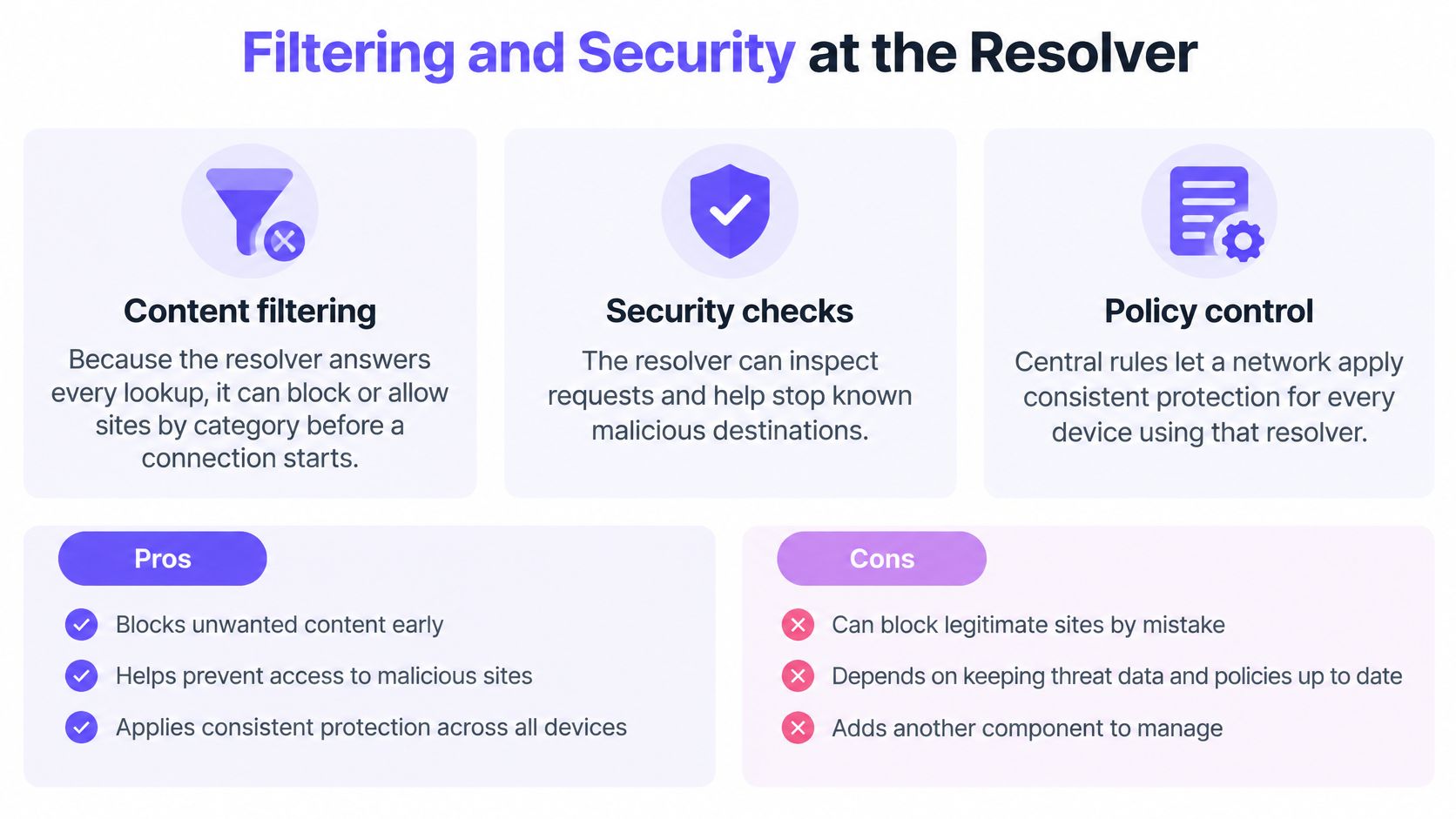
A resolver can apply rules to the lookups it receives before the device starts a connection. But recursion alone doesn't supply those rules. Content classification, threat intelligence, and DNS authenticity checks are separate capabilities.
Content filtering sets access rules
Category-based DNS filtering lets a network owner decide which destinations users may reach. A family attraction might restrict adult content on guest WiFi while maintaining different rules for an administrative network.
Before a device opens a site or app, it asks DNS where to find it, and we answer using the policy for the network the device is on. That makes the network's identity important, not just the domain being requested.
The main functions are distinct even when one service provides them.
Threat defence evaluates the destination
Threat controls can refuse lookups for known phishing and malware domains. Our threat defence also blocks command-and-control callbacks from infected devices at the lookup, preventing those attempted connections from starting through that resolution path.
That's useful containment, but it doesn't remove malware from the device. Endpoint protection and firewall controls still have their own jobs.
DNSSEC checks authenticity, not safety
DNSSEC validation uses a configured trust anchor and a chain of cryptographic signatures to authenticate signed DNS data. RFC 4033 describes secure validation and says a security-aware resolver should consider signature validity when selecting cache lifetimes, allowing for clock inaccuracies.
Administrators therefore need accurate system time and cache handling that preserves validation status. A resolver must distinguish legitimately unsigned data from signed data that fails validation.
- Early control: Filtering can stop an unwanted lookup before a connection begins, but only for requests using that resolver.
- Consistent rules: Devices using the same network policy receive consistent treatment, but alternate resolution paths need separate controls.
- Authenticity checking: DNSSEC helps detect forged signed answers, but doesn't encrypt queries or determine whether a domain is malicious.
A correctly signed phishing domain is still a phishing domain. Filtering decides whether access should be allowed; DNSSEC establishes whether signed DNS information is authentic.
Outages, Stale Answers and Common Misconceptions
A guest opens a website while its authoritative DNS server is unreachable, yet the page still loads. The resolver may have an unexpired cached answer, so it doesn't need to contact that authoritative server for this request.
Some resolvers can also serve stale answers after ordinary expiry when upstream servers are unavailable. That's an availability strategy, not evidence that DNS records remain current indefinitely. Cloudflare's DNS explainer provides the underlying distinction between the resolver that retrieves information and the authoritative server that supplies it.
Cached answers explain why an authoritative outage doesn't always become an immediate browsing outage.

Availability and protection need explicit choices
Resolvers can cache unsuccessful results too. Negative caching retains information such as a name not existing, avoiding repeated searches for the same missing name. After an administrator creates that name, some clients may still receive the cached negative result until it expires.
Failure handling raises a separate policy question. A fail-open filtering design permits resolution without its normal policy checks when those checks are unavailable. A fail-closed design refuses requests it can't approve, preserving the restriction but potentially interrupting legitimate access.
DNSSEC validation failures are another distinct case. Operators shouldn't treat invalid signed data as authenticated merely to keep a page loading.
Assumptions that cause operational mistakes
- Recursion automatically means blocking: Recursion retrieves answers; administrators add blocking through a policy layer.
- A DNS filter controls every connection: Hard-coded destination addresses and some VPN paths can avoid the protected lookup entirely.
- Changing network DNS instantly moves every client: Existing settings, DHCP leases, and browser-level resolver choices can leave devices on another path.
When investigating an outage, distinguish an unreachable authority, an expired record, a negative answer, a validation failure, and a policy rejection. They can look similar to a guest but require different remedies.
Recursion moves answers. Policy and resilience determine which answers the network will deliver under changing conditions.
Confirm Which Resolver Your Network Uses Before You Change It
If you're asking what is recursive DNS because you're about to change a live network, start by mapping the current path. Record the working configuration so you can restore it if testing exposes an internal-name or application dependency.
Check the path before rollout
- Find the device's configured DNS service. Use its network settings or a DNS lookup tool. A router address may represent a forwarding service, so trace its upstream destination too.
- Inspect DHCP and controller settings. Confirm which resolver the network advertises and whether manually configured clients follow it.
- Write down the required policy. Identify content categories, malware controls, lookup logging, and differences between staff and guest access.
- Choose acceptable update behaviour. Specify tolerable record-refresh and policy-update delays, plus the intended response to service failures.
- Pilot on a limited network. Test permitted sites, blocked destinations, internal resources, and recovery before extending the change.
Deployment is a per-network DNS setting or DHCP change on the controller, with nothing installed on client devices. That covers devices following the network's DNS configuration, rather than guaranteeing that every application uses it.
Test VPNs and DNS over HTTPS, which can create alternate resolution paths. Our team shows how the network handles VPNs and encrypted DNS before a trial.
A recursive resolver with policy is the right choice when the network needs filtering before connections start and the owner accepts its cache and failure behaviour.
Purple Shield provides protective DNS, content filtering, threat defence, and DNS-layer ad blocking for guest and public WiFi without device agents. Visit Purple Shield to discuss your network's resolver path, the policies you need, and how to test enforcement before rolling out a DNS change.