
DNS Over HTTPS Explained: Privacy vs Public WiFi Filtering
DNS over HTTPS encrypts lookups inside port 443 traffic. Learn what it hides, why it can bypass WiFi filtering, and how networks keep control.
Published October 26, 2026

DNS over HTTPS sends DNS lookups inside ordinary HTTPS traffic on port 443, encrypted between the device and the resolver, and it became an IETF standard in 2018.
You've enabled content filtering on your guest WiFi, but a guest's browser still opens a category you thought you'd blocked. The firewall is running, the network settings look right, and another device gets the expected block page. The difference may be which resolver the browser asks, not whether your filter is working.
For venue operators and IT leads, that's the central issue with DoH. It protects a lookup while it travels, but the browser's choice of destination can also move that lookup outside your network's filtering policy.
Table of Contents
- What DNS over HTTPS Means in Plain Terms
- How a DoH Lookup Travels From Device to Resolver
- Who Can See Your Lookups When DoH Is On
- Why DoH Weakens DNS Filtering on Shared WiFi
- What DoH Costs in Speed and What Filtering Still Does
- Check and Change DoH on Common Devices
- Choose and Layer Your DoH Controls
What DNS over HTTPS Means in Plain Terms
DNS over HTTPS, usually shortened to DoH, carries DNS questions and answers through an encrypted web connection. A DNS resolver is the service a device asks to translate a domain name into a network address.
Think of DNS as a phonebook. Before opening a connection, an application needs an address, although it may already have a usable answer in its cache. Traditional DNS commonly sends that question in readable form.
A postcard is a useful analogy: anyone handling it can read the message. DoH puts the question in a sealed envelope and carries it inside the same kind of delivery van used for ordinary secure web traffic.
Compare the transport, not just the encryption
DNS over TLS, or DoT, also seals the envelope, but uses a separately labeled delivery entrance. That makes its traffic easier for a network operator to identify by its destination port.
The IETF's RFC 8484, published in October 2018, defines DoH's HTTPS exchange, typically using port 443, unlike traditional DNS on port 53.
Traditional DNS, DNS over TLS and DNS over HTTPS compared
| Feature | Traditional DNS | DNS over TLS (DoT) | DNS over HTTPS (DoH) |
|---|---|---|---|
| Transport | UDP or TCP | TLS | HTTPS |
| Usual port | 53 | 853 | 443 |
| Readable by local network | Yes | No | No |
| Easy to spot by port | Yes | Yes | No, shares port 443 with web traffic |
| Easy to block by port | Yes | Yes | No, not selectively by port alone |
| Defined in | Original DNS specifications | DNS over TLS specification | RFC 8484 |
Blocking a dedicated DNS port is straightforward. Blocking the port used by secure websites would also stop legitimate web traffic, so DoH needs more selective controls.
Encryption doesn't decide what gets filtered. A resolver can decrypt an incoming DoH request, apply a content or threat policy, and return its answer securely. The important questions are who operates that resolver and whose policy it follows.
Keep this comparison handy when reviewing controls. A rule that handles traditional DNS or DoT doesn't automatically handle DoH.
How a DoH Lookup Travels From Device to Resolver
A courier needs an address before delivering a package. Similarly, a browser needs a destination address before it can connect to a hotel booking page, unless it already has that answer cached.
This diagram follows the lookup from the browser to the resolver and back.
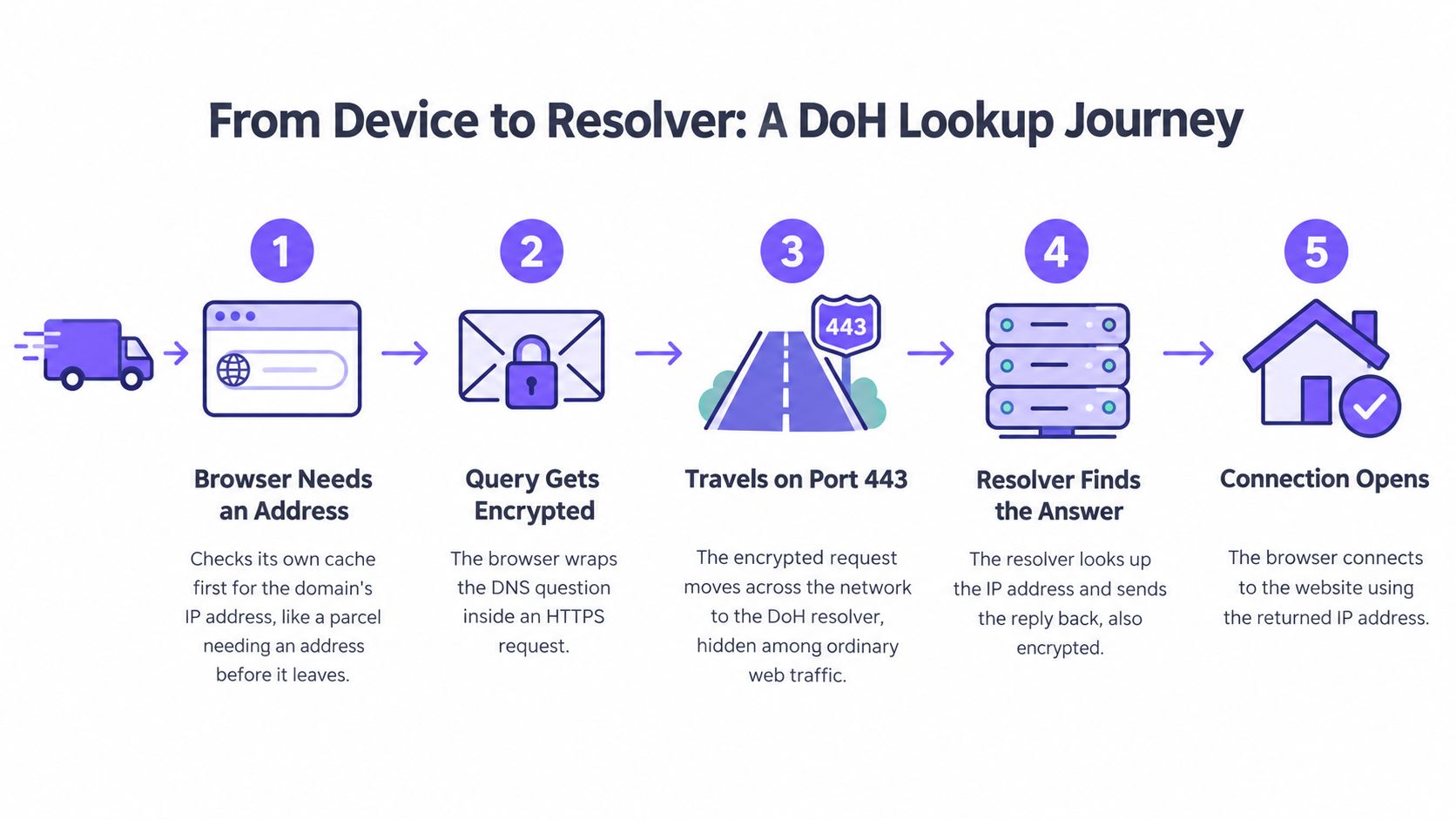
Follow the request and response
The browser needs an address. It checks whether it already has a usable answer for the booking site. A cache hit may avoid a new lookup entirely, so the local network won't see a DNS exchange for that action.
It builds a DNS question. If it needs a fresh answer, the browser prepares a query containing the domain name. At this point, the question is still inside the device, not traveling across the WiFi.
It selects the DoH resolver. The browser prepares an HTTPS request for its configured resolver. The local network can observe the destination address and connection metadata, but it can't directly read the domain inside the encrypted DNS message.
It establishes or reuses a secure connection. If needed, the device completes a TLS handshake before sending the protected request. With a persistent HTTP connection, subsequent queries can reuse that connection; the network sees encrypted traffic, including its timing and size.
The resolver returns the answer. The resolver processes the question and places the DNS reply inside an encrypted HTTP response. The network can see traffic returning from the resolver, not the answer's readable contents.
The browser connects to the website. It uses the returned address to begin the website connection. The local network can observe that new destination, which is separate from reading the earlier DNS question.
For more detail on caching and resolution, the explanation of what a DNS lookup does separates the address-finding process from the website connection itself.
Identify the filtering point
For a fresh connection requiring DNS resolution, the lookup happens before page content loads. That gives an approved resolver an opportunity to refuse a blocked destination before the browser connects.
An independently configured browser can send that decision somewhere else. The venue's resolver then receives no question to evaluate.
The accompanying video offers another way to follow the process.
Who Can See Your Lookups When DoH Is On
DoH doesn't hide browsing from everyone. It protects the DNS exchange against ordinary observers between the device and its chosen resolver, but that resolver must read the question to answer it.
That distinction matters on shared WiFi. A guest may reasonably want protection against local interception, while a hospital or school needs confidence that its safeguarding and threat controls still apply.
DoH changes who you trust with DNS activity; it doesn't remove the need to trust someone.
Separate DNS visibility from browsing visibility
The table describes ordinary DoH use without an additional privacy relay, VPN or interception system. Reading a DNS message and inferring a destination from other network activity are different capabilities.
Who can see DNS lookups when DoH is in use
| Observer | Sees domain names | Sees that DoH is in use | Why it matters |
|---|---|---|---|
| Other devices on the same WiFi | No, not from the encrypted lookup | Rarely through ordinary peer access | Passive reading of the DNS message is blocked |
| Venue or ISP network | No, not inside the DoH exchange | Often, through traffic to a known resolver address | Local DNS controls can't evaluate queries sent elsewhere |
| Websites you visit | Only the site you connect to | Not from the website connection alone | A site doesn't receive your unrelated DNS queries |
| DoH resolver operator | Yes, every query it receives | Yes | A direct connection exposes those queries alongside your source address |
| Browser or OS vendor | Only if it operates the resolver or receives relevant telemetry | The software knows its configured mode; vendor reporting requires telemetry | Software configuration isn't the same as automatic vendor visibility |
The resolver doesn't necessarily see every lookup made by the device. Another application may use a different resolver, and cached answers may require no query. It only sees the requests that are sent to it.
Likewise, the browser vendor doesn't automatically receive DNS history just because it supplies the browser. Resolver operation, software settings and telemetry collection are separate roles.
Make the trust decision explicit
For managed Firefox installations, Mozilla's DNS over HTTPS policy documentation provides controls for the resolver configuration and whether users can change it. That's a practical way to align the browser's behavior with an organization's DNS governance.
A venue or ISP may still observe destination addresses, connection timing and traffic volumes. Other protocol metadata may also help identify a site, so an encrypted DNS question isn't a promise of anonymous browsing.
Use a short trust assessment before approving a resolver:
- Name the operator. Establish which organization receives the questions, rather than relying on a browser's default label.
- Read the retention terms. Check what query and connection information is stored, for how long, and for what purpose.
- Check jurisdiction and access. Understand where the operator processes information and who can obtain it.
- Match visibility to responsibility. Decide which security events your IT team needs to investigate and which browsing details it shouldn't retain.
The useful question isn't whether privacy or manageability matters more in the abstract. It's whether your chosen DNS path gives users appropriate confidentiality while leaving the organization able to perform its stated responsibilities.
Why DoH Weakens DNS Filtering on Shared WiFi
A hotel gives guests a reception number for help finding local services. Most guests call the desk, but another guest uses a directory app instead. Reception can control its own recommendations, not the answers delivered by that app.
Network DNS works similarly. Your network supplies a resolver, but a browser with its own DoH configuration may ask an external service instead.
The illustration shows that alternate route around the network's DNS desk.

The bypass is about the route
The problem isn't that an encrypted query can never be filtered. It's that your filter can't apply policy to a query it never receives.
On a family attraction's guest network, that could mean an adult-content block doesn't apply to a particular browser. On a staff network, a malicious application could resolve a command-and-control domain through an unapproved resolver.
The consequences depend on which controls rely on DNS:
- Network-specific policies. Rules assigned to an SSID or VLAN won't govern questions sent outside the approved resolver path.
- Search restrictions. DNS-based Safe Search enforcement can be bypassed, although account-level or endpoint restrictions may still apply.
- Threat blocking. A DNS filter can't refuse an unseen lookup, even if its threat list contains the requested domain.
A measurement study of encrypted-DNS deployment reports Firefox telemetry in which approximately 13.91% of 9.54 trillion desktop handshakes used DoH during 2025. It also describes a measurement dataset in which DoH was approximately 6.4 times more prevalent than DoT.
Those observations don't establish the share of devices bypassing your venue's filter. Browser defaults, regional rollout, resolver compatibility and administrator policies all affect whether DoH is active.
Test coverage rather than assuming it
A successful block on a staff laptop doesn't prove equivalent coverage on a guest's personal phone. The devices may use different browsers, DNS settings or tunnels.
Treat your WiFi content filter as a control with a defined traffic path. Test that path using the devices and applications your visitors bring with them.
Filtering based only on the network-provided resolver is no longer complete coverage by default. It needs supporting controls and an honest account of what remains outside policy.
What DoH Costs in Speed and What Filtering Still Does
Encryption adds work, but the practical question is whether users notice a slower session. Initial connection setup and repeated lookups have different costs, so testing a single fresh request can give a misleading picture.
An empirical comparison of DNS transports reported UDP and TLS responses below 1 millisecond in its no-delay local baseline, while HTTP/2 consistently stayed below 10 milliseconds; the results below retain the study's experimental context rather than predicting venue performance.
DNS lookup latency by protocol in the cited study
| Protocol | Reported result | Context |
|---|---|---|
| UDP | Below 1 ms | No-delay local baseline |
| TLS | Below 1 ms | No-delay local baseline |
| HTTP/2 | Below 10 ms, consistently | Connection reuse and multiplexing help reduce overhead |
| HTTP/1.1 | Fluctuates substantially | Attributed to pipelining limits |
| Public DoH versus traditional DNS | Slower per name | No significant rise in overall page load time observed |
Measure the session, not just the handshake
Persistent connections let a client spread setup costs across later queries. Multiplexing allows it to handle multiple exchanges without establishing a separate secure connection for each question.
DNS filtering can still refuse a domain before a new connection starts, provided the request reaches the filtering resolver. Ad and tracker blocking may reduce subsequent requests, but encryption alone doesn't remove ads or accelerate a page.
Track the operational signals that reveal real problems:
- Handshake failures. Look for connection setup errors and retries.
- Cache-hit rates. Separate cached responses from fresh resolution.
- Resolver response time. Measure behavior during busy guest sessions.
- Fallback behavior. Check whether failures cause devices to stop resolving or switch to another path without notice.
Practical rule: Test browsing, policy enforcement and failure recovery together, not as separate acceptance checks.
A nearby, resilient resolver endpoint is a better starting point than choosing a protocol on latency assumptions alone. Confirm the result on your network under realistic load.
Check and Change DoH on Common Devices
A browser setting can explain why devices on the same WiFi behave differently. Menu labels change between releases, so use Settings search if the path below isn't visible.
Inspect the browser and operating system
- Chrome: Open Settings, Privacy and security, Security, then Use secure DNS. Check whether it follows the current provider or specifies another service.
- Firefox: Open Settings, Privacy & Security, then DNS over HTTPS. Review the protection mode, including Off, Default Protection or Max Protection, and the selected resolver.
- Edge: Open Settings, Privacy, search and services, Security, then Use secure DNS. Managed policy may lock the setting.
- Android: Open Settings, Network & internet, then Private DNS. This setting uses DoT rather than DoH; browser-level secure DNS needs a separate check.
- iOS and macOS: Inspect installed configuration profiles, device-management settings and DNS-related apps. An encrypted DNS profile may operate independently of the browser.
Verify the effective path
A system VPN can carry DNS through its own tunnel regardless of the browser setting. Also check whether an app supplies a separate encrypted DNS service.
Confirm which resolver receives a fresh test lookup from the actual browser or app. Use browser diagnostics or a resolver-identification test alongside approved-resolver logs, rather than trusting the settings screen alone.
Choose and Layer Your DoH Controls
Layer controls by device ownership and policy need. Managed staff laptops can follow an enforced configuration; personal guest cell phones generally can't. Applying the same restrictions to both groups creates either avoidable gaps or unnecessary breakage.
You can allow external DoH and accept reduced local DNS visibility, restrict it and accept compatibility risks, or combine managed-device policy with selective guest-network controls. The layered approach gives you a clearer statement of what's protected and what isn't.
Match each control to its actual scope
Network controls are useful, but they don't make every encrypted resolver identifiable. A private resolver, changing address or VPN tunnel can defeat assumptions built around a list of familiar services.
Controls for DoH on shared and managed networks
| Control | What It Stops | Where It Applies | Trade-off |
|---|---|---|---|
| Block outbound port 853 | Standard-port DNS over TLS | Firewall or gateway | Does nothing to DoH over ordinary HTTPS |
| Force port 53 to the network resolver | Plain DNS bypass | Gateway enforcement, supported by DHCP configuration | Ignores DoH entirely; DHCP alone doesn't force compliance |
| Block known public DoH resolver addresses | Connections to listed resolvers | Firewall or capable gateway | Lists go stale, new resolvers appear, some apps break |
| Disable browser DoH by managed policy | Browser-level bypass in covered browsers | Managed laptops and staff devices | Can't reach personal cell phones on guest WiFi |
| Enforce network resolver through MDM | Unapproved DNS changes covered by device policy | Enrolled staff and corporate devices | Needs enrollment and platform support; guests stay outside it |
| Accept DoH and filter at the endpoint | Nothing on the network side | Managed endpoints only | Guest devices remain outside endpoint policy |
Blocking a resolver's address may also block unrelated services hosted at that address. Avoid treating a firewall's encrypted-DNS category as a permanent, exhaustive inventory.
Where you need control beyond domain resolution, assess a secure web gateway alongside endpoint and network policies. Check deployment requirements carefully, particularly when devices aren't organization-owned.
Build a testable operating policy
Start with the service you need to deliver. A staff administration network, a public library connection and a children's activity venue may reasonably need different restrictions and different explanations to users.
Use this deployment checklist:
- List the required policies. Identify the SSIDs, VLANs and device groups that need content controls or threat filtering, and assign an owner to each.
- Separate managed devices from guest BYOD. Record where browser policy or MDM can be enforced and where only network controls are available.
- Close ordinary DNS bypass routes. Where your policy requires it, block outbound DoT and restrict traditional DNS to the approved resolver. Cover both supported network address families.
- Apply managed browser policy. Configure the approved DNS path and prevent unsupported user overrides on staff equipment.
- Maintain guest-network resolver restrictions. Review blocked resolver addresses regularly, test exceptions and remove rules that cause unacceptable collateral blocking.
- Publish a plain-language guest notice. Explain which categories are filtered, what network information is recorded and any restrictions on encrypted DNS or VPN use.
- Test a real device on every network. Check allowed sites, blocked categories, approved security test destinations, resolver failure and VPN behavior.
Before launch: A block page proves that a particular request was filtered, not that every application on the device follows the same route.
Make encrypted DNS part of acceptance testing
To use Shield, you point the network's DNS at Shield. We answer every DNS lookup on the network we protect, on every device, with nothing on the device to switch off; external resolver and tunnel paths must therefore be included in the network's protection design.
Before you trial Shield, our expert shows how your network handles VPNs and encrypted DNS. Use that discussion to establish which requests reach the protected DNS path, which controls enforce it, and what happens when a device tries another route.
Set acceptance criteria before changing guest access. An approved resolver, a documented exception process and repeatable device tests provide a stronger foundation than assuming an enabled filter sees everything.
Purple Shield provides protective DNS, content filtering, threat defense and ad blocking without installing agents on guest devices. Visit Purple Shield to arrange a pre-trial discussion about your SSIDs, filtering policies, and how your network handles encrypted DNS and VPNs.