
DNS security guide: DNSSEC, DoH, DoT and protective DNS
Learn how DNS security works, from DNSSEC and DoH to protective DNS and sinkholing, and which controls each network needs.
Published November 11, 2026
A guest in your lobby joins the free WiFi and taps a link for a brand they already trust. The phone doesn't open the page first. It asks where that name lives. Forge the answer and the browser walks to a look-alike server while the padlock still looks normal. Let a real answer through for a phishing kit, and the connection still starts. Hotels, campuses, hospitals, local governments and airports see this every day, because almost every visit begins with that question. DNS security is the set of checks you put on it: is the answer genuine, is the question hidden from people on the path, and is this destination one this network should allow?
Table of contents
- Why Your DNS Lookup Is a Security Control Point
- DNS Security Controls Compared at a Glance
- How DNSSEC Proves a DNS Answer Is Genuine
- Encrypting DNS Queries With DoH and DoT
- How Protective DNS and Sinkholing Stop Infected Devices
- Where Encrypted DNS and Blocklists Fall Short
- Set Your DNS Security Controls Network by Network
Why your DNS lookup is a security control point
A name can be signed, hidden and still lead somewhere you would never allow. That is why the lookup matters: before a phone opens a site, a TV loads an app or a register syncs, it asks DNS where to go, and the network answers first.
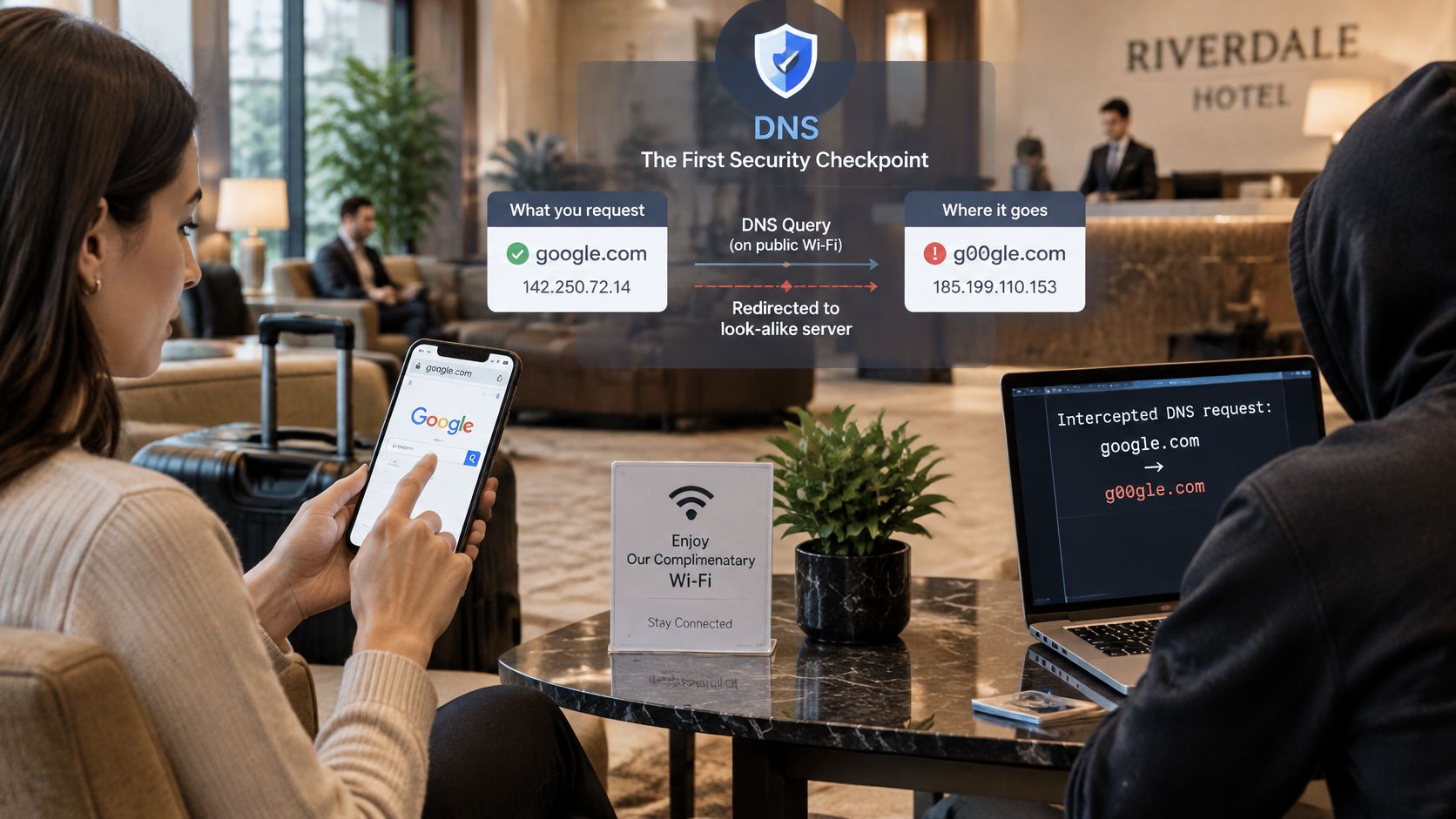
Treat that answer as a checkpoint with three separate tests. Was the record changed after the owner published it? Can people on the path read the name being requested? Should this venue, school, ward or guest network let the connection begin? By 2015, APNIC materials reported DNSSEC deployment on 630 of 808 top-level domains, or 78%, although only about 12% of resolvers were then validating those responses. Adoption has kept moving since then, and the same lesson holds: authenticity proves the answer is genuine, while policy still decides whether the destination belongs here.
Three jobs, not one switch
- Authenticity. Prove the record wasn't swapped after the owner published it.
- Confidentiality. Stop someone on the path from reading every name a device requests.
- Policy. Decide which destinations this venue, school or hospital unit allows.
The controls in this family are DNSSEC, DNS over HTTPS (DoH), DNS over TLS (DoT), protective DNS and DNS sinkholing. Each does part of the job. A signed phishing domain is still a phishing domain. An encrypted query is private on the path, yet if an app chooses its own resolver it can walk around the venue policy that was meant to check the answer.
Email shows the split clearly. A DKIM record lookup shows a message carries the domain's signature; it says nothing about whether the content is safe for guests. Shared networks face the same gap because you rarely put software on every cell phone, laptop, camera or TV. You do choose the resolver and the policy it applies, which is why a DNS lookup is a security decision for hospitality WiFi, campuses, hospitals, local governments, airports and multi-site offices.
A protective DNS layer such as Purple Shield sits at that checkpoint: it answers lookups for the network it protects with nothing to install on devices, and it can refuse known phishing, malware and command-and-control names before the connection starts. Encryption then becomes a placement choice. Hide queries where exposure is real, keep the resolver where your allow, block and safeguarding rules still apply, and let each SSID, VLAN or venue carry the policy that fits its risk.
DNS security controls Compared at a Glance
| Control | Problem it solves | What it does not cover | Where it is deployed |
|---|---|---|---|
| DNSSEC | Forged or altered DNS answers | Hiding the query, and judging whether a site is safe | Authoritative zones and validating resolvers |
| DNS over HTTPS (DoH) | Eavesdropping and tampering on the path to the resolver | Bad destinations, and it can bypass local filtering if unmanaged | Client-to-resolver and resolver-to-upstream links |
| DNS over TLS (DoT) | The same transport exposure as DoH, on a dedicated port | Bad destinations, and it can bypass local filtering if unmanaged | Client-to-resolver and resolver-to-upstream links |
| Protective DNS | Malware, phishing, command-and-control and unwanted categories | Newly compromised domains that feeds haven't flagged yet | Recursive resolver serving every network |
| DNS sinkholing | Infected devices contacting command-and-control servers | Cleaning the device. It only shows which device tried | Protective DNS policy responses |
Read the rows as three groups, not five competing products. Authenticity controls prove an answer is genuine. Transport controls hide the query while it travels. Policy controls decide whether a destination is allowed. They stack. A guest network that only encrypts queries still accepts a signed phishing name. A network that only filters, and never checks signatures, can be fed a forged address for a bank.
Say a validating resolver rejects a forged answer for a major bank. Good. A look-alike domain that was registered and signed correctly still resolves, because nothing in the signature says the site is a scam. That gap is what protective DNS is for. Sinkholing is the follow-on. Instead of a silent failure, the blocked command name returns an address you control, so the log shows which laptop tried to call home.
Practical rule: Pick at least one control from each group. Authenticity, transport and policy fail in different ways, and a single product name on a slide doesn't close the other two.
Legal teams looking at guest WiFi risk often want the same split written in plain duties. The By Design Law Firm security tips are a useful companion when you brief non-technical stakeholders on what the network is refusing.
Before you go further, answer one question for the network in front of you. Which of the three jobs is unprotected today?
How DNSSEC proves a DNS answer is genuine
Ordinary DNS answers are easy to forge, because nothing in the protocol ties a record to the owner of the name. DNSSEC adds a digital signature to each record, so a validating resolver can separate a genuine answer from an altered or invented one. The signature works like a tamper-evident seal on a medicine bottle. It proves the contents were not changed after the owner sealed them, and it says nothing about whether what is inside is good for you.
The chain a resolver actually checks
Trust is a chain of signatures, checked link by link. The root signs the top-level domains. Each top-level domain signs the names beneath it, and those names sign the individual records. A validating resolver walks that chain from the root down. One broken link, or one altered record, and the answer fails.
The visitor then sees an error rather than a perfect fake. To staff it looks like a broken site, so expect reports of "the internet is down" at the exact moment validation is doing its job.
Adoption splits into two questions that are easy to confuse: how many users sit behind a resolver that checks signatures, and how many names are signed at all. APNIC reported that global DNSSEC validation first passed 25% in April 2020, with Sweden above 85% and Saudi Arabia at about 96% in the cited measurements. A guest behind a validating resolver still gets no DNSSEC protection when the name they ask for has no signed chain.
| Measure | Reported value | What it tells operators |
|---|---|---|
| Users behind validating resolvers (2023) | About 30% | A large share of users sit behind a validating resolver |
| Share of DNS query traffic receiving validation (2023) | About 1% | Few queried names are signed, so most lookups see no check |
| Tranco top one million domains validly signed (2024) | 9.4% (94,317 domains) | Signing is still a minority of popular names |
| Queries targeting signed names (Cloudflare data) | About 3.2% | Most lookups get no DNSSEC protection |
| Signing rate for .com and .net | Far below the leading country-code namespaces | The largest namespaces lag |
| Signing rate for .nl, .cz, .no and .se | Well above the largest generic namespaces | Some country-code namespaces sign far more often |
| Validation in Sweden and Saudi Arabia (cited measurements) | Above 85% and about 96% | Validation varies sharply by country |
Read those rows as a gap between two halves. Resolvers are widely ready to check, yet the names guests ask for are mostly unsigned, so the seal is missing on most lookups. Signing also spreads unevenly, concentrated in a handful of country-code namespaces while the largest generic ones trail far behind. Treat DNSSEC as a control that catches forged answers where a signed chain exists, and expect it to stay silent across most of the lookups on a busy SSID.
Checks you can run this week
Each check takes minutes, and together they show whether the seal is being verified on your network.
- Confirm the recursive resolver your SSIDs use validates DNSSEC, not only caches answers.
- Look up one name you know is signed and one you know is unsigned, and compare the result.
- Log validation failures with the network and the time, so a spike isn't written off as "WiFi being WiFi".
- Decide in advance whether a failed answer is dropped or flagged for a person to review.
DNSSEC never tells you the verified site is safe to use. A correctly registered, correctly signed domain can still host a scam. Policy has to sit beside the seal.
Encrypting DNS Queries With DoH and DoT
A signed answer can still travel in the clear. Anyone on the path, including a neighbor on guest WiFi or a compromised access point, can see which names a device asks for. Authenticity and confidentiality are different problems, and you need both.
DNS over HTTPS, specified in RFC 8484, encrypts DNS and authenticates the server, which cuts passive watching and makes it harder to steer queries at a rogue resolver. DNS over TLS gives comparable transport protection on its own port. NIST SP 800-81 also recommends separating recursive and authoritative roles, because distinct policies reduce risks such as cache poisoning. Don't let the server that publishes your own zones also answer the public's recursive questions.
A laptop that quietly leaves your policy
Picture two guests on the same SSID. One laptop sends every lookup to the venue resolver. You can validate DNSSEC, apply categories and threats, and send upstream queries over encrypted DNS where that fits. The other guest's browser has its own built-in encrypted resolver. Those queries never touch your filter, and your log stays empty while the laptop resolves a blocked category on its own.
That bypass is the trade-off encrypted DNS creates on unmanaged networks. It isn't a reason to leave queries in the clear. It is a reason to be deliberate.
- Block direct outbound DNS to arbitrary servers, so devices can't pick a resolver you don't run.
- Decide known encrypted endpoints on purpose. An unmanaged DoH path inside an app will route around local filtering and reporting.
- Keep the recursive resolver under your policy. It should validate, apply category and threat rules, then encrypt upstream.
Resolver logs should record the policy decision, the network and the time. They shouldn't keep a longer browsing history than the venue actually needs, because a DNS history can reveal health, legal and personal searches.
Encryption on its own isn't DNS security. It hides the question. It doesn't decide whether the answer should be allowed.
How protective DNS and sinkholing Stop infected devices
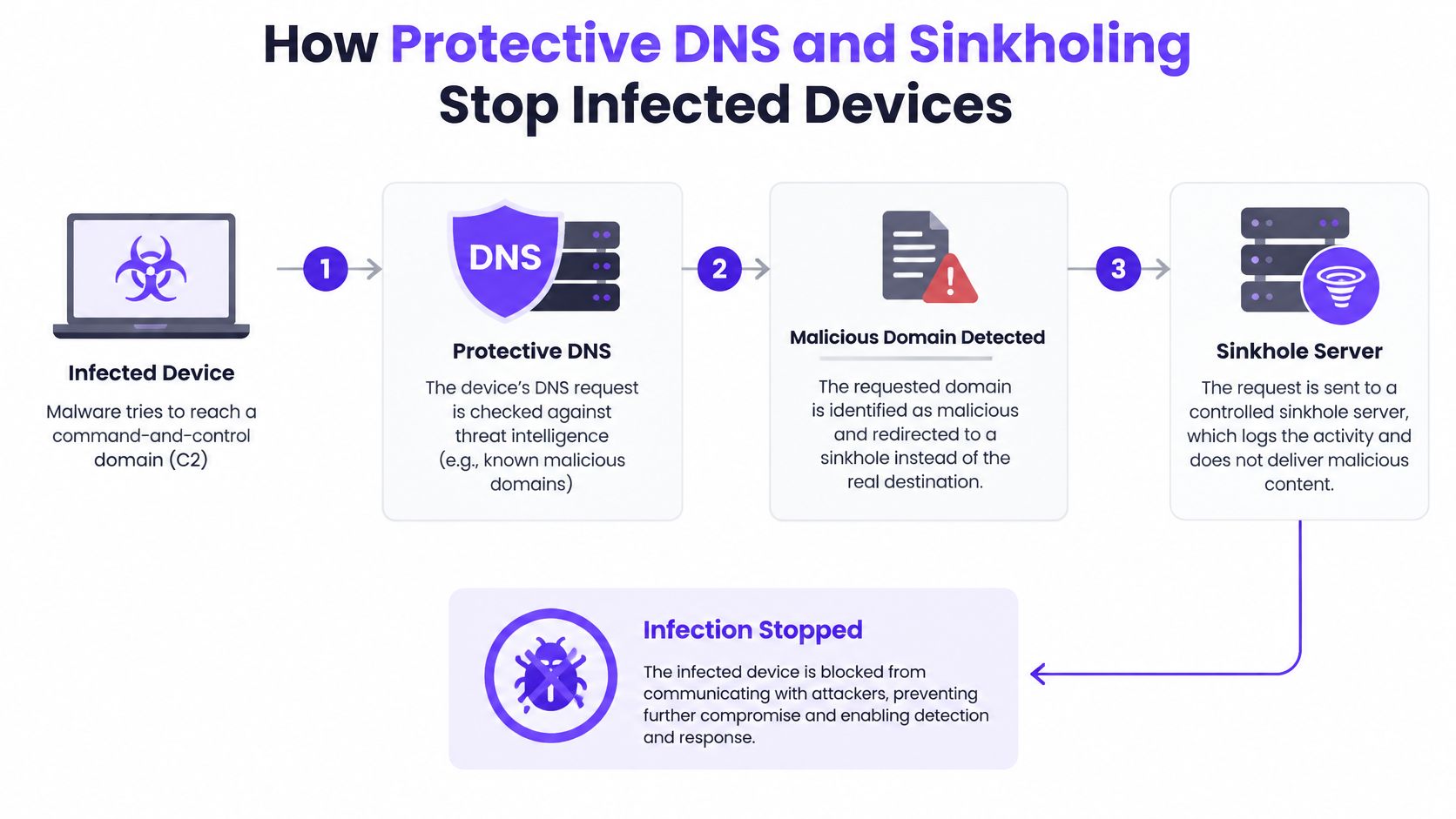
Protective DNS works because it acts before an application opens a connection. The resolver checks the name and can refuse ransomware, phishing, botnet and malware infrastructure. CISA describes this as an extra defensive layer fed by threat intelligence, notes that more than 91% of malware uses DNS during cyberattacks, and says protective DNS could prevent approximately one in three cyber incidents.
On shared WiFi the infected laptop can still be sitting in the lounge. What it can't do is learn the address of its command server.
What the sinkhole shows you
A plain block can look like a dead site. Sinkholing returns a controlled address instead, so the attempt is visible. Say a laptop on the guest SSID beacons to a command name every few minutes. The sinkhole log records the device, the timestamp and the domain. You isolate that session, then clean the machine. You haven't disinfected it by blocking DNS. You've stopped the call home and found the patient.
- The device asks for the name.
- The resolver checks threat feeds and the policy for that SSID.
- A blocked command name returns the sinkhole address.
- The connection never starts.
- A log entry is written with the network and the time.
- An operator isolates the device and investigates.
Two checks make this real rather than theoretical. Clients have to be forced onto the approved recursive resolver, including a watch for other resolvers and encrypted bypasses. Query telemetry has to be kept long enough to see which network, which device and which name.
Feeds miss names that were clean yesterday. A newly registered domain, or a legitimate site that was just compromised, can slip past reputation data. IP-based callbacks and apps with their own resolution need other controls. The stronger pattern pairs protective DNS with DNSSEC validation, resolver policy, segmentation, and firewall or endpoint telemetry.
Watch DNS tunneling as well. Malware hides data inside the query name itself, so you see unusually long or random-looking subdomains and a high query volume from one device. Treat that device like a sinkhole hit. Pull it off the shared SSID and investigate, even when no feed has named the domain yet.
A short walkthrough of the same idea, from lookup to blocked callback, is worth watching with the team that owns the guest SSID.
Where encrypted DNS and Blocklists fall short
Blocking newly registered domains feels like the obvious filter, and it isn't enough. A malicious registration is often spotted in days. A legitimate site that an attacker has taken over can stay dangerous for months, and it already has a reputation your feed trusts.
A 2025 CAIDA study found a median detection time of 16.3 days for maliciously registered domains, against 86 days for compromised domains, more than a fivefold gap. On shared WiFi that means a familiar brand, a local newspaper or a supplier portal can host malware, phishing or command content after a breach, while every reputation score still looks fine.
Two ways this fails in a venue
Aggressive lists punish the wrong people. A guest can't load a booking engine, a patient can't open a clinic portal, a student loses a research site, and the front desk hears about the WiFi. A permissive list does the opposite. It leaves the exposure window open until the next feed update, which for a compromised domain can be a long wait.
Encrypted DNS fails differently. A browser or app that picks its own resolver never presents the name to your policy, so neither the new-domain rule nor the compromised-domain lag matters. You do not see the lookup. If an encrypted resolver is unreachable, some devices fall back to ordinary DNS, and that fallback is readable and alterable on the path. DNS over HTTPS on a guest device is a privacy feature for the user and a visibility gap for you, unless you've decided where those queries are allowed to go.
Three compensations keep the list from becoming the whole strategy.
- Behavioral signals next to reputation. Long, random subdomains, sudden query spikes, or a quiet device that starts resolving dozens of new names deserve a look before the feed agrees.
- A temporary quarantine when a previously trusted domain changes behavior between updates. Hold it, don't pretend the old score is still true.
- A review path that releases quickly. Someone on shift should be able to restore a legitimate site the same day, with a note of who allowed it.
The open question for a public network isn't "should we encrypt DNS?" It's how you keep queries private without letting unmanaged phones, apps and devices walk around the safety policy.
Set your DNS security controls network by network
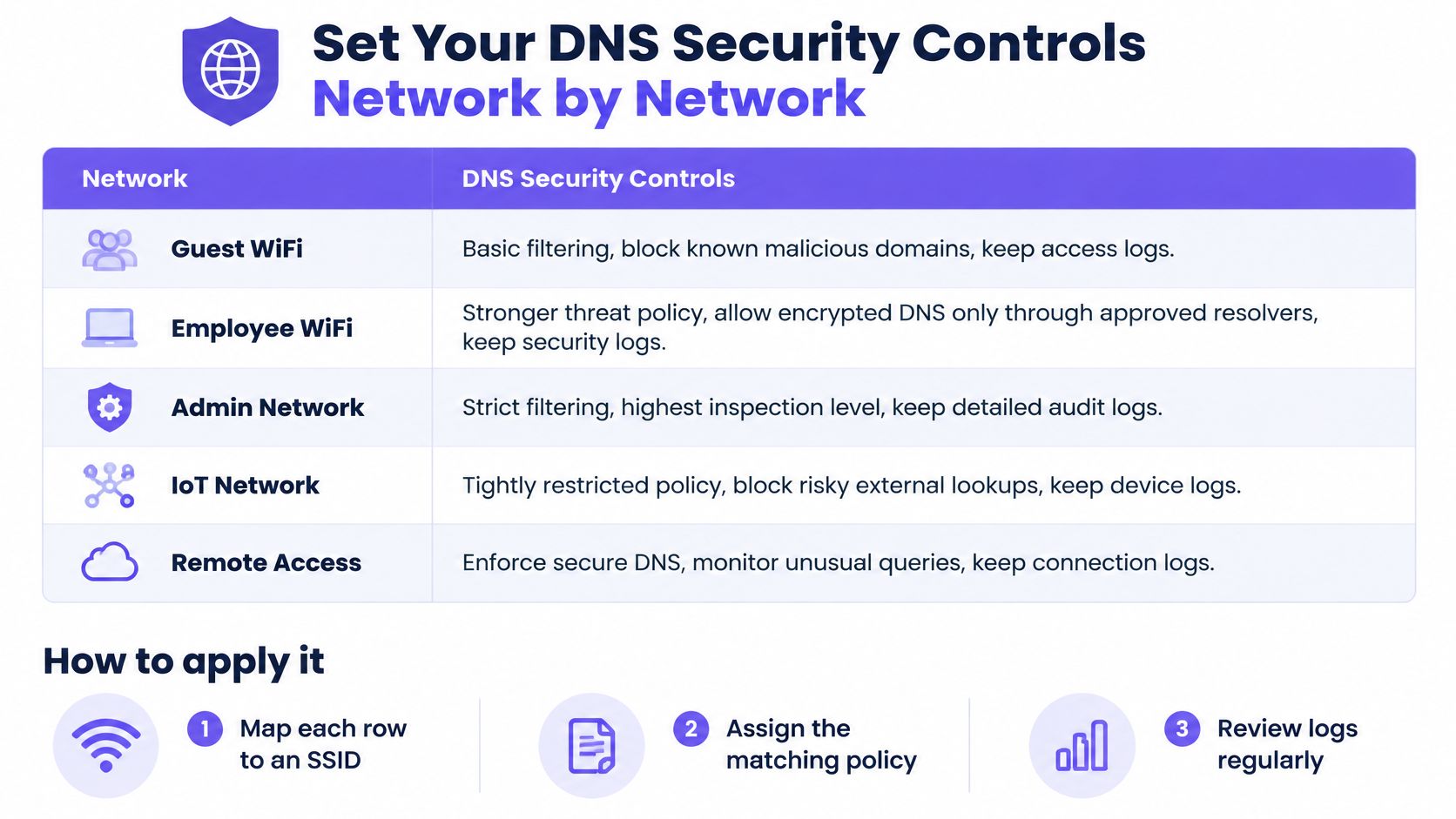
One policy for the whole building is how guest phones, infusion pumps and staff laptops end up with the same rules. Map each row below to its own SSID or VLAN, so the policy travels with the network rather than with a hope that users pick the right WiFi.
| Network | Filtering and threat policy | Encrypted DNS handling | Logs to keep |
|---|---|---|---|
| Guest and public WiFi | Adult and harmful categories, threat defense, Safe Search | Encrypted DNS only through the managed resolver, known public DoH endpoints blocked | Blocked domains, device or session identifier, timestamps |
| Staff networks | Threat defense first, with separate allow and block lists | Encrypted DNS from managed devices only | Policy decisions and administrator changes |
| Student or resident networks | Age-appropriate categories set per group | Managed resolver only, known public DoH endpoints blocked | Blocked lookups, kept for a set retention period |
| IoT and device networks | Threat defense and command-and-control blocking, no category policy | Port 53 kept under your resolver, encrypted DNS tested before you enforce it | Lookups by device address and anomaly alerts |
| Healthcare and public sector sites | Threat defense plus category filtering | Managed resolver only, every exception documented | Audit-ready logs for auditors and stakeholders |
Network segmentation is what stops a compromised TV on the guest VLAN from using the staff resolver. Purple Shield is one way to run the table without building the resolver yourself. One DNS layer filters content, stops threats and strips ads on every device, with a policy per SSID, VLAN and venue and a single dashboard. On Open networks that policy is strict and family-safe, on Secure networks threat defense comes first, and on xPSK networks safeguarding is set per group. You read blocked URLs, threat analysis and usage, then adjust policy from that same dashboard.
Why device networks need a test first
Encrypted DNS is awkward on mixed IoT. Many devices still speak ordinary DNS, and you can't configure them one by one. Recent IETF guidance notes that most IoT devices still use unencrypted DNS on port 53, so those queries stay exposed to interception, and encrypted DNS isn't universally mandated. Experimental work cited alongside that guidance reported a 482.5% performance loss for DoT in an IoT test environment, rising to 537.9% when combined with DNSSEC. Test on a lab SSID before you force encryption onto door locks, POS registers or clinical devices. A control that knocks devices offline will be switched off.
Roll the change in this order.
- Confirm every client on that SSID uses the approved resolver.
- Verify DNSSEC validation on that resolver, with one signed and one unsigned name.
- Set the per-SSID policy from the table, including Safe Search where the audience needs it.
- Turn logs on with a retention limit you can defend.
- Rehearse a compromised-domain case, quarantine first, then a same-day review.
- Put a monthly policy review on the calendar, and record who changed an allow entry.
Pick the network where a bad lookup does the most harm, and change that one this week. For most venues that is guest WiFi. For a hospital or a campus it may be the network patients, students or visitors really join.
Purple Shield is protective DNS for venue, campus and public networks. It checks each lookup before a connection starts, applies a different policy per SSID, VLAN and venue, and shows you what was blocked. If you want that control on the WiFi you already run, visit Purple Shield.