
Secure Web Gateway vs DNS Protection: What to Use
Compare secure web gateways with DNS-layer protections for guest and public WiFi. Learn capabilities, performance trade-offs, and where each fits your stack.
Published October 19, 2026
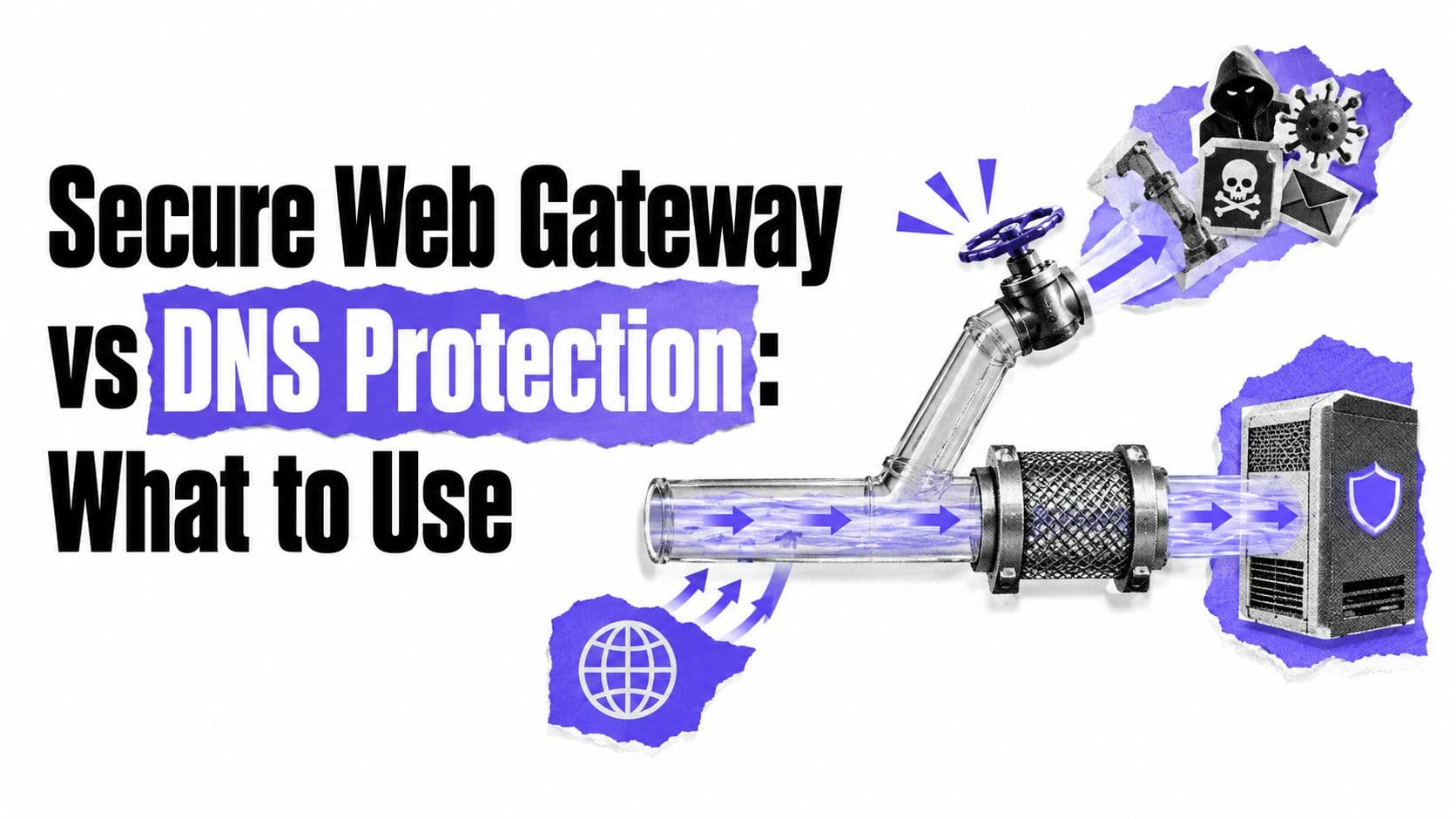
If a guest joins your WiFi with a compromised laptop, what stops the callback to its command server, and what can you prove afterward? That question, not a feature checklist, should decide whether you need a secure web gateway, DNS-layer protection, or both.
Table of Contents
- Why the Right Web Protection Layer Matters
- What a Secure Web Gateway Actually Does
- How DNS-Layer Protection Works
- Comparing Capabilities and Performance
- Where Each Approach Fits in Your Stack
- How to Choose the Right Approach
- Testing and Verifying Your Protection
Why the Right Web Protection Layer Matters
A guest checks into a hotel, opens a laptop, and joins the SSID. The device looks ordinary. It authenticates, gets an address, and starts resolving domains, one of which belongs to a command-and-control service the malware on it has been trying to reach for days.
At that moment, you don't control the endpoint. You can't check whether its antivirus is current, push an agent, or install a certificate for TLS inspection. You must work through the network path, and the layer where you enforce policy determines what you can stop and what evidence you'll have later.
The Question Behind the Purchase
Operators often ask which product is better. That's the wrong framing. A secure web gateway and a DNS-layer service enforce at different points, see different things, and fail in different ways, so the useful question is which enforcement point matches your device mix, your sites, and your duty of care.
Consider three common situations on the same estate. A student's tablet needs category filtering and Safe Search. A contractor's cell phone needs phishing protection without anyone touching the handset. A managed staff laptop may need full inspection of uploads to unsanctioned storage. One layer rarely handles all three equally well.
Practical rule: Start from device ownership. The less you control the endpoint, the earlier and more network-native your enforcement has to be.
Getting this wrong has visible consequences. Deploy deep inspection where you can't manage certificates and you'll break applications or bypass the traffic you meant to inspect. Rely only on lookups where you need payload visibility and you'll miss threats carried inside otherwise permitted sessions. Either mistake leaves a gap you'll discover during an incident, not during procurement.
User experience matters just as much. Guests judge your network in seconds. Controls that add noticeable delay, force captive workarounds, or block legitimate services without a clear explanation generate support calls and pressure to weaken policy. Controls that operate at connection setup tend to survive contact with real venues.
The choice also isn't binary. Many properties need a broad baseline that covers every device, plus deeper inspection for the smaller population of managed endpoints where that inspection is technically and legally workable. Defense in depth here isn't a slogan. It's an admission that each layer proves something different, and you should know exactly what that something is before you sign.
What a Secure Web Gateway Actually Does
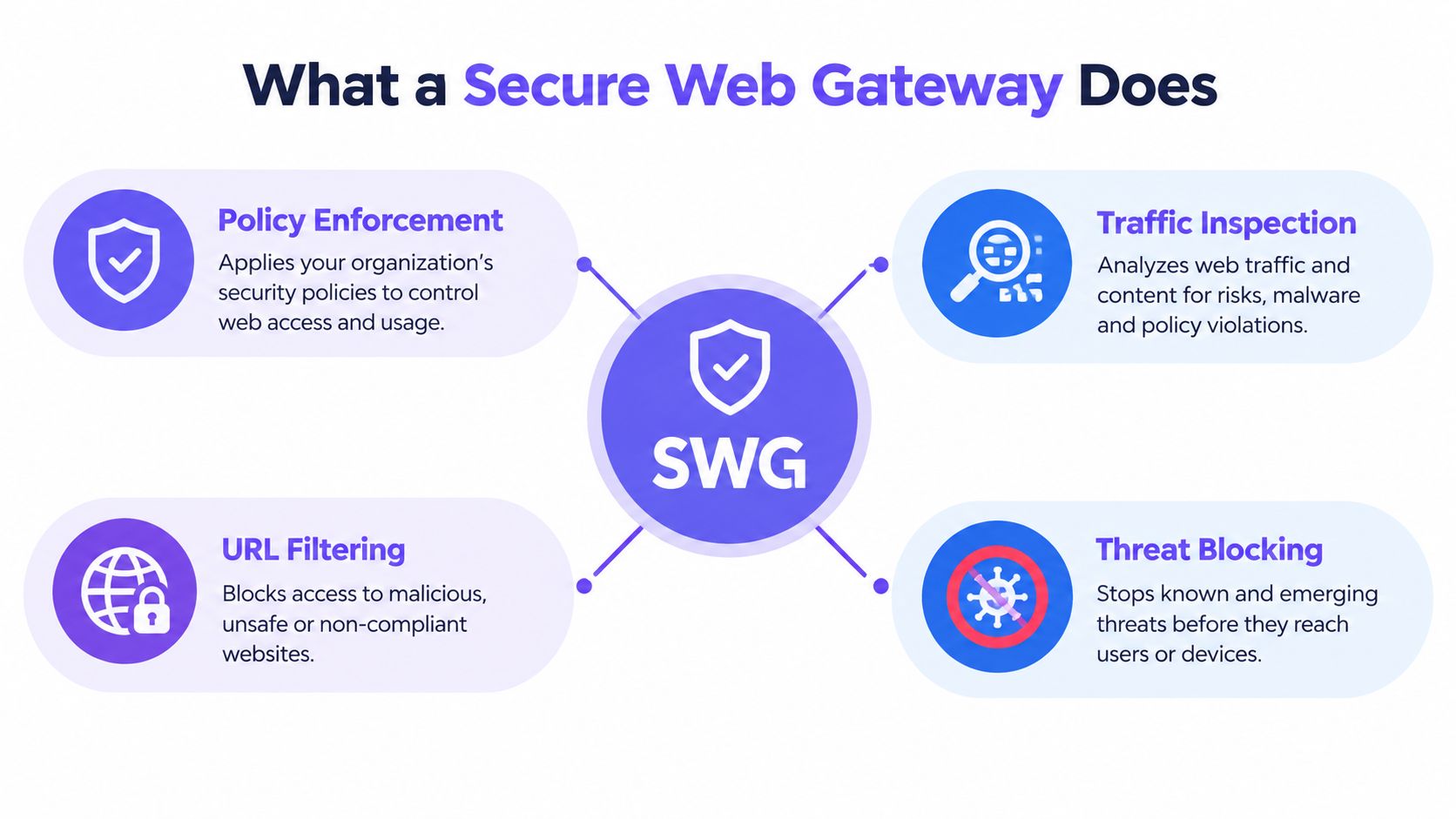
A secure web gateway is best understood as a policy enforcement and inspection point for outbound web traffic, not as a bigger blacklist. NIST describes the function as protecting outbound user traffic through HTTP and HTTPS inspection while centralizing control, visibility, and reporting across headquarters, branches, home offices, and remote locations, which you can read in the NIST guidance on secure web gateway functions.
In practice, traffic is steered to the gateway, explicitly through proxy settings, via a tunnel from a branch, or through an agent on a managed device. The gateway evaluates the request against policy, inspects what's returned, and logs the decision. If that proxy model is unfamiliar, it helps to understand the related forwarding concepts first, including how reverse proxies work, before comparing vendor architectures.
Core Functions Worth Evaluating
- URL and category filtering: Blocks or allows destinations by reputation and content class, rather than by domain alone.
- Malware and phishing detection: Scans downloads and pages, including content inside permitted sessions where inspection is enabled.
- Application controls: Distinguishes between sanctioned and unsanctioned services sharing the same underlying infrastructure.
- TLS inspection: Decrypts and re-encrypts traffic where you can deploy trust, which is straightforward on managed fleets and fraught on guest devices.
- Audit logging and policy scope: Records who or what requested a resource, which rule applied, and what action followed.
That last point separates a gateway from a blocklist. You're buying consistent policy and evidence, applied the same way across locations, not just a feed of bad domains.
Market and Deployment Context
The category is now a major security investment area. The secure web gateway market was estimated at $14.75 billion in 2024, with forecasts to $75.54 billion by 2033 at a 20.6% CAGR, and North America held 37.4% of global revenue in 2024, according to Grand View Research market estimates for secure web gateways. Treat those as analyst estimates, not audited totals, since vendors and researchers draw product boundaries differently.
Delivery has shifted decisively to the cloud. Cloud-based deployment accounted for 76.32% of SWG revenue in 2025, with cloud deployment forecast to grow at a 22.05% CAGR through 2031, per Mordor Intelligence analysis of SWG deployment models. That matters operationally. A cloud gateway can apply policy without an appliance at every site, which suits distributed properties, though it introduces dependence on routing and proximity to inspection points.
The trade-off is consistent. You gain depth, payload visibility, and granular application control. You pay in deployment complexity, certificate management, and the ongoing work of steering traffic so inspection happens.
How DNS-Layer Protection Works
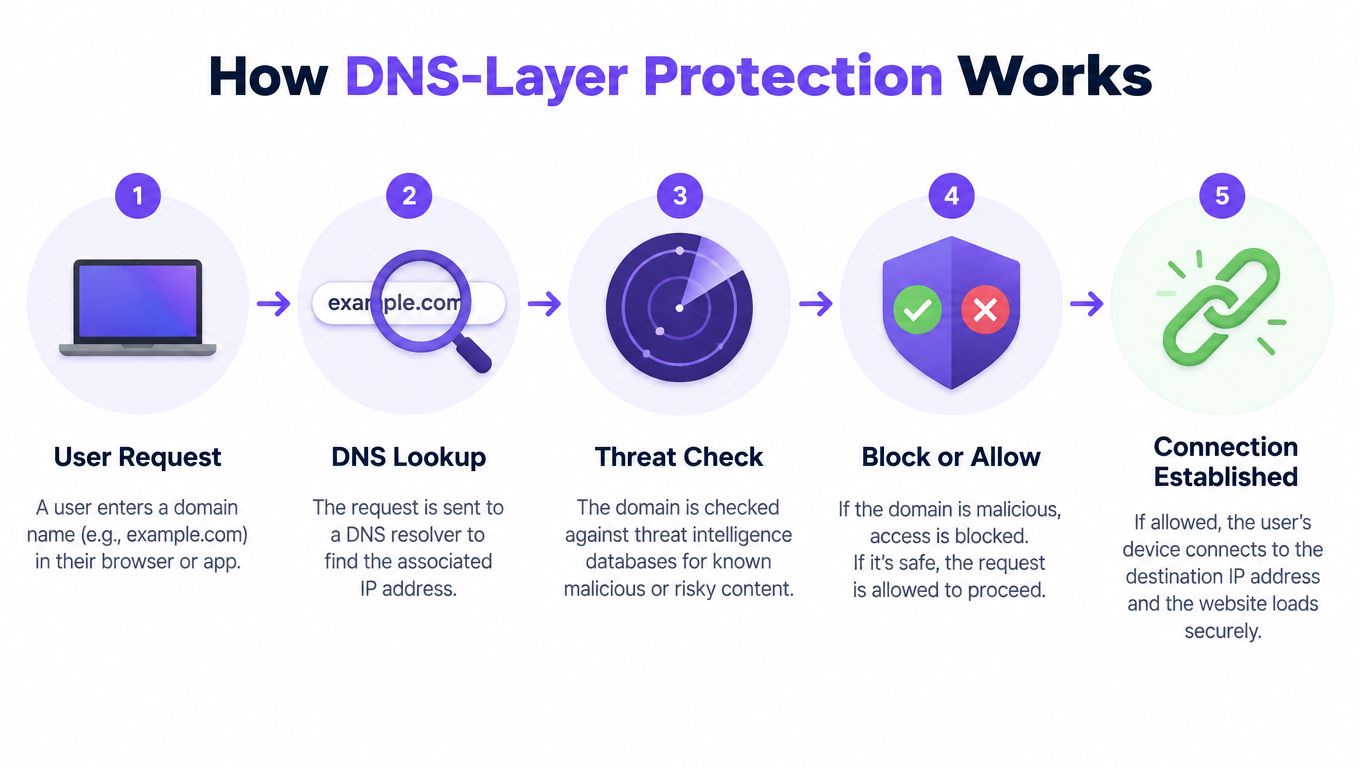
Every connection starts with a question. Before a browser, app, or piece of malware can reach a service, it usually resolves a name, and protective DNS answers that lookup against policy before any connection begins.
If the domain is known for phishing, malware distribution, or command-and-control, the resolver refuses or redirects the lookup. The device never gets a usable destination, so the callback fails at the earliest possible point. That's a narrower intervention than payload inspection, but it's also one that works without touching the endpoint.
What Happens at Lookup Time
Category policy works the same way. A request for an adult or gambling domain on a family SSID can be blocked, while the same lookup on a staff network follows a different rule. Safe Search enforcement on Google, Bing, and YouTube can be applied through resolution behavior, and ad and tracker domains can be withheld so pages carry less third-party weight.
Policy granularity is where this becomes useful across an estate. You can vary rules by SSID, VLAN, venue, and schedule, so a school applies stricter filtering during teaching hours, a hotel separates guest and back-of-house traffic, and a bar chain keeps one baseline while allowing site-level exceptions. Reporting then shows which domain was requested, which policy matched, and on which network segment.
A DNS block proves a lookup was stopped under a named policy at a recorded time. It doesn't prove the content behind that domain was inspected, and honest reporting shouldn't pretend otherwise.
Why It Fits Unmanaged Devices
Deployment is the decisive advantage. There's no hardware purchase, no firewall change, and nothing installed on client devices, so coverage extends to cell phones, gaming devices, smart TVs, and the long tail of things agents never reach. A guest who joins for twenty minutes gets the same baseline as a resident who stays for a term.
That simplicity has limits you should state plainly. DNS sees the name being resolved, not the full URL path or the payload returned over an allowed connection. A malicious file hosted on a permitted, reputable service won't be caught by the lookup alone. Clients that bypass your resolver through encrypted DNS, hard-coded resolution, or a VPN can also reduce visibility unless the network actively handles those paths.
So DNS-layer protection gives you broad, early, evidence-backed control with minimal friction. It doesn't give you deep inspection. Knowing which of those you actually need is the whole decision.
Comparing Capabilities and Performance
The cleanest way to compare these layers is by what each one can observe. A gateway positioned in the traffic path can inspect requests and responses, including full HTTPS payloads where TLS inspection is legitimately deployable. DNS protection observes the lookup that precedes the connection. Everything else follows from that difference.
That means threats hidden inside permitted HTTPS sessions, malicious uploads, and data loss through sanctioned-looking services need gateway or endpoint controls. It also means a gateway that can't be placed in path for a guest device inspects nothing at all, however strong its engine is. Coverage you can enforce beats capability you can't.
SWG vs DNS-Layer Protection at a Glance
| Criterion | Secure Web Gateway | DNS-Layer Protection |
|---|---|---|
| Inspection depth | Full request and response where in path | Domain lookup before connection |
| Device coverage | Strongest on managed devices | Every device using the resolver |
| Performance impact | Depends on inspection and distance to point of presence | Minimal, limited to resolution |
| Deployment complexity | Steering, tunnels, agents, or certificates | Resolver configuration per network |
| Evidence quality | URL, user, action, and content verdicts | Domain, policy, segment, timestamp, action |
| Main blind spot | Traffic that bypasses the proxy path | Payloads inside allowed sessions |
Feed quality underpins both rows of that table. Category accuracy, freshness, and recategorization speed determine whether either control blocks the right things, so it's worth understanding how threat intelligence feeds shape filtering decisions before you compare vendor claims.
Performance You Can Measure
Don't compare a datasheet throughput number with a guest's page load. Independent SWG guidance reports roughly 40–80 ms of added latency when users are near a cloud point of presence and approximately 150–400 ms when they're far away, while a published appliance datasheet reports up to 110 Gbps firewall throughput and more than 25 Gbps IPS throughput under laboratory conditions, figures detailed in the Check Point appliance datasheet and SWG performance guidance. Those numbers describe different things. Lab throughput tells you little about TLS handshake time at a congested rural site at peak check-in.
Measure what guests feel instead. Compare security enabled versus bypassed at representative sites, during busy periods, and report median alongside p95 and p99 latency for DNS resolution, TLS setup, and time to meaningful content. Averages hide the worst venues, which are exactly where complaints originate.
The QUIC and Encrypted DNS Gap
QUIC runs over UDP, mandates TLS 1.3 encryption, and supports connection migration between WiFi and cellular networks, which creates an enforcement gap for conventional gateways, as described in research on QUIC-aware proxying and traffic forwarding. Blocking UDP on port 443 can force fallback to inspectable TCP, but it may degrade performance or break modern applications. Allowing QUIC preserves experience while reducing what a traditional gateway can see.
DNS policy still applies at lookup time if the client uses your resolver, which is why the two controls answer different questions. Ask vendors to define blocked precisely. Was a lookup stopped, a connection prevented, or content actually inspected? Those are three different claims.
Where Each Approach Fits in Your Stack
Venue type predicts the answer better than organization size. A useful starting point is to look at device ownership on each SSID, then map inspection needs to that reality, a framing also reflected in Nerds 2 You Edmonton security advice for smaller networks weighing layered controls.

Hospitality, airports, libraries, and family attractions run networks where nearly every device is unmanaged and transient. DNS-layer protection fits because it covers guests immediately, supports free versus paid tiers through per-SSID policy, and produces evidence of filtering without inspecting personal content. A gateway adds little there if you can't steer or decrypt guest traffic responsibly.
Schools, campuses, and Student Housing sit in the middle. Safeguarding duties demand consistent category filtering and Safe Search on every device, including personal cell phones and consoles. Managed teaching devices, though, may justify gateway inspection for application control and download scanning, which is why many properties layer both and apply them to different segments.
The operational pattern behind that split is worth seeing worked through in practice.
Hospitals and healthcare sites face a similar division. Patient and visitor WiFi needs broad, low-friction filtering. Clinical and administrative systems sit behind stricter, separately governed controls, and mixing those populations under one inspection model usually serves neither well.
Where a Gateway Earns Its Cost
Corporate offices and multi-site enterprises with managed fleets are the gateway's home ground. You can deploy agents or tunnels, manage certificates, tie policy to identity, and inspect uploads to unsanctioned services. Bring-your-own-device segments in those same offices still need separate thought, since personal devices resist exactly the controls that make a gateway effective, a tension explored in guidance on BYOD security for mixed device estates.
- Guest and public SSIDs: DNS-layer baseline, transparent block pages, per-venue reporting.
- Student and resident networks: DNS filtering everywhere, gateway controls on managed devices.
- Staff and corporate segments: Gateway inspection tied to identity, with DNS as an early block.
- Operational technology and displays: DNS policy for devices that can't run agents, tightly scoped allowlists.
The hybrid pattern isn't indecision. It's assigning each layer to the population where its enforcement holds.
How to Choose the Right Approach
Three questions settle most evaluations. Who owns the devices, what inspection level does your risk or compliance position require, and what operational capacity do you have to run the control properly? Answer them per network segment, not for the organization as a whole.
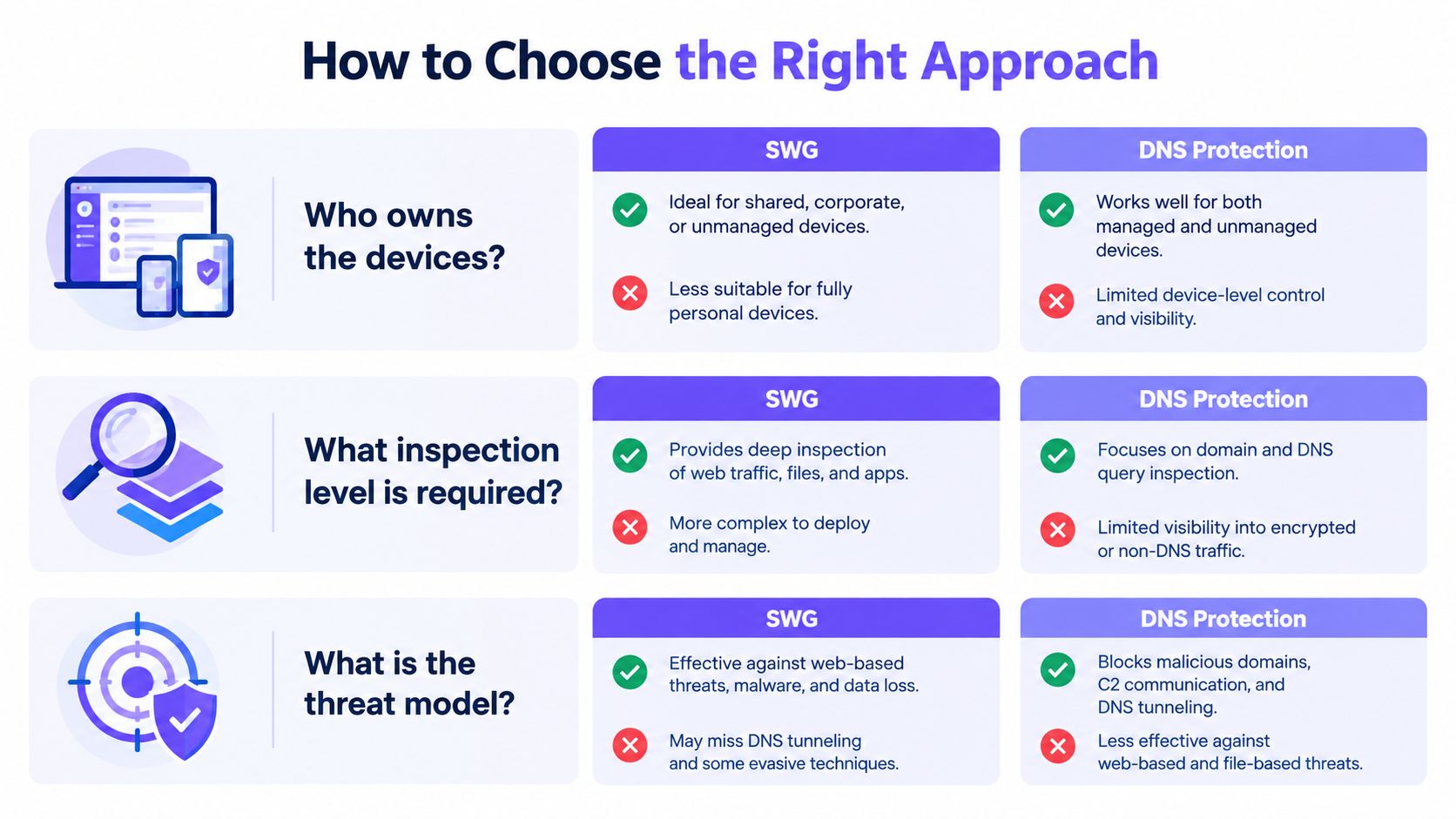
If unmanaged devices dominate, start with DNS-layer protection as the default. It covers every connection attempt that uses your resolver, deploys without endpoint work, and gives you auditable evidence of what was blocked, where, and when. For hotels, bars, airports, and public WiFi, that's the control that will still be working on a busy Saturday when nobody's available to troubleshoot a proxy exception.
If managed devices dominate and you need payload inspection, application control, or data loss prevention, choose a secure web gateway and fund the operational work it requires. That includes traffic steering, certificate lifecycle, exception handling for pinned applications, and capacity planning for inspection points. Buying the license without that work buys partial coverage.
Reliability Over Feature Lists
Be skeptical of detection claims you can't verify. Independent research evaluating parental-control tools found uneven protection across vendors, with no single tool providing full coverage, while DNS-resolver filtering performed more consistently than several alternatives, and Cloudflare reported deceptive links represented 52% of malicious emails it analyzed in 2025, up from 43% in 2024, according to independent research on filtering tool coverage and deceptive link trends.
Selection test: Ask every vendor how quickly a newly registered domain gets classified, how recategorization appeals work, and what evidence a single block produces. Vague answers predict operational pain.
For most mixed properties, the honest recommendation is both, sequenced sensibly. Deploy the DNS baseline first because it's fast, covers the devices nothing else touches, and immediately creates property-wide evidence. Add gateway inspection where device ownership and risk justify it. That order closes the widest gap first instead of perfecting protection for the easiest devices.
Testing and Verifying Your Protection
Don't accept a dashboard screenshot as proof. Run an acceptance test on your own SSIDs, with your own device mix, before you commit, and structure it around how traffic behaves rather than how the sales diagram says it should. For broader test design, see ThreatExploit AI's recommendations on building repeatable security testing routines.
An Acceptance Test That Means Something
Measure enforcement separately for DNS, HTTP, HTTPS, QUIC, encrypted DNS, and IPv6, then verify outcomes stay consistent across SSIDs, VLANs, venues, and schedules. A block that works on the staff network but not the guest VLAN, or during the day but not under an evening policy, is a finding, not a footnote.
- Known-bad lookups: Confirm phishing, malware, and command-and-control test domains are blocked and logged with policy and segment.
- Category checks: Verify adult, gambling, and other restricted categories on each SSID, plus Safe Search behavior on major search and video services.
- Bypass attempts: Try encrypted DNS, a consumer VPN, direct IP access, and QUIC-capable browsers, then record what each control still sees.
- Fresh domains: Test recently registered, uncategorized domains and note whether policy defaults to allow, block, or warn.
- Legitimate services: Confirm payment, conferencing, and venue-critical applications still work without manual exceptions piling up.
Failure and Performance Behavior
Test fail-open versus fail-closed deliberately by interrupting the service or tunnel. You need to know whether an outage produces blocked browsing or an unfiltered network, and which of those your duty of care can tolerate. Document the behavior in your risk register, since auditors will ask. The same evidence discipline supports wider assurance work, including the controls described in guidance on Cyber Essentials certification requirements.
Benchmark at representative sites during busy periods. Record page load to meaningful content, DNS resolution time, TLS handshake time, and throughput under concurrent users, comparing security enabled versus bypassed and reporting median with p95 and p99. Include tunnel or point-of-presence loss so you see reconnection behavior before guests do.
Finally, inspect the evidence itself. Every block should preserve timestamp, policy, network segment, requested domain, action, and reason. An aggregate counter won't satisfy a safeguarding lead, an insurer, or your own incident review. If the reporting can't reconstruct a single decision, the control isn't finished, whatever it blocked.
Purple Shield provides protective DNS and content filtering built for guest, venue, and public WiFi, checking every lookup before a connection starts and applying policy per SSID, VLAN, venue, and schedule with no agents on user devices. If you want that baseline evidence across your estate while you decide where deeper gateway inspection belongs, visit Purple Shield to see how it deploys on your existing network.