
What is a content filter? How it works and where it applies
What is a content filter? Learn how filters block categories, enforce Safe Search, use DNS, and where they apply on home, school, and public WiFi.
Published November 4, 2026

A content filter examines internet requests and blocks, allows, or restricts them according to defined rules. But if a network blocks an unsafe website, does that mean it can recognize harmful material everywhere else?
That's the gap behind the question, what is a content filter? A filter makes decisions using information it can inspect, such as a domain name, a destination address or a page URL. Understanding that decision point helps you choose useful protection without expecting it to provide complete online safety.
Table of Contents
- What a Content Filter Does in Plain Terms
- Content Categories Filters Commonly Block
- Enforcement Methods From DNS to Safe Search
- How a Filter Decides Each Request
- Where Content Filters Apply and How Policies Differ
- What Filters Miss and Where They Overblock
- Choose the Filter Layer Your Network Needs
What a Content Filter Does in Plain Terms
A content filter examines internet requests and blocks, allows or restricts them according to defined rules. Think of a building receptionist who checks each visitor's badge before deciding whether they can go upstairs.
Say a visitor connects a cell phone to a hotel's WiFi and opens a betting website. The network's filter checks the destination against the hotel's policy. If gambling is prohibited, it refuses access, even though the visitor owns the cell phone and hasn't installed any filtering software.
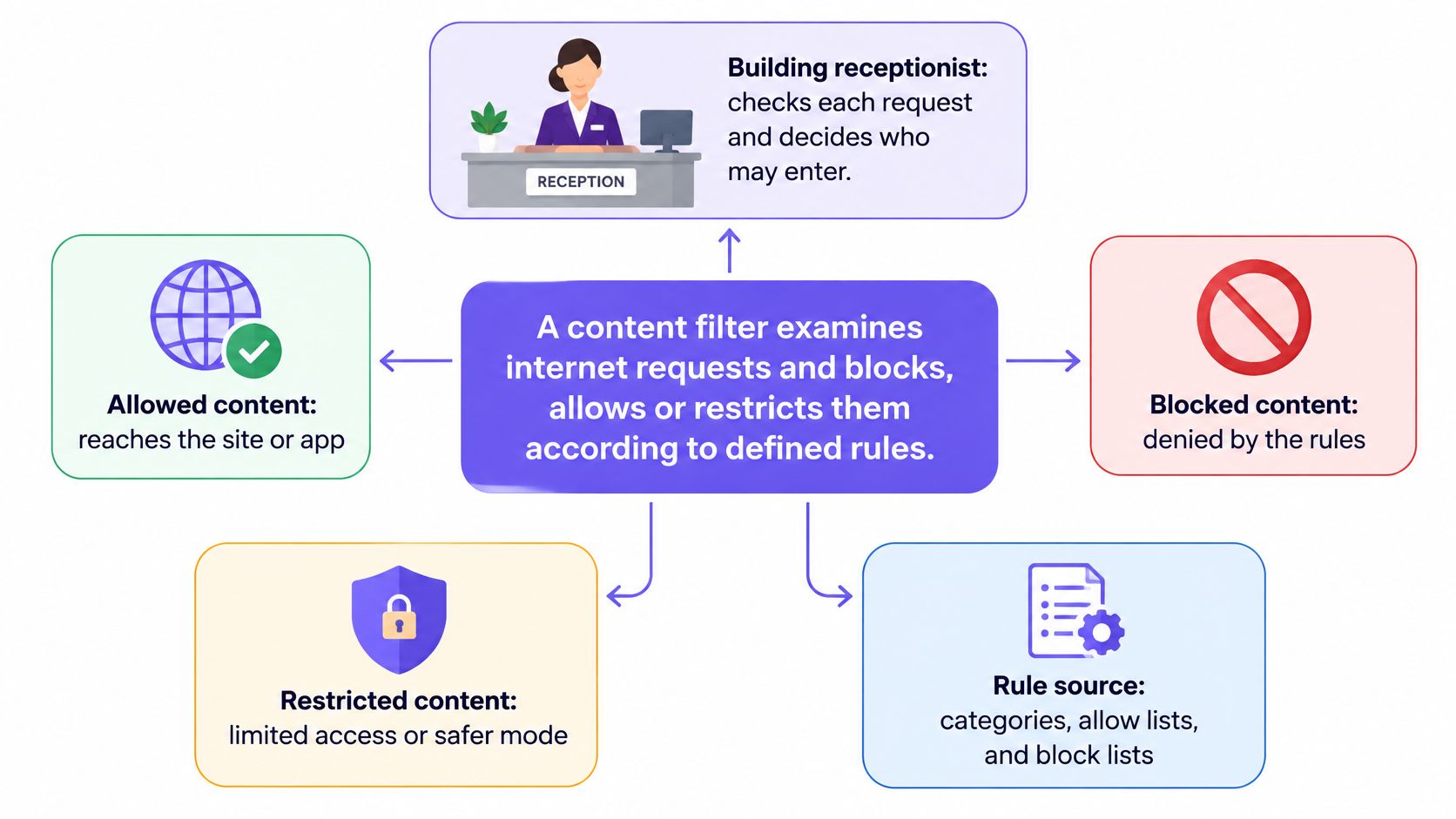
Rules turn a request into an outcome
Administrators can target categories, such as adult material or social networking, specific domains, or their organization's own restrictions. A filter can permit, block, redirect or log a request. Logging can accompany another outcome, so an allowed request may still leave a record.
The scale ranges from parental controls on a phone to a shared-network service covering devices throughout a venue. The important distinction is where the rules operate, not whether the device belongs to a parent, school or business.
An institutional milestone was the Children's Internet Protection Act, passed in October 2000, which required eligible schools and public libraries receiving certain E-Rate discounts to adopt internet-safety policies and filter specified visual depictions, as described in the NTIA report on CIPA. Its requirements covered internet-connected computers used by adults and minors, making filtering an institutional responsibility rather than merely a personal device setting.
Practical rule: Identify the rules, the enforcement point, and the resulting decision. A category list alone isn't a working filter.
In the hotel example, the rule prohibits gambling, the enforcement point sits on the guest network, and the decision denies access. Those components explain what the system does.
Content Categories Filters Commonly Block
| Category | What It Covers | Common Setting |
|---|---|---|
| Adult or sexually explicit | Pornography and nudity sites | Schools, guest WiFi, family accounts |
| Child sexual-abuse imagery | Destinations identified through known abuse lists | Baseline safeguarding policies |
| Gambling | Betting and casino sites | Hotels, workplaces, schools |
| Violence and weapons | Graphic violence, weapons sales | Schools, public libraries |
| Social networking | Social media and chat platforms | Schools, offices managing time |
| Games and streaming | Online games and video services | Schools, workplaces managing bandwidth |
| Malware and phishing | Known malicious or scam domains | Networks using a security filtering layer |
A content category groups destinations by theme. Think of grocery store aisles: putting products into labeled groups makes a large selection manageable, but a label doesn't describe every item perfectly.
A vendor usually maintains the category database, while an administrator decides which categories a policy permits. Administrators can also maintain local lists for destinations that need special treatment.
Adult-content controls address access to sexually explicit websites. Abuse-list controls address identified illegal material or associated destinations, but they don't mean a domain filter inspects and matches every image itself. Gambling policies cover betting services, while violence and weapons categories need careful review because legitimate reporting and educational resources can overlap with sensitive subjects.
Not every restriction is a safety judgment
Schools and workplaces may restrict social platforms, games or streaming to manage distraction and network use. A blocked video service isn't necessarily malicious, and an allowed social platform isn't necessarily suitable for every activity.
National school-library findings summarized in the Wiley encyclopedia entry on internet filtering reported that 88% of schools blocked social-networking sites and 69% blocked online games. Those historical findings illustrate how broadly institutions have used filtering beyond illegal or adult material.
Malware and phishing categories serve a different purpose: they restrict destinations associated with compromise or deception. Keep the security reason separate from a productivity preference so staff understand why each rule exists.
Before enabling categories, record:
- The purpose: State whether the restriction supports safeguarding, security, bandwidth management or an acceptable-use policy.
- The affected group: Specify whether the rule applies to students, guests, staff or another network segment.
- The owner: Name who can approve changes and resolve disputed classifications.
A shorter, justified policy is easier to maintain than a long list enabled without review.
Enforcement Methods From DNS to Safe Search
| Method | Where It Acts | What It Can See | Main Limit |
|---|---|---|---|
| DNS-layer filtering | Name resolution, before connection | Requested domain name | Cannot judge individual pages on an allowed domain |
| IP-based blocking | Network routing | Destination IP address | Can overblock unrelated sites sharing an address |
| URL or proxy filtering | Web gateway or proxy | Full URL path when visible or decrypted | HTTPS limits visibility unless inspected |
| Endpoint software | Software installed on each device | Page and app activity within its permissions | Requires installation and maintenance on covered devices |
| Safe Search enforcement | Supported search-service settings | Controls the filtering mode for returned results | Covers only supported services and their filtering capabilities |
Choose the point where a decision happens
DNS-layer filtering acts when a device asks how to reach a domain. Before the application connects, the resolver checks the name against policy and can refuse resolution or return a controlled response.
The NIST draft guidance on secure DNS deployment describes protective DNS as supporting real-time harmful-traffic blocking, policy-based category filtering and historical query information for incident response. Our explanation of how DNS filtering works explores that enforcement point in more detail.
IP-based blocking uses the destination's numerical network address rather than its name. That can be useful for a specific hostile destination, but shared hosting makes it a blunt tool: blocking an address may affect services you intended to leave available.
A URL filter or web proxy can make more specific distinctions, such as allowing a website while restricting a particular path. However, HTTPS encrypts the path in transit. Inspecting it usually requires an explicitly configured inspection arrangement, with certificate management, privacy considerations and application-compatibility testing.
Endpoint software moves enforcement onto the device. Depending on its permissions and design, it can apply controls to browser or application activity and continue working away from the venue. That makes it useful for managed equipment, but less practical for visitors' personal cell phones.
Search controls solve a narrower problem
Safe Search enforcement keeps supported search services in a more restrictive mode. Google and Bing provide search-filtering settings, while YouTube uses Restricted Mode rather than an identically named Safe Search feature.
For example, a student searching a neutral biology term may receive a more restricted set of results. That doesn't guarantee every result is appropriate, and it doesn't govern every destination the student can open directly.
Choose DNS filtering for broad shared-network coverage, endpoint controls for managed-device requirements, and more detailed inspection only when you need it and can govern it responsibly.
Search controls complement those choices. They aren't a substitute for deciding which destinations the network should allow.
How a Filter Decides Each Request
A DNS-based decision follows a logical sequence, although vendors may combine checks or perform them in a different order. Rule precedence matters more than the display order: an exception shouldn't accidentally override a security restriction.
The device requests a domain lookup. The request goes to the network's approved resolver. This gives the filtering service a decision point before the application establishes its connection.
The filter checks classification and local lists. It looks for the domain's category and any administrator-maintained allow or block entry. These checks establish what the destination is and whether someone has created a specific exception.
The service selects the applicable policy. A separate WiFi network name, or SSID, and a virtual network segment, or VLAN, can identify which rules apply. A schedule can further distinguish class time from leisure access.
Threat intelligence contributes a security decision. The service checks for known phishing, malware, or command-and-control destinations. Configure precedence so a convenience exception doesn't bypass a mandatory threat block.
The resolver returns an outcome. An allowed request receives the information needed to connect; a denied request receives a refusal or another controlled response. A block page is possible where the implementation supports it, but it isn't guaranteed for every application or encrypted connection.
The service records the decision. Useful records identify the requested domain, applicable policy, outcome, and time. Logging follows the decision so administrators can investigate the result rather than just the attempted lookup.
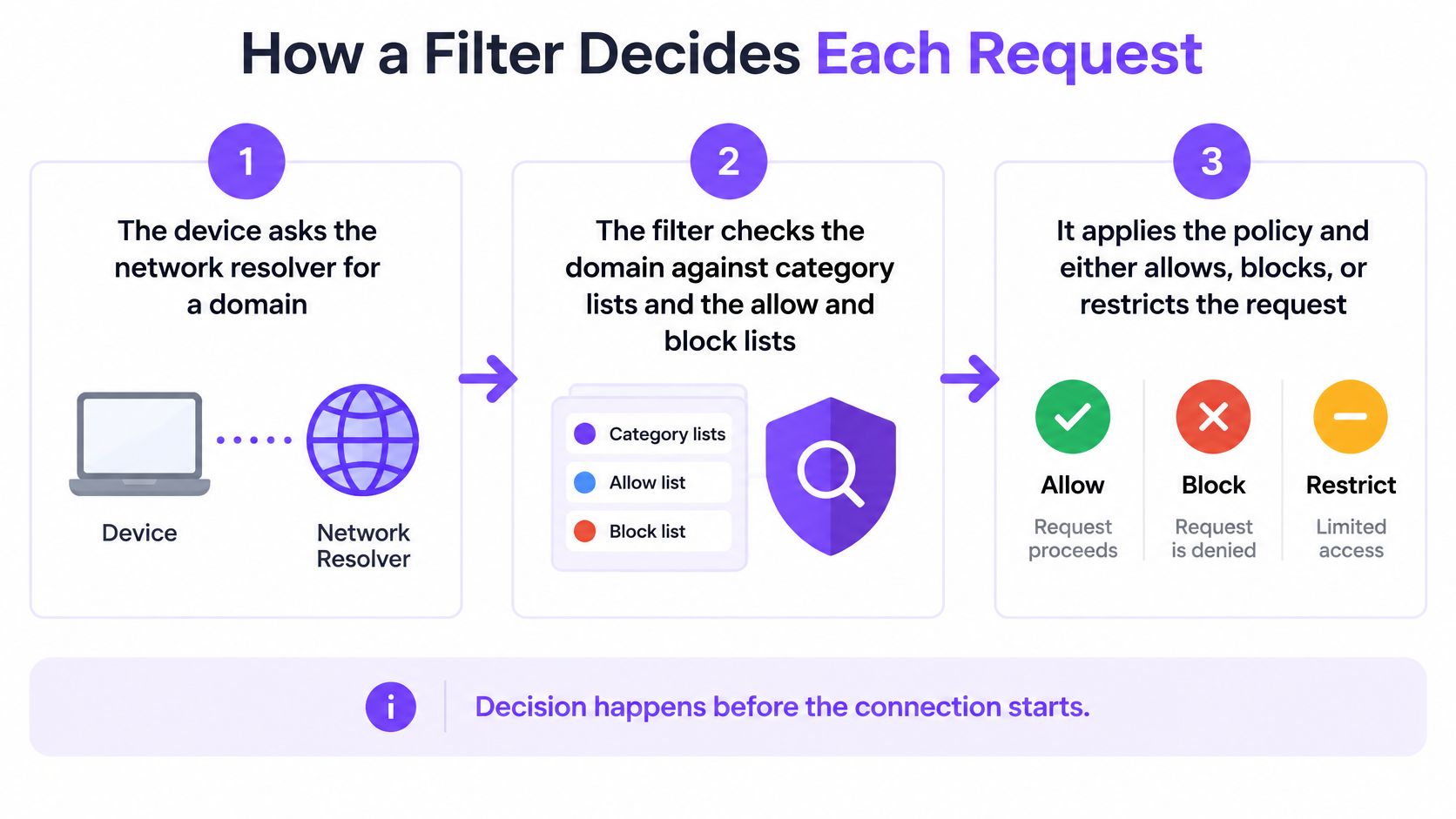
Make enforcement visible and dependable
A device using its own external encrypted-DNS service can skip the approved resolver. Network administrators therefore need resolver-governance controls, not just a DNS setting handed out when devices join.
A clear explanation of a block is better than an unexplained connection failure.
Where a block page is technically possible, give the policy reason and a route for requesting review. For applications that can't display one, provide accessible support instructions elsewhere.
Where Content Filters Apply and How Policies Differ
The same category can be reasonable for a child's device and excessive for an adult's research session. Treat the following as policy examples, not universal requirements.
Family protection often starts with a shared learning device.

| Setting | Typical Categories | Enforcement Point | Schedule Example |
|---|---|---|---|
| Family home | Adult, gambling, social networking | Child's device or home router | Stricter evening rules |
| School | Adult, gambling, social networking, games | Network-wide, separate student and staff policies | Social media blocked during class time |
| Public library | Adult-content controls appropriate to child, adult and guest tiers | Separate network segment per access tier | Child-tier restrictions throughout operating hours |
| Hotel or bar guest WiFi | Adult, gambling, malware and phishing | Guest network using its designated protective policy | Same policy at all hours |
| Hospital | Malware and phishing, adult material on patient networks | Separate patient, staff and clinical networks | Stricter evening rules on patient network |
Match protection to context without unnecessary identification
At home, a parent may associate restrictions with a particular device. A school needs educational exceptions and different staff access, while a public library must consider adults' legitimate access alongside child safeguarding.
Hotels and bars generally can't assume they know each visitor's age, making a clearly communicated guest policy useful. Hospitals need an additional distinction: patient browsing rules shouldn't be applied indiscriminately to clinical systems.
The OECD report on age assurance and child well-being emphasizes proportionate, privacy-preserving safeguards. Identity-based controls associate permissions with a person; network-policy controls apply rules to a segment or venue without necessarily collecting identity or estimating age.
For educational environments, web filtering for schools needs to support learning access as well as restrictions. Search-result controls and destination controls address different parts of that task.
This video provides another way to approach the topic.
Decide what happens during disruption
Fail-open operation preserves connectivity when filtering becomes unavailable, potentially allowing unfiltered access. Fail-closed operation refuses affected traffic instead, preserving the restriction but interrupting service.
Choose deliberately for each environment. A guest browsing network and a clinical workflow can have very different consequences when connectivity stops.
What Filters Miss and Where They Overblock
Benefits: filters can reject known harmful destinations, apply consistent shared-network restrictions and provide records for investigation. Limits: they can miss threats, deny legitimate access and require human review when classifications don't match the purpose of a visit.
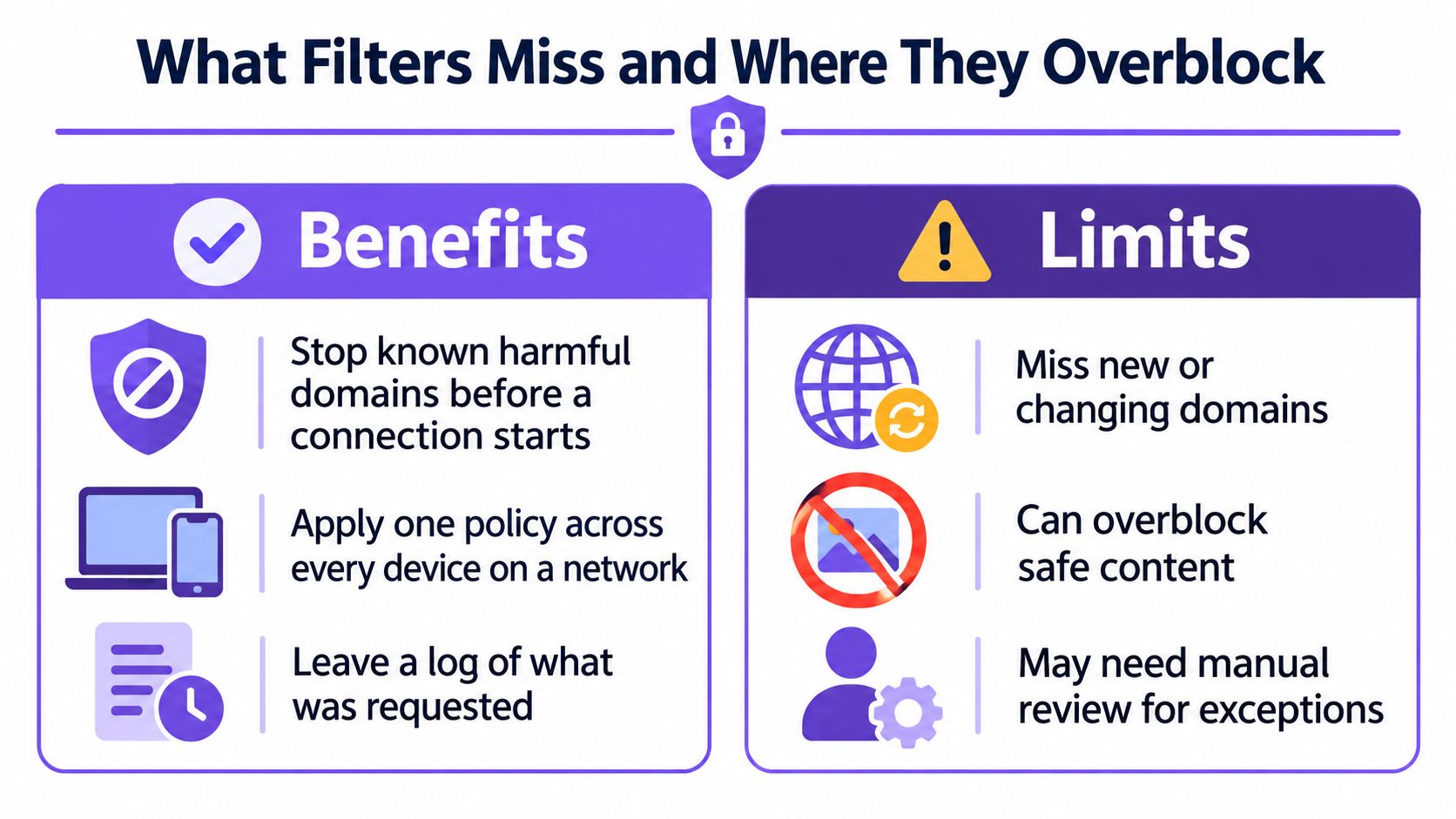
A false negative occurs when material that should be blocked gets through. A false positive occurs when permitted, legitimate material is blocked instead.
Independent testing described in this network-filtering evaluation paper found that some parental-control systems failed to block as many as 96% of sensitive domains and examined collateral blocking associated with shared IP addresses. That finding concerns the tested systems and domains, not a universal failure rate for content filters.
Measure both kinds of error
A domain-only filter can't determine the meaning of every post, image or page within an allowed service. Nor does a domain's category establish why someone is visiting it: a health educator and a casual browser may request the same sensitive resource for different reasons.
Audit the actual policy rather than celebrating a large block count:
- Test intended outcomes: Use vendor-provided test destinations and safe, representative legitimate sites. Don't browse illegal material to evaluate a filter.
- Review denied access: Sample blocked requests for curriculum resources, booking services, healthcare information and other necessary destinations.
- Record missed restrictions: Investigate reported access that contradicts policy, including new domains and misclassification.
- Control exceptions: Require a reason, an approver and a review date for overrides.
Resolver bypass also belongs in testing. Understanding DNS over HTTPS helps administrators distinguish legitimate encrypted resolution from an unauthorized route around network policy.
Audit standard: Count wrongly denied legitimate services alongside missed threats. Neither measure is useful alone.
Filtering reduces exposure; it doesn't replace safeguarding procedures, platform moderation, user reporting or device security. A useful audit produces policy changes and resolved cases, not just a dashboard screenshot.
Choose the Filter Layer Your Network Needs
Which filter layer can enforce your rules across the devices on your network? Choose based on who needs protection, what must be restricted and where you can apply and review the policy. A useful filter is one your team can operate, test and explain.
Work through the operational decisions
Name the users and devices. Separate guests, students, staff and unmanaged equipment. Include devices without browsers, since they can still make network requests.
Give each restriction a reason. Separate threat protection from safeguarding and productivity choices. Clear reasons help administrators assess exceptions consistently.
Check whether device installation is realistic. On shared WiFi, installing software on visitors' devices may not be practical. Purple Shield is a protective DNS layer that combines content filtering, threat defense and ad blocking, with nothing installed on client devices. Policies can be set per SSID, VLAN and venue from one dashboard.
Specify search-service requirements. Purple Shield enforces Safe Search on Google, Bing and YouTube. Include all three in acceptance testing rather than assuming a general adult-content rule changes search behavior.
Set policies for segments and schedules. Define requirements for each SSID, VLAN and venue, then specify any time-based changes. Apply restrictions to the groups that need them.
Require reporting you can interpret. Purple Shield reporting shows blocked URLs, threat analysis and usage alongside the applicable policy. Decide which staff need access and set a suitable retention policy.
Assign someone to handle appeals. Give users a clear way to report blocked access and name an owner to review it. Record the reason for each approved exception so administrators can understand the decision later.
Write a policy for each network segment, including the reason for every blocked category. Then compare a week of logs with safe test results, user complaints and exception decisions. Adjust rules where they do not match the intended outcome.
Purple Shield provides protective DNS, content filtering, threat defense, and DNS-layer ad blocking for shared WiFi, without software on visitors' devices. Visit Purple Shield to explore its network-specific policies and reporting, then assess the fit against your segment-by-segment policy.