
What is DNS tunneling and how Attackers Hide data
What is DNS tunneling? Learn how attackers hide data in DNS queries and how to detect and block it at the DNS layer.
Published November 14, 2026
On shared WiFi, a guest laptop asks DNS to look up a site just like every other device. If that laptop is compromised, it can also use ordinary lookups to send hidden commands or stolen data. The operator's challenge is to tell that activity apart from the normal DNS traffic of phones, laptops, and apps.
A published demonstration showed that DNS tunnels can carry data, while a 2019 passive-DNS measurement found that nearly all observed NULL-record traffic was associated with suspected tunnels. The practical lesson for a network operator is to compare each device with its usual behavior on that SSID, rather than rely on one threshold for every network. A burst of unusual lookups may matter on a guest network even if the same volume is ordinary elsewhere.
Encryption changes what appears in the logs. Operators may see less of the queried name, making it harder to inspect the contents directly. Device, network, and timing patterns still help establish a baseline and flag behavior that has changed.
Table of contents
- What DNS Tunneling Is in Plain Terms
- How Attackers Hide Data in Ordinary Lookups
- Why Attackers Accept Slow Speeds for Stealth
- Tools, Studies and Scale Behind DNS Tunneling
- Spotting DNS Tunneling in Your Logs
- Encrypted DNS and Where Detection Falls Short
- Choose DNS-Layer Controls That Log Every Lookup
What DNS tunneling is in Plain Terms
Think of a courier who is allowed through every door because the building needs deliveries. The courier hides letters inside routine parcel labels. Nobody opens the labels, so the letters ride along with mail that has to get through. That's the shape of what is DNS tunneling.
Every device asks DNS where a site lives before it connects, so name lookups are essential traffic that firewalls rarely block. A compromised phone or laptop splits commands, credentials, or files into labels and spreads them across many requests aimed at a domain the attacker controls. The attacker's authoritative server puts the pieces back together and can send instructions home in the replies. The path runs both ways, even though each individual lookup looks like a normal question about a hostname.

This is not a special record type and not a product you install. As a 2019 measurement study of passive DNS puts it, the technique encodes data inside ordinary queries and responses and uses name resolution as a communication channel. Publicly documented discussion of the idea goes back to at least 1998, so you're not looking at a brand-new trick. It stays attractive because DNS is required for normal internet use and is often permitted where most direct outbound protocols are restricted.
Say a guest laptop on your cafe SSID has already been infected at home. It doesn't open a strange port. It asks, over and over, where oddly long names live. Your resolver forwards those questions because that's its job. The far end reads the labels as data.
DNS tunneling turns a name lookup into a hidden data path.
You should be able to tell a colleague that in one breath, and add why a basic "allow DNS" rule lets it through.
How Attackers Hide data in ordinary lookups
The channel is a sequence, not a magic packet. Each step exists because the last one has a limit.
- The compromised device picks what to send. That might be a short command, a stolen password, or a slice of a file. A whole document won't fit in one name, so the implant plans many small pieces.
- It encodes those pieces as labels, often hexadecimal, Base32, or Base64-like text, stuck in front of an attacker-controlled domain. Encoding is why the left-hand side of the name looks like random junk instead of a word a person would type.
- Each query walks the normal resolver chain. Recursive resolvers forward it without understanding the application payload, which is why "our DNS is working" doesn't mean the questions are innocent.
- The attacker's authoritative server rebuilds the file or the command from many separate queries. One quiet file can become thousands of labels, and each lookup still looks like a single ordinary request.
- Responses carry instructions or acknowledgments back, so the same pipe is a two-way command-and-control path, not only a one-way leak. If you want the wider pattern those callbacks fit, see what command and control means on a network.
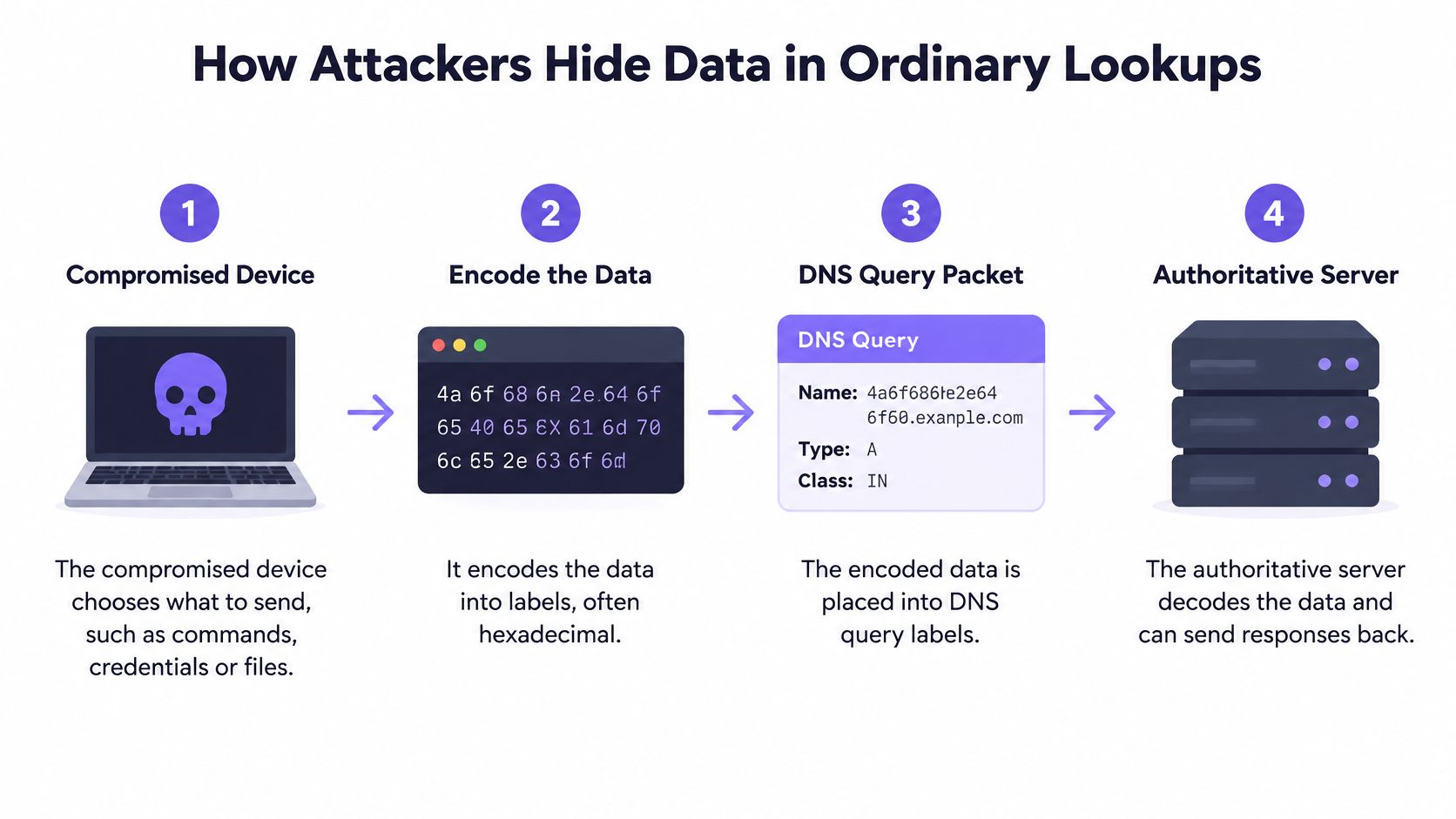
MITRE's description of application-layer DNS is blunt about why this blends in. Many networks permit outbound DNS, resolvers don't read the payload, and simple domain blocking isn't enough once the parent name keeps changing labels. Useful signs are long subdomains, encoded patterns, high-frequency queries, and known malicious infrastructure. Pair DNS logs with endpoint and flow context. A script or a non-browser process making the lookups matters as much as the name itself.
Record types worth a second look
Record type tells you where the bulk might sit. It doesn't prove a tunnel by itself.
| Record type | Normal purpose | How tunnels abuse it |
|---|---|---|
| A and AAAA | Map a hostname to an IPv4 or IPv6 address | Carry small encoded labels inside query names |
| TXT | Hold short text such as verification strings | Return larger encoded responses with commands or data |
| NULL | No standard everyday use | Carry large payloads |
A and AAAA traffic is everywhere, so abuse hides in the query name more than in the answer. TXT is a favorite for bigger replies because the record is built to hold text. NULL has almost no everyday job on a guest network, so a sudden pile of it deserves a human look. Blocking one type and calling it done fails, because the same job can move to another type.
The check you can run this afternoon is simple. Pick a parent domain that one client keeps hitting, and count unique labels under it. A real site doesn't need a fresh unreadable name on every lookup.
Why Attackers accept slow Speeds for Stealth
A tunnel is a bad way to move a movie and a good way to stay invisible. DNS names have length limits, and every query carries protocol overhead, so the attacker sends many odd, encoded questions instead of a few fat transfers. Bandwidth is the price. Stealth is the purchase.
A published technical analysis, covered in a 2023 cloud-environment study, reported a demonstrated throughput of about 110 KB/s with approximately 150 milliseconds of latency. That's slower than ordinary web or file transfer, and it's still enough for credentials, small archives, and a steady command channel. On a guest network you won't see a single huge spike. You'll see a client that never quite goes quiet.
Why the slow path still wins
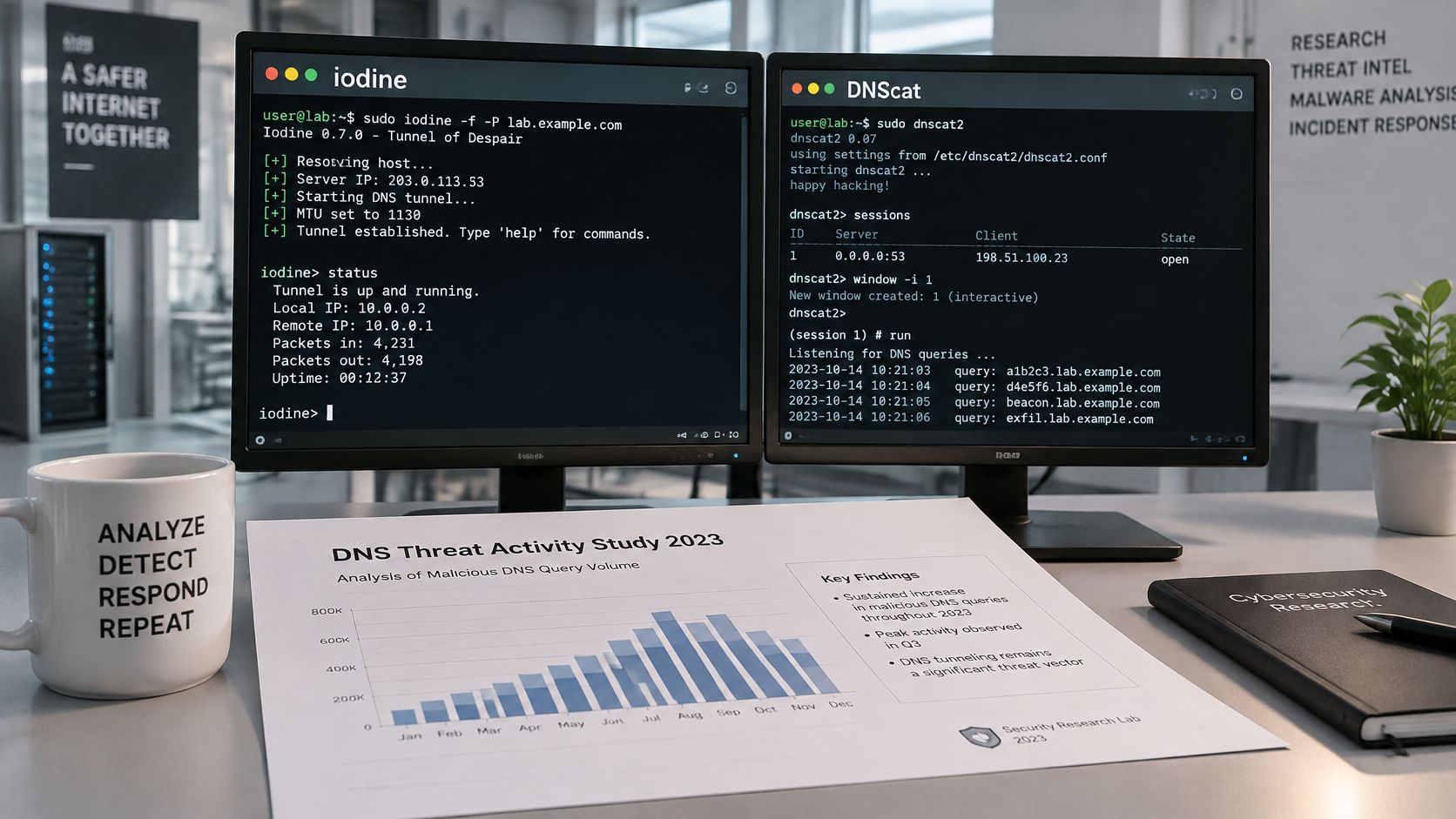
Outbound DNS is often allowed on networks that block most direct outbound protocols. The tunnel uses the door you left open on purpose. The same 2023 work tested Iodine and DNScat under different firewall configurations and found that tunneling could still support exfiltration when conventional controls were present. Turning off one record type doesn't close the channel. The tools keep talking.
That study also cited a secondary industry estimate that 80% of malware attacks obtain command-and-control access through DNS or use DNS as part of their communications. Treat that as an estimate, not a universal count. It still explains the attacker's math. A slow, permitted pipe beats a fast pipe that your firewall drops.
Practical rule: Judge how a host's DNS behaves over time. The mere presence of DNS queries is not a finding.
Encrypted transports such as DNS-over-HTTPS and DNS-over-TLS make the contents of each exchange harder to read, which is a separate problem from raw speed. For the economics, the point is narrower. Attackers accept a trickle because your policy already treats that trickle as required traffic.
Tools, Studies and scale behind DNS tunneling
A guest laptop on cafe WiFi can send ordinary-looking DNS requests while communicating through one rarely used domain. To understand the scale of that activity, researchers test tunneling tools such as Iodine and DNScat against network controls. These tests show how a tunnel can be made repeatable, rather than relying on a single unusual request.
Lab tests show what a control can handle under specific conditions. A result depends on the tool, the firewall configuration, and whether the tester can change record types. Public write-ups of specific campaigns on shared WiFi are limited, so operators need evidence from the DNS activity their own networks handle.
What the measurements actually counted
A linked 2019 passive-DNS study analyzed more than 2 billion entries and flagged 273 candidate tunnel domains. Within the observed traffic, almost all NULL-record traffic was attributed to suspected tunnels, as was about 35% of TXT-record traffic.
| Measure | Figure | Status |
|---|---|---|
| Passive-DNS entries analyzed | More than 2 billion | Measured, 2019 study |
| Candidate tunnel domains flagged | 273 | Measured, 2019 study |
| NULL-record traffic attributed to tunnels | Almost all observed | Measured, 2019 study |
| TXT-record traffic attributed to tunnels | About 35% | Measured, 2019 study |
| Malware using DNS for C2 or communications | About 80% | Secondary industry estimate, not universal |
On shared WiFi, a single unusual name is weak evidence. A steadier clue is one client making repeated, distinct requests under the same uncommon parent domain. The value comes from seeing the client, query name, and timing together, then comparing activity within that network rather than treating every SSID as if it had the same baseline.
The walkthrough shows how encoded data can be carried in DNS names. It can help operators understand the shape of a tunnel, but a demo domain is not a detection rule. Use the idea to interpret your own query records in context.
Spotting DNS tunneling in your logs
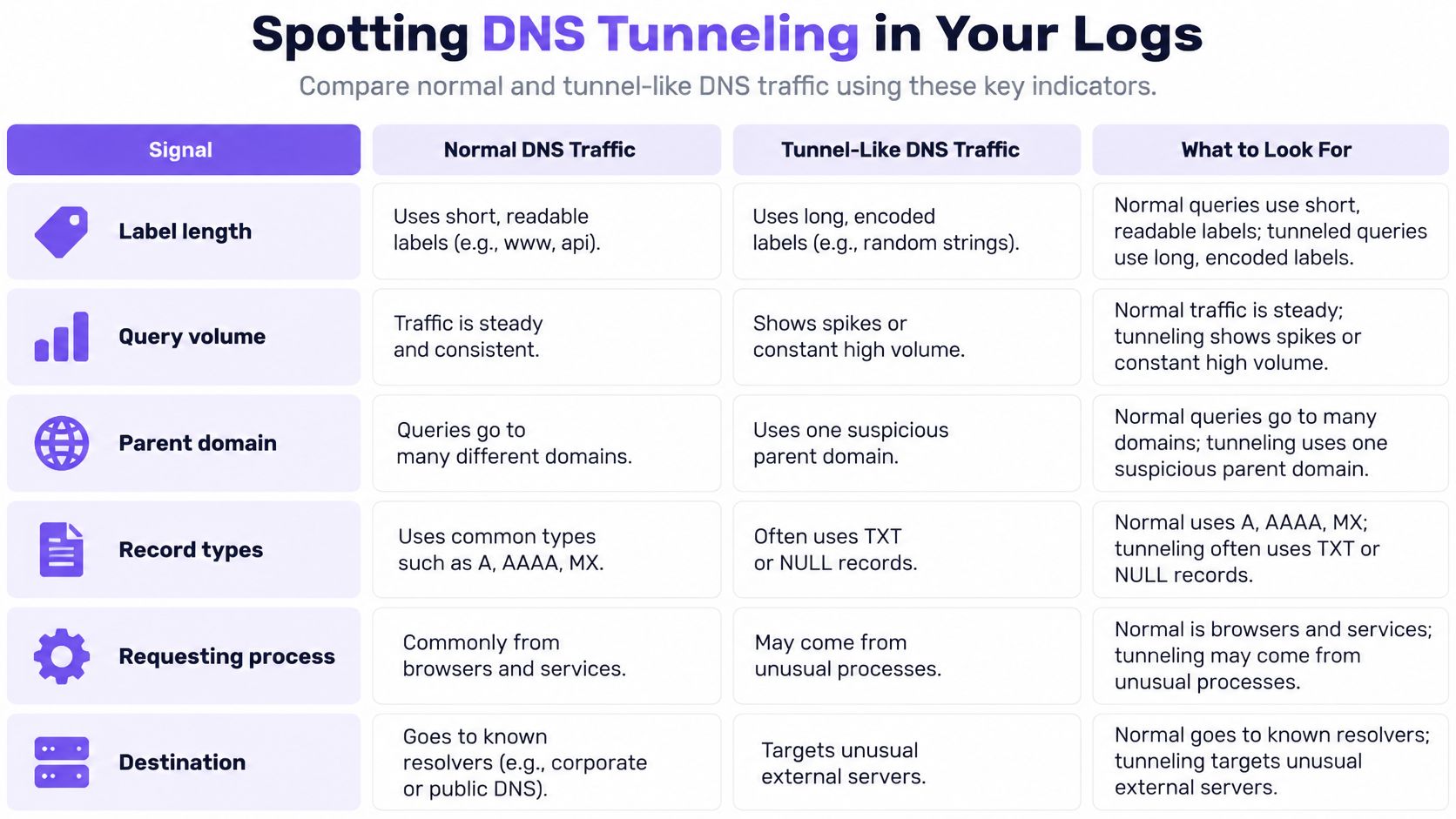
No single signature is reliable. You combine query text, frequency, entropy, domain reputation, response patterns, and how far a host sits from its own normal profile.
| Signal | Normal traffic | Tunnel signal |
|---|---|---|
| Subdomain length | Short, readable labels | Unusually long or high-entropy labels |
| Query volume | Bursty and tied to user activity | Abnormal rates or steady beacons from one host |
| Parent domain | Many unrelated domains | Many unique lookups under one rarely used domain |
| Record types | Mostly A and AAAA | Heavy TXT, NULL or unusual A and AAAA use |
| Requesting process | Browser or known application | Scripts or non-browser processes |
| Destination reputation | Established, well-known domains | New or uncommonly abused top-level domains |
Why a global threshold fails on shared WiFi
Guest, public, and student networks are noisy on purpose. A conference morning, a hotel checkout, and a library evening don't share one honest "queries per minute" line. A single global count will page you for a busy SSID and miss a quiet implant.
CISA's note on this technique matches what operators see on the floor. DNS blending is a way to avoid detection and network filtering, and an implant can beacon at regular, low query rates or lengthen labels gradually so a threshold-only alert never fires. Per-client, per-SSID, per-VLAN, per-venue, and per-time-window baselines fix the comparison. You ask whether this phone, on this SSID, in this hour, looks like its own last week.
MITRE's analytics point at the same pile: rare lookups tied to data transfer, abnormally long queries, odd increases, and top-level domains that show up again and again in abuse.
A triage order that doesn't destroy the evidence
Work in this order so you still have something to hand to whoever runs what incident response involves if the device turns out to be more than a noisy cell phone.
- Pull the DNS logs for the flagged host, including source address and full query name.
- Filter for long or high-entropy labels under a single parent domain.
- Compare that host's volume and record types with its own baseline, not with the busiest access point in the building.
- Correlate the pattern with the device or the process making the lookups. On unmanaged guest kit you may only have a MAC and an SSID. That's still better than a building-wide counter.
Then isolate the device, check the parent domain's reputation, and keep the logs before you change resolver policy or wipe the client. If the name is already known-bad, a DNS sinkhole can stop the next lookup from completing while you sort out the laptop. Don't start by deleting the history that shows the beacon.
Force clients toward authorized recursive resolvers, and block or inspect direct outbound DNS where the venue gear allows it. Retain source and query-name telemetry. A pretty dashboard that drops the query string can't show you the encoded label.
Encrypted DNS and where detection Falls short
On shared WiFi, a guest's phone can use encrypted DNS without the network operator seeing the names it looks up. Blocking every encrypted resolver may seem like a simple fix, but it can disrupt legitimate apps and privacy tools. Neither choice removes the need to understand what the network can still observe.
Attackers can carry command-and-control traffic over encrypted protocols. The CISA page on protocol tunneling describes this technique. With encrypted DNS, a resolver or monitor that relies on reading conventional DNS query names loses that view. Operators may still see timing, traffic volume, destination behavior and retry patterns, but those signals do not reveal the hidden query text.
What a strong lab score doesn't promise you
Research using behavioral features has reported strong results in laboratory conditions, where systems look for patterns in traffic rather than inspect query contents. Those results do not automatically transfer to a live guest network. The mix of devices, apps and privacy settings varies by venue, so a pattern that is unusual on one SSID may be normal on another. Build baselines per network rather than applying one global threshold.
Blocking encrypted DNS can also disrupt services guests expect to use. On shared WiFi, operators may not control the handset or know why an app chose a particular resolver. Prefer the resolver you operate where possible, and record which clients do not use it.
Decide what you can inspect, what you will block, and how you will record false positives. With encrypted DNS, detection depends more on network-specific metadata and resolver policy than on reading every query name.
For a closer look at how DNS over HTTPS changes network visibility, consider which signals remain available when query names are encrypted.
Choose DNS-Layer controls that log every lookup
Controls work in a stack. None of them, alone, ends tunneling. Together they shrink the channel, keep it visible, and shorten the time an implant sits unnoticed on guest WiFi.
- Force authorized resolvers. Point every SSID at recursive resolvers you operate or trust, so each lookup is visible and tied to a network. If clients can pick any resolver on the internet, your logs are a sample, not a record.
- Close the bypass. Block or inspect direct outbound DNS where the access points allow it. A tunnel that never touches your resolver is invisible to every report you built in step 1.
- Keep the right fields. Retain source address and query name, and attribute them per SSID and VLAN. A count of "DNS packets" without the name won't show encoded labels.
- Stop known-bad names at the lookup. Threat defense should block command-and-control callbacks from infected devices and block known phishing and malware domains before a connection starts. The device still tries. The session never forms.
- Tie repeats to a device. Correlate rare-domain lookups with the client or process. A beacon is a relationship over time, not a single evil string.
Shield runs behind a firewall rather than instead of one, and blocks the DNS lookup before a connection starts. Purple Shield is one managed DNS-layer option in that spot. It complements the firewall and the log review you already do. It doesn't replace either, and it doesn't remove the need for per-client baselines.
Start with resolver enforcement and logging. Let those baselines build for a few weeks of real guest traffic, including a busy weekend and a quiet Monday. Then tune blocklists and alerts against long labels, one-parent-domain bursts, odd record mixes, and low-and-regular beacons. You'll still get false positives on student housing or a hotel. You'll get fewer of them than a single building-wide threshold ever gave you, and you'll know which device to isolate when the pattern holds.
Purple Shield is protective DNS for venue, guest, and public WiFi. It checks lookups before connections start, blocks known command-and-control, phishing, and malware domains, and keeps a policy per SSID, VLAN, and venue so shared networks aren't judged by one global threshold. If you want that layer on the WiFi you already run, visit Purple Shield.