
What is internet filtering? How it works and who uses it
What is internet filtering? Learn how DNS, URL and keyword filters block content, where they are used on WiFi networks, and what they cannot stop.
Published November 26, 2026
You're sitting in a hotel lobby, you tap a link, and instead of the page you get a blank screen telling you the site isn't allowed. Or you're on the other side of that screen: you run the guest WiFi at a clinic, cafe, or campus, and you're trying to keep visitors away from scams and explicit sites without breaking normal browsing. Both situations run on the exact same machinery.
Internet filtering is the process of restricting access to websites, apps, or services according to defined rules. It works like a security desk at the entrance of a building: every time a device tries to reach a site, a technical rule checks the request and decides whether to let it pass, redirect it, or turn it away. Those checkpoints now shape everyday browsing in schools, workplaces, and public venues, and the same mechanisms operate at national scale across dozens of documented countries.
That reach is exactly why filtering deserves a careful look. Filtering is a method, not a goal. A checkpoint cannot tell the difference between shielding children from gambling sites and blocking citizens from independent journalism, because the technical step is identical in both cases. The only way to judge any filter is to ask three questions: who writes the rules, what gets blocked, and whether someone can challenge a mistake. Keep those questions in mind, because they apply just as much to a small business network as they do to a national one.
Table of Contents
- What Internet Filtering Is and How Its Methods Compare
- Filtering Versus Firewalls, Monitoring and Parental Controls
- How a DNS Filter Stops a Request
- Where Filtering Is Used and What Each Setting Blocks
- Why Filters Fail and How to Verify Yours
- Balancing Protection With Overblocking
What internet filtering is and how its methods Compare
Internet filtering works like a security desk at the entrance of a building. Every time a cell phone, laptop, or tablet tries to reach a website or service, a technical rule checks the request and decides whether to let it pass, send it somewhere else, or turn it away. Network operators use those rules for safeguarding, acceptable-use policies, malware prevention, or bandwidth management, while governments can apply the same mechanisms to restrict journalism, political debate, human-rights information, education, or religious sites.
This isn't a rare edge case confined to a single region. In data compiled by the OpenNet Initiative and published by UNESCO, researchers documented internet censorship using political, social, and conflict-related indicators across 74 countries, showing that technical filtering operates globally alongside legal controls. More recently, the Freedom House 2025 Freedom on the Net report examined 72 countries and found that global internet freedom declined for the 15th consecutive year, worsening in 27 countries while improving in only 17. Roughly 69% of the global population measured in that assessment lives in countries where political, social, or religious content was blocked online, and in 2022 alone, Access Now recorded 187 internet shutdowns across 35 countries.
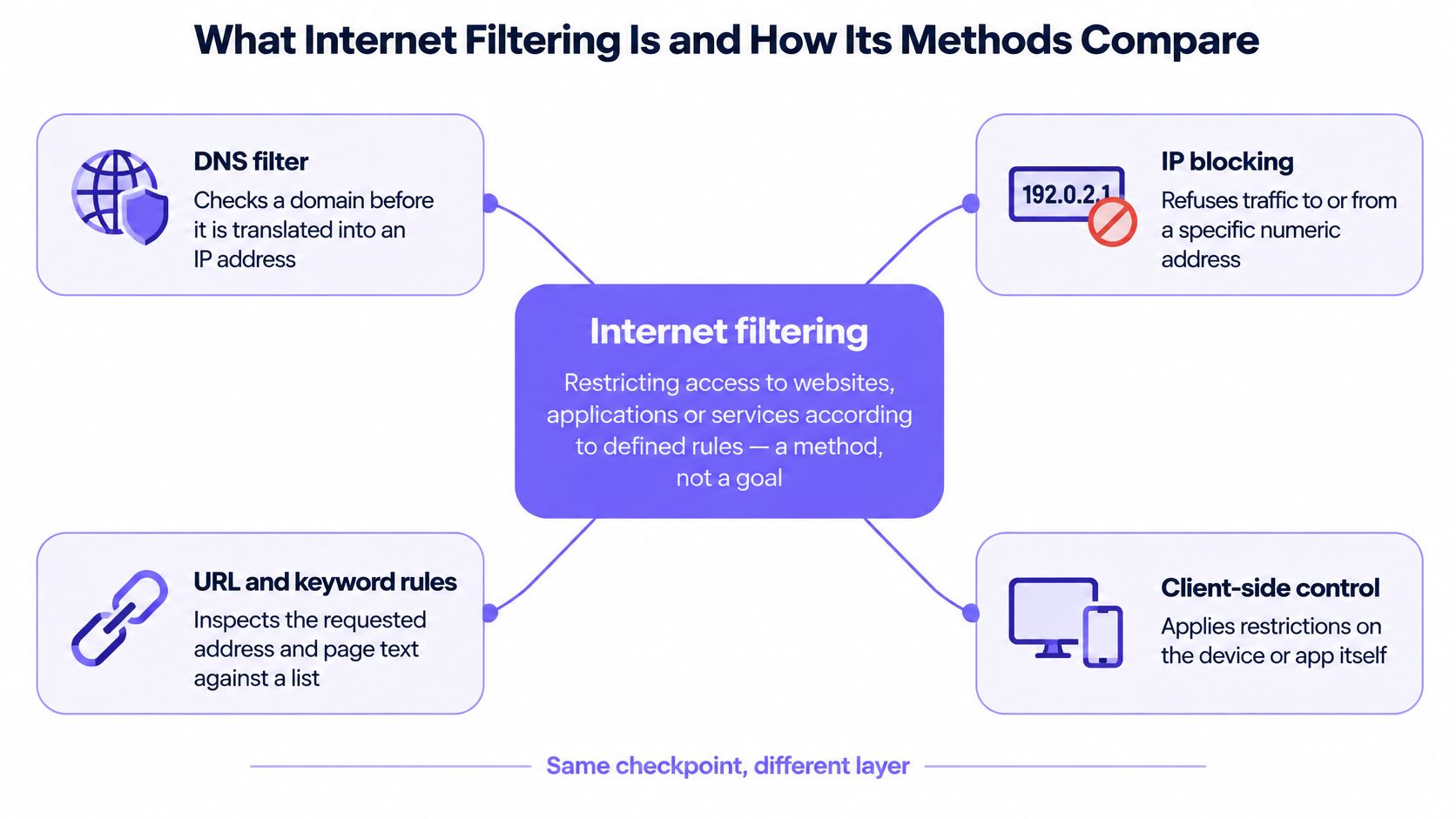
Those figures describe state-level restrictions rather than ordinary family-safety WiFi, yet the technical plumbing overlaps heavily. The same domain lookup block, proxy interception, or destination refusal can either protect patients on hospital WiFi or cut off public information. The diagram below maps four of the most common layers where those checkpoints sit.
Comparing filtering methods by what they can see
People often assume every filter inspects every word on a web page. In reality, each filtering method sits at a different checkpoint in a connection, and what it can block depends strictly on what it can see. A filter that only checks domain names sees far less than one examining full addresses, which is why teams weighing deeper inspection often look closely at how URL filtering inspects full web addresses before choosing a layer.
| Method | What it sees | Typical use | Main limitation |
|---|---|---|---|
| Domain-name (DNS) blocking | The domain in the lookup | Guest, school and hotel WiFi | Cannot see paths or page content; bypassed by other resolvers |
| URL or path filtering | The full address, including path | Schools and enterprise proxies | Needs traffic inspection, which raises cost and privacy questions |
| Keyword filtering | Words in queries or page text | Search safety settings | Produces false positives on innocent words |
| IP-address blocking | The destination IP | Known malicious hosts | Can block many unrelated sites sharing one server |
| Application or protocol control | App identity or traffic pattern | Limiting streaming at busy times | Breaks when apps change their behavior |
| Search-result suppression | Search index entries | Removing results from search | Only affects search, not direct access |
A filter can only enforce rules on the information visible at its layer. Ask a shallow checkpoint to make nuanced content decisions, and it will either miss too much or block entire sites that did nothing wrong.
Choosing between these methods is always a trade-off between visibility, privacy, and upkeep. Deeper inspection catches specific pages inside large platforms like YouTube or Wikipedia, whereas lighter domain checks run centrally across thousands of visitor devices without decrypting private traffic.
Three questions that judge any filter
Because the mechanism stays neutral while the policy sets the outcome, you can evaluate any filtering system in seconds by asking three plain questions:
- Who sets the policy? Decide whether the rules come from a local network owner accountable to visitors and staff, a third-party vendor whose lists nobody reviews, or a state authority with no public oversight.
- Which categories are blocked? Narrow, clearly named categories like phishing, malware, and explicit material behave differently from broad political, social, or vague safety buckets that sweep up ordinary news and health resources.
- How transparent and appealable are the decisions? Users should be able to tell when a block happened, understand why it happened, and have a practical route to request a review or use a legitimate alternative when a page is caught by mistake.
Filtering Versus firewalls, monitoring and Parental controls
Say a family checks into a hotel and connects a tablet to the guest WiFi. The hotel's firewall allows encrypted web traffic over port 443 so guests can load secure websites normally. Behind that door, the internet filter checks the specific domain the tablet is trying to reach, letting a travel booking site load while stopping a known phishing page or an adult site.
Because vendors frequently bundle these features into one dashboard, people regularly mix them up. The same rule-matching engine can even sit underneath multiple products, which makes the labels sound interchangeable when their jobs are distinct.
Where each tool starts and stops
A firewall acts like the lock and door frame of a network. It decides which connections are permitted at all, typically based on network addresses, ports, and protocols. It stops unauthorized traffic from entering or leaving, yet on its own it usually doesn't care whether an allowed web connection points to a library catalog or a scam store.
Internet filtering adds content and category rules on top of those permitted connections. Rather than asking whether web traffic is allowed, it asks whether a particular destination fits the network's acceptable-use or security policy.
Network monitoring sits beside both controls and watches without stepping in. It records events such as blocked lookups, bandwidth spikes, and connection logs so administrators can spot problems or produce safeguarding reports. Monitoring reports what happened; it only enforces rules when paired with an active filter or firewall.
Parental controls narrow that same filtering idea down to a single household device, router, or user account. Parents use tools like Apple Screen Time, Google Family Link, or home router apps to build individual child profiles, set bedtime cutoffs, and restrict specific apps. Those controls often sit alongside broader conversations at home, including guidance from Children Psych on digital habits and adolescent depression, because technical limits work best when paired with real supervision rather than treated as a replacement for it.
Practical rule: Ignore the marketing label on the box. Judge any network safety tool by the exact rules it enforces, the traffic layer it covers, and the decision log it leaves behind.
How a DNS filter stops a request
A request to open a website begins with a directory question. The browser has a human-readable name, while the network needs a numeric destination address. The Domain Name System (DNS) answers that question. A DNS filter puts its checkpoint inside this lookup, like a receptionist who checks the visitor list before giving out a door code.
In its protective DNS guidance, NIST identifies name-resolution filtering as DNS infrastructure that applies security policies during resolution, recommending it as a network-wide defense-in-depth layer that can also filter traffic categories violating organizational policy. The practical value is timing. The filter can refuse a trip before the browser starts it, much like stopping a car at the driveway gate rather than chasing it down the road.
The flowchart below traces what happens in the fraction of a second between tapping a link and seeing either a website or a block page.
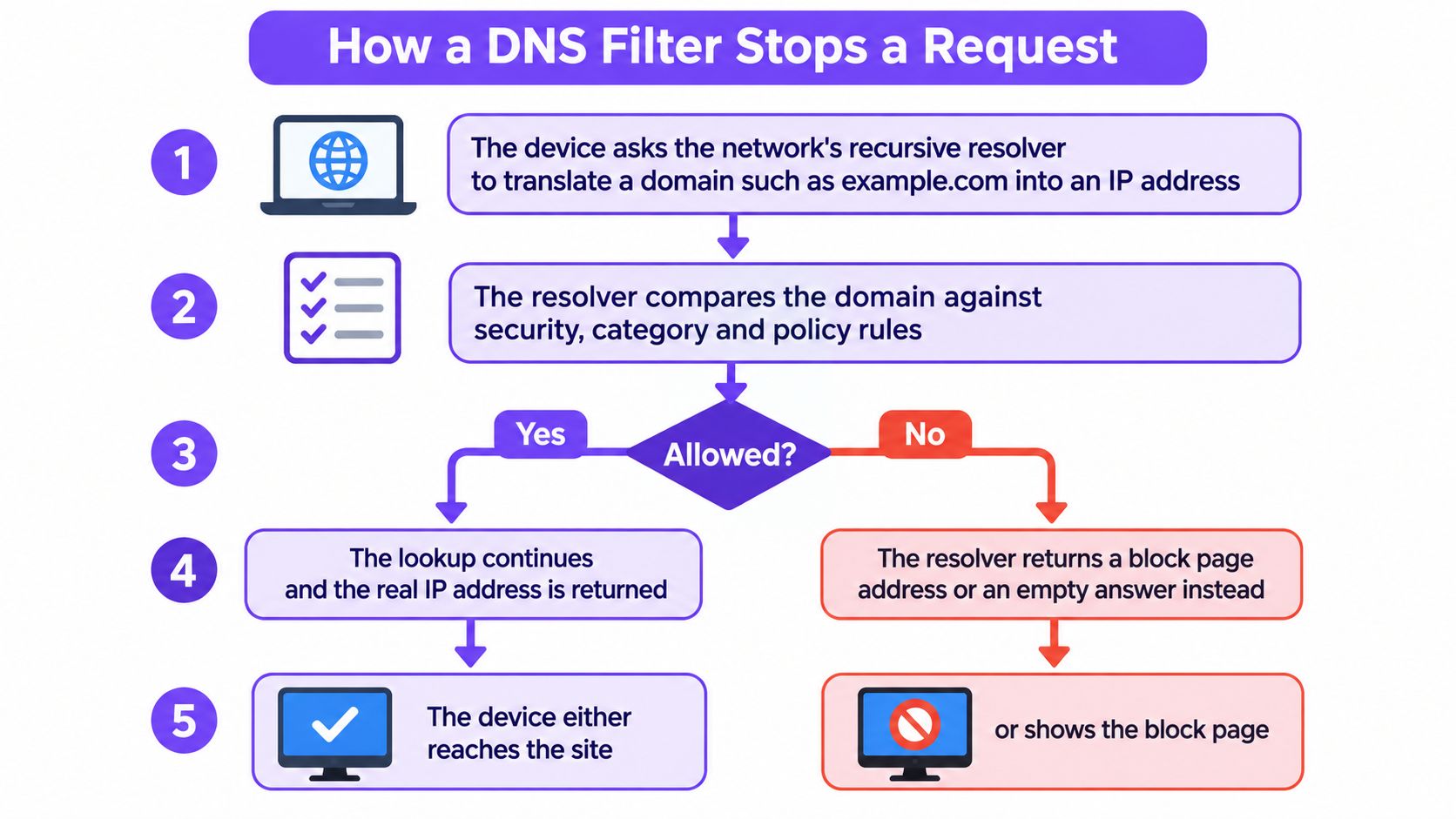
Six Steps from Click to block page
The device asks for an address. When you tap a link or open an app, your device sends a lookup request to the network's recursive resolver asking to translate a domain such as example.com into a numeric IP address. Since almost every web and app session begins with a name lookup, it serves as a universal checkpoint.
The resolver checks its rule lists. Before answering, the resolver compares that domain against threat intelligence feeds, content category databases, and the network's custom allow or block lists. It can also apply the network's schedule. Catching the request here avoids downloading a single byte of malicious or restricted content.
Allowed domains resolve normally. If the domain passes every policy check, the resolver returns the destination address and the browser loads the site as usual. Users rarely notice the check because the lookup adds only milliseconds. That small delay is the trade-off for checking every name at one central point.
Blocked domains get a policy response. If the domain hits a restricted category or threat list, the resolver refuses to hand over the address and returns either an empty "does not exist" reply, called NXDOMAIN, or the address of a custom block page. That policy response keeps the destination out of reach without crashing the user's browser.
The connection never starts. Because the device never learns the destination address, the app usually stops right there, before any HTTP request or encrypted TLS handshake begins. Stopping malware or phishing at this stage prevents infected devices from talking back to command-and-control servers. A firewall may still be running behind it, because protective DNS works alongside that control rather than replacing it.
The event is recorded in the log. The resolver logs the blocked domain, timestamp, and policy rule that triggered it. That record gives IT teams and safeguarding leads clear evidence for incident reviews and compliance audits. Useful reporting shows blocked URLs, threat analysis, and usage beside the policy in force.
Why public WiFi runs on DNS and where its Vision Ends
That central lookup model is why DNS filtering fits guest and public WiFi so well. A venue cannot install monitoring software on a visitor's personal cell phone, a contractor's laptop, or a smart payment terminal. Because DNS enforcement runs centrally on the network, one policy can cover an entire SSID or VLAN the moment a device connects, with nothing installed on any device. That same layer can address phishing, malware, command-and-control callbacks, adult sites, and gambling domains.
Purple Shield is one example of this model. It is a protective DNS layer that does content filtering, threat defense, and ad blocking in one layer. It checks each domain against content categories, allow and block lists, the network's schedule, and threat intelligence. Its filtering meets the Friendly WiFi standard and the Internet Watch Foundation standard. The team behind Purple has run content filtering on WiFi since 2012.
Still, DNS filtering has blind spots. It generally sees the domain being looked up, not the rest of an HTTPS web path, the text on the page, or encrypted payloads inside an app. It also only applies while devices use the network's designated resolver. If a device switches to a different resolver, that network's filter loses its view of the lookup. The method is useful, but it is still only a method. The value depends on who sets the rules, what the rules block, and whether people can see and challenge a mistaken block.
To check whether a DNS filter is active on a WiFi network you use, open a browser and visit a test domain known to sit in a blocked category. Many filtering vendors publish harmless test pages for adult, gambling, or phishing categories. A working DNS filter will either serve a clear block page or fail immediately with a server-not-found error instead of loading the site.
Where filtering is Used and what each setting Blocks
Because filtering is just a checkpoint, two buildings across the street from each other can run the exact same software and end up with completely different policies. A family bar and grill wants guests to browse comfortably without someone opening explicit material beside a children's table, while a hospital's primary worry is ransomware spreading from a compromised personal device.
| Setting | Common goal | Categories often blocked | Key check |
|---|---|---|---|
| Bar or hotel guest WiFi | Family-safe guest access and bandwidth control | Adult, gambling, malware | Separate guest and staff networks |
| School or campus | Safeguarding and acceptable use | Adult, self-harm, gaming | Time-based rules for classes and evenings |
| Hospital | Patient and staff protection | Malware, phishing, adult | Fail-open or fail-closed behavior on resolver outage |
| Local government or public library | Duty of care for the public | Adult, extremist, malware | Appeal route and clear block-page reason |
| Corporate office | Security and bandwidth control | Malware, command-and-control, streaming | Per-VLAN policy and reporting |
Two operational checks most teams skip
Most organizations pick their blocked categories on day one and then forget the operational details that determine whether the filter helps or hurts. Two checks from the table above cause the majority of real-world headaches when teams overlook them.
First, network separation matters far more than aggressive category lists. Putting visitors, employees, and students onto one shared WiFi network forces an impossible compromise: either the rules are too loose to protect guests and minors, or they're so strict that staff can't do their jobs. Splitting traffic onto dedicated SSIDs or VLANs lets a hotel keep point-of-sale terminals isolated from guest phones, and lets colleges adjust web filtering in school environments so daytime classroom rules relax slightly in dorms during the evening.
Second, failure behavior and appeal routes rarely get tested until an emergency hits. Every operator has to decide in advance what happens if the DNS resolver becomes unreachable:
- Fail-open mode: Traffic bypasses the filter so internet access stays up during an outage, which some hospitals prefer for clinical continuity while accepting a temporary filtering gap.
- Fail-closed mode: Unchecked lookups stop resolving until resilient backup resolvers respond, protecting safeguarding commitments on student or public networks at the cost of halting browsing if every resolver path fails.
Public venues like libraries and local government organizations carry an extra obligation on top of uptime. When a resident hits a block page on a public terminal, an unexplained error looks like broken WiFi or arbitrary censorship, whereas a plain explanation and a clear review route preserve trust. Find the row in the table that matches your own setting, and keep its key check handy as you test whether your current setup holds up.
Why filters fail and how to verify Yours
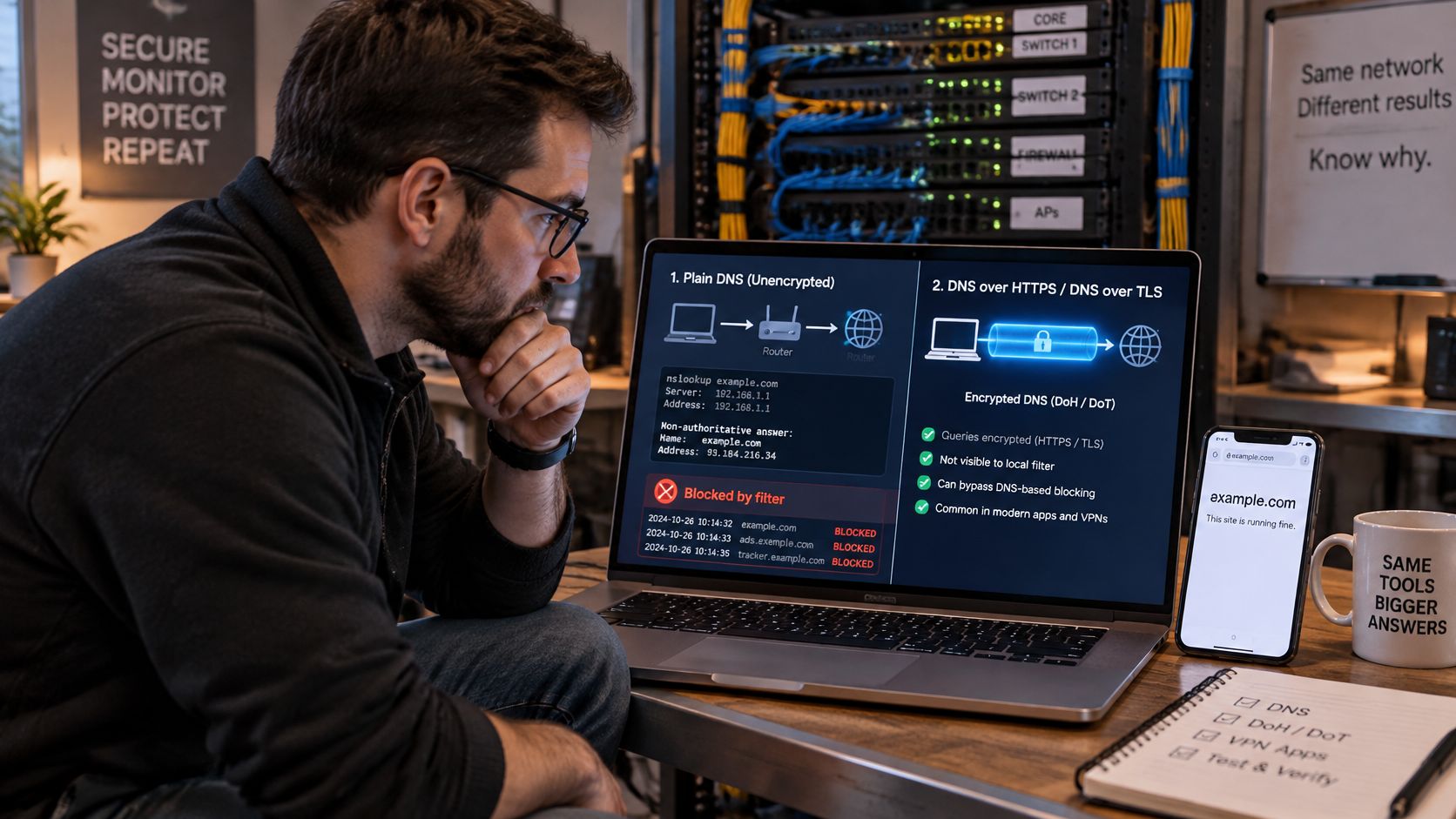
Even a carefully built blocklist fails when devices walk around it. Traditional DNS queries travel in plain text across a local network, so your gateway can easily spot and steer them to the approved resolver. Newer privacy protocols changed that equation: DNS-over-HTTPS (DoH) and DNS-over-TLS (DoT) wrap lookups inside encrypted tunnels, letting browsers such as Chrome, Firefox, or Edge send queries straight to an outside provider instead of your venue's filter.
The IETF analysis of operator-network DNS-over-HTTPS challenges documents how encrypted lookups disrupt environments where operators have safeguarding obligations or operational reasons to filter traditional DNS queries. Add consumer VPNs, proxy apps, and connections made directly to numeric server addresses, and a device can skip the local lookup checkpoint altogether.
This isn't a purely theoretical corner case. A 2025 European University Institute and Freedom House report found that anti-censorship tools had been blocked in at least 21 of the 72 countries examined over the preceding five years, reflecting how widely circumvention tools have spread and how fiercely networks contest them. Understanding how DNS-over-HTTPS affects network filtering is now essential for any local WiFi operator, not just national telcos.
Below is the exact visibility gap network teams run into when plain lookups sit alongside encrypted traffic on the same WiFi segment.
Closing those gaps requires a layered setup rather than blind blocking. Firewall rules should restrict standard outbound DNS traffic so devices can reach only your designated recursive resolvers, a precaution NIST explicitly recommends alongside maintaining DNS availability and query confidentiality. You also need clear policies for known encrypted-DNS endpoints and VPN gateways, and you must apply them to IPv6 as well as IPv4, since many modern cell phones fall back to unfiltered IPv6 resolvers the moment IPv4 gets restricted.
Proportionality still counts here. Blocking every encrypted tool or VPN across a hotel or corporate office creates collateral damage for remote workers using legitimate business VPNs and raises real privacy concerns. Treat filtering as one layer inside defense-in-depth, paired with endpoint protection, firewalls, clear acceptable-use terms, and visibility into bypass attempts.
Seven checks before you trust a filter
Before relying on any filtering service for guests, students, or staff, walk through this verification list. The short video below also shows how encrypted lookups behave in practice so you know what to watch for during testing.
- Match categories to the actual audience. Review the exact blocklists enabled on each network rather than accepting a generic default bundle. A hospital waiting room, an elementary school, and a late-night bar shouldn't share identical category lists.
- Confirm per-network and time-based granularity. Check that policies can be assigned separately by SSID, VLAN, venue, and schedule. Purple Shield, for example, provides protective DNS and content filtering that runs standalone on any WiFi network or across Purple Access networks, letting operators assign a distinct policy to each one.
- Verify the DNS layer sits behind your firewall. Your firewall still handles port rules, segmentation, and outbound DNS enforcement while the filter evaluates domains. Purple Shield runs behind a firewall rather than replacing one, blocking restricted or malicious lookups before a connection ever begins.
- Test fail-open or fail-closed behavior in a simulated outage. Don't trust a datasheet promise. Temporarily interrupt the primary resolver path on a test VLAN to confirm whether browsing halts safely or fails open exactly as your risk policy requires.
- Check that logs and reports live in one place. During a safeguarding query or security incident, you shouldn't have to piece together three disconnected spreadsheets. Blocked domains, threat events, and usage trends belong in one searchable view.
- Inspect the actual block page. Trigger a block on a cell phone and read what a real visitor sees. A good block page states the policy reason plainly and tells the user how to ask for a review if the site was miscategorized.
- Ask for written proof of any claimed standard. If a venue advertises family-safe accreditation such as Friendly WiFi or alignment with the Internet Watch Foundation list, verify it in writing. Our filtering at Purple Shield meets the bar set by the Internet Watch Foundation and the Friendly WiFi standard, giving operators auditable assurance rather than vague promises.
Running a Five-Minute Verification Test
Once those seven boxes look right on paper, test the live WiFi like a curious guest would. Connect an unmanaged cell phone or laptop, try loading a known blocked test domain over both IPv4 and IPv6, switch on secure DNS inside a browser like Chrome or Firefox and try again, and finally test whether a consumer VPN app connects cleanly or triggers your policy. Also check captive-portal login flows on guest SSIDs, because an overly aggressive DNS rule can accidentally break the splash page before a visitor even accepts your terms.
Balancing Protection With Overblocking
More blocking does not automatically mean more safety. A filter can function exactly as the software engineers designed it and still fail the people using the network.
Recent U.S. school evidence reported by CalMatters shows how wide that gap gets in practice: about 70% of teachers and students surveyed said web filters interfered with completing assignments. When broad or opaque category lists sweep up legitimate health guidance, current-events journalism, LGBTQ+ support pages, civic resources, or academic research, the network stops being a safe learning space and turns into an obstacle course.
That's why internet filtering is always a governance and proportionality problem, not just an IT check box. Technical setup is the easy part. The harder questions are human ones: who gets to define "harmful" content, how are exceptions reviewed when a teacher or guest flags a mistake, and where does responsible safeguarding end and unjustified overblocking begin?
Measurable controls that keep filters Fair
Well-run networks don't rely on guesswork or silent blocklists. They build concrete checks around the filter so mistakes get caught and fixed quickly:
- Category transparency: Publish plain-language summaries of which categories are restricted on each network so staff, students, and guests aren't left guessing why a page won't load.
- An appeal and review workflow: Give users a simple route, such as a link or contact address on the block page, to challenge false positives without waiting weeks for an IT ticket to bounce around.
- False-positive tracking: Log how often legitimate domains get unblocked after review. A high rate of overrides is a clear signal that a category or keyword rule is tuned too broadly.
- Differentiated policies by network and schedule: Keep stricter safeguards on public or younger-user SSIDs while giving adult researchers, clinicians, and staff the access their work requires.
- Explanatory block pages: Tell the user which rule stopped the page rather than showing a dead browser error that looks like a broken connection.
Judge any internet filter by two numbers side by side: the genuine harm it prevented and the legitimate access it denied.
Before you sign off on a new filter or renew an old one, run a three-question review on your own policy. First, what exact categories are blocked today? Second, who holds the authority to change those rules or approve an exception? Third, how quickly does a mistaken block get reversed once someone reports it? If you can answer all three clearly, your filter is doing its job as a protective tool rather than an opaque wall.
If you run guest, student, patient, or visitor WiFi and want clear, auditable DNS protection without installing software on people's devices, explore Purple Shield. It sits behind your existing firewall with separate policies per SSID, VLAN, venue, and schedule, combining family-safe content categories, threat protection, and transparent reporting in one place. Check how it fits your network and keep safeguarding proportionate across every site you manage.