
AI driven threat detection explained: Beyond blocklists
AI driven threat detection explained: how it spots new threats faster than blocklists, and how DNS-layer protection stops them before a connection starts.
Published November 27, 2026
You run WiFi across a hotel group, a multi-site school district, or a busy hospital wing, and your inbox is full of vendors promising that artificial intelligence will catch every cyberattack automatically. Meanwhile, you don't have a 24-hour security operations center sitting down the hall. You've got an already stretched IT team, an external ICT provider, or venue managers who just need the guest network to stay fast, safe, and free of complaints.
That gap between security marketing and day-to-day reality is wider than most brochures admit. In Fortinet's 2025 global research, 48% of IT decision-makers identified insufficient AI expertise as the largest challenge to integrating AI into cybersecurity, while 47% cited data privacy and information security concerns. When a tool generates a flood of technical warnings that nobody on site knows how to verify, buying smarter software doesn't make the network safer.
The hard question around AI-driven threat detection isn't whether a model can spot a few extra bad domains in a lab test. What matters is whether non-specialist staff can trust its alerts and act on them quickly, with reliable blocklists and DNS-layer checks doing the heavy lifting underneath.
Table of Contents
- What AI-Driven Threat Detection Actually Means
- How AI Detection Differs From Blocklists
- How DNS-Layer Protection Stops Threats Earlier
- How an AI Detection Pipeline Works Step by Step
- Where AI Detection Gets It Wrong
- Acting on AI Alerts in Venues, Schools, and Hospitals
- Run a Pilot on One Network Before Going Wider
What AI-Driven threat detection Actually Means
AI-driven threat detection is software that scores network events, mostly DNS lookups and connection attempts, for signs of attack using patterns it has learned, rather than matching only against a list of known-bad items.
Think of a doorman standing outside a busy venue. A traditional list-based guard checks each visitor's name against a printed sheet of banned individuals; anyone not on that sheet walks straight through. An AI-driven guard keeps that same banned list in hand, yet also watches how people behave, noticing someone who shows up at 3am and tries every side door on the building.
Modern detection models evaluate a handful of concrete network signals on every lookup:
- Domain age: Newly registered domains are far more likely to host fresh phishing pages or malware callbacks than established sites with years of normal traffic.
- Name randomness: Attackers often use algorithms to spin up gibberish-looking web addresses quickly, which look different from human-chosen business names.
- Query rhythm: A laptop that pings an unfamiliar address every sixty seconds without a browser open behaves differently from a guest reading the morning news.
- Attack pattern similarity: The model compares the sequence of lookups and failed connections against behavior seen in earlier ransomware or botnet campaigns.

Why it matters alongside known-bad lists
AI detection isn't a replacement for known-bad threat intelligence. It's a second opinion layered on top of it, built to catch the brand-new infrastructure attackers spin up before security researchers have cataloged it.
Security teams have moved this capability into everyday operations because speed shrinks damage. In 2024, 82% of organizations using AI said it was useful for improving threat detection in security operations centers, according to the SANS Institute's 2024 AI Survey. Earlier containment pays off operationally too: IBM's 2024 Cost of a Data Breach study, compiled from Ponemon Institute research, reported that 67% of organizations were deploying security AI and automation across their security operations centers, and those using these technologies extensively identified and contained breaches nearly 100 days faster, on average, than organizations that didn't.
Working definition for your manager: AI threat detection watches how devices ask for web addresses and flags suspicious behavior early, even when the destination isn't on a known blocklist yet.
Keep one principle clear whenever you evaluate a product. The value lies in finding unfamiliar threats before they cause harm, not in having the word "AI" printed on the invoice.
How AI detection Differs from blocklists
Every network filter makes a fundamental trade-off between certainty and foresight. A static blocklist answers a simple yes-or-no question: "Is this domain on my banned list?" That makes it precise on threats researchers already know about, yet completely blind to anything created ten minutes ago.
AI-driven detection asks a probabilistic question instead: "Does this lookup behave like an attack?" Because it judges behavior rather than waiting for a human-verified entry, it can flag an unseen domain before any feed catches up. Automated cyber defense has been heading toward machine-speed reaction for a decade; on August 4, 2016, DARPA's Cyber Grand Challenge pitted seven high-performance computers against each other in an air-gapped network for nearly 12 hours, demonstrating that automated Cyber Reasoning Systems could spot flaws and apply defenses at machine speed without waiting for human operators at every step.
| Criterion | Static Blocklist | AI-Driven Detection |
|---|---|---|
| Basis of decision | Exact match against known-bad lists | Scores patterns such as domain age, name randomness, and query rhythm |
| Unseen or newly registered domains | Allowed until someone adds them to a list | Can be flagged on behavior before a list entry exists |
| Response to a fresh campaign | Lags until feeds are updated | Can react to unusual activity while the campaign is still new |
| Typical false-positive source | Outdated or over-broad list entries | Unusual but legitimate behavior, such as a new app or shared cloud service |
| Explaining a block | Name of the list that matched | Needs evidence: triggering signals, confidence score, and recommended action |
| Upkeep | Feeds must be updated and reviewed | Model must be monitored for drift and retuned |
Two rows in that comparison decide whether a tool works smoothly on a busy public network or drives your helpdesk crazy.
Unseen domains and Fast-Moving Campaigns
Blocklists rarely surprise anyone. If a domain lands on a reputable phishing list, blocking it almost never upsets a guest or teacher.
The weakness shows up when attackers rotate domains faster than list providers can verify and publish updates. Say an attacker launches a credential-harvesting campaign targeting hospitality staff using fifty freshly registered lookalike domains at 7:00 a.m. A static list lets those lookups sail through until enough victims report the sites and a feed refresh propagates down to your network.
Why false Positives Feel different with AI
Early warnings come with a cost: statistical models make educated guesses, and legitimate internet traffic often looks strange. A freshly launched point-of-sale cloud app, a student project hosted on a new domain, or a content delivery network using automated hostnames can all trip a behavioral score.
When a blocklist stops a site, the audit trail is effortless because the name matched an entry on a specific list. When an AI model blocks a site, staff need context showing which signals raised the score and how confident the system was.
Most networks don't pick one over the other. They pair both so static lists absorb known threats with near-zero friction while the behavioral model covers the gap for brand-new attacks.
How DNS-Layer protection stops threats earlier
Before a guest's phone loads a single image or opens a payment page, it has to ask a DNS resolver to translate the website's readable name into a network address. That split-second lookup is the cheapest, cleanest point on the entire network to stop a bad connection, because no web request has been sent and no malicious file has started downloading.
A protective DNS service checks every domain name before returning an answer. If the name matches a known threat or scores high on the AI model, the resolver returns a block page instead of connecting the device. It's the network equivalent of checking the destination before the car leaves the parking lot, rather than waiting until it arrives at an unsafe address.
Three threat types show up constantly on shared networks at this stage:
- Command-and-control callbacks: An already infected laptop or cell phone tries to reach its attacker's server for instructions or stolen-data uploads.
- Phishing pages: A guest clicks a convincing delivery or banking link from an email or text message.
- Malware distribution domains: A compromised advert or sketchy download link tries to pull an installer onto a visitor's device.
Where DNS checks Sit Beside other controls
No single tool catches everything, especially on venues and campuses where hundreds of personal cell phones and tablets connect every day. Comparing what each control inspects makes the gaps obvious.
| Control | What It Inspects | Where It Acts | Main Blind Spot |
|---|---|---|---|
| DNS-layer protection | Domain names every device looks up | Before the connection starts | Direct IP connections and apps with hard-coded resolvers |
| Firewall rules | IP addresses, ports and protocols | At the network edge, as traffic passes | Names hosted on shared IP addresses |
| Endpoint agent | Process behavior and files on the device | On the device itself | Guest and BYOD devices that run no agent |
| Web proxy or content filter | Full web requests, sometimes decrypted | In the path of web traffic | Heavier to deploy and more sensitive for privacy |
Each layer pulls its own weight. Firewalls guard the network edge by filtering addresses, ports, and protocols, yet modern cloud hosting packs thousands of legitimate and malicious sites behind the same shared infrastructure, leaving address-only rules clumsy. Endpoint agents see deep into files and running processes on managed corporate laptops, which makes them essential for staff machines, though you obviously can't install an agent on a hotel guest's phone or a hospital visitor's tablet.
Web proxies inspect full web requests and can even decrypt traffic to read inside sessions. That visibility carries real deployment weight, certificate management overhead, and serious privacy questions on public WiFi where inspecting full browsing content is rarely appropriate.
DNS-layer protection sees only the destination names devices look up, not the full pages they read. It won't stop an app that bypasses local resolvers or connects directly without a domain name, so firewalls and managed endpoint tools remain necessary alongside it. As a first checkpoint on a mixed network, though, checking every lookup before the connection begins gives you the earliest, lightest net across every connected device.
How an AI detection pipeline works step by step
A guest at a hotel connects to the WiFi and a hidden ad script on a news page tries to reach a command-and-control server. Between that lookup and the answer, less than a blink passes, yet six distinct checks happen inside it. Walking through them one at a time removes most of the mystery around AI security, because a single DNS lookup always moves through the same six stages.
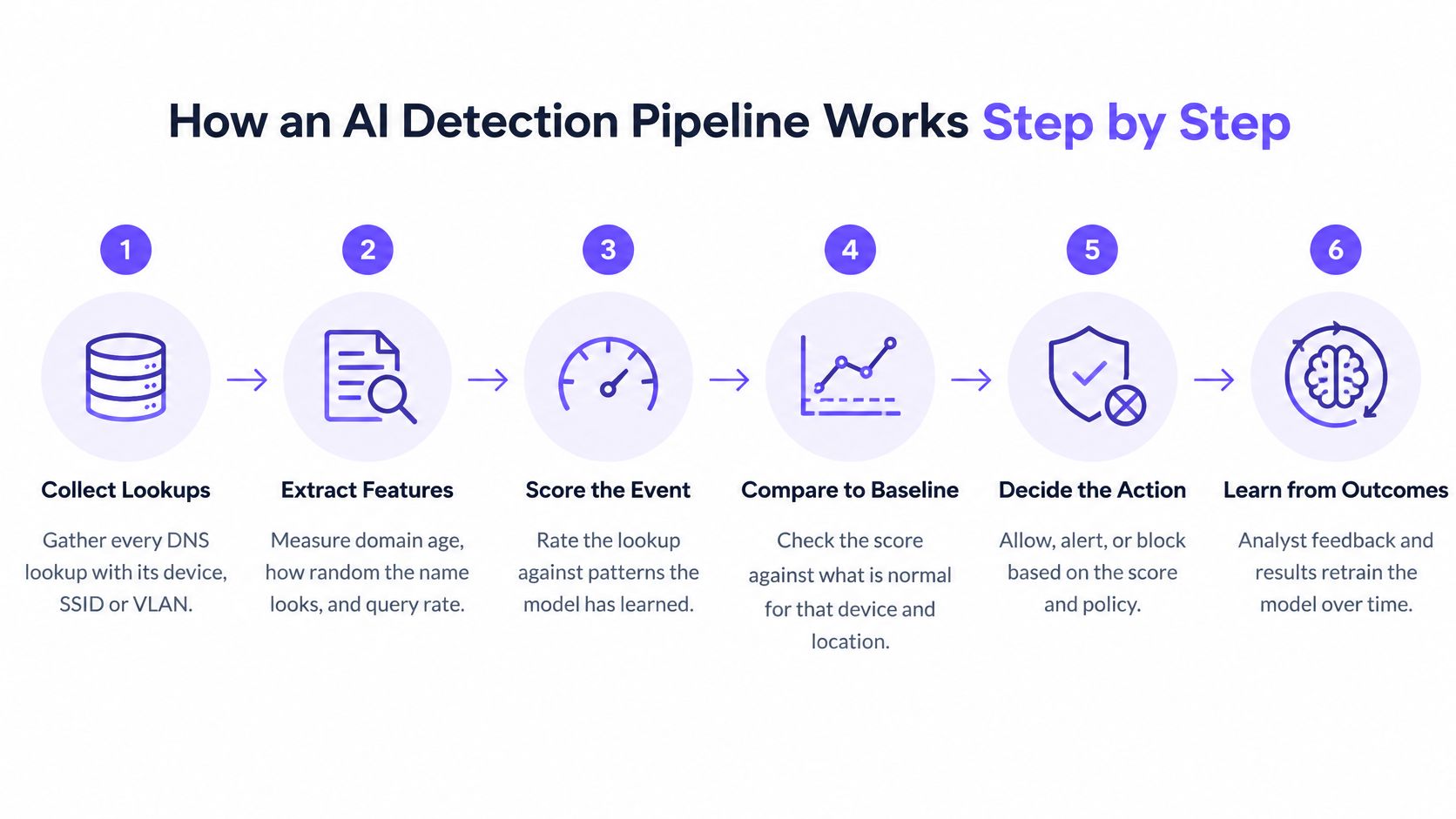
- Collect the lookup and its local context. Every time a device asks for a domain, the resolver logs the requested name alongside metadata such as the device identifier, the SSID, and the VLAN. Knowing whether a query came from the public guest WiFi or the back-office finance network shapes how risky it looks later.
- Extract behavioral features. The pipeline strips the raw lookup down into measurable clues: how recently the domain was registered, how random the string of characters looks, how frequently that device asks for it, and whether clusters of failed lookups preceded it.
- Score the event against learned patterns. The detection model weighs those features together and outputs a probability or confidence score. A score isn't a verdict by itself; it's a measure of how closely this activity resembles past attacks.
- Cross-check against deterministic rules and feeds. Before anything gets blocked or allowed, the pipeline checks the domain against known command-and-control indicators, curated threat intelligence feeds, category policies, and Safe Search enforcement. Predictable policy blocks stay locked in place regardless of how the model fluctuates.
- Apply the decision and log the evidence. Based on the combined policy and score, the resolver allows the lookup, flags it for monitoring, or serves a block page. It also stores the triggering signals, confidence level, and action taken so someone can audit the decision later.
- Feed real outcomes back into tuning. When a user clicks a dispute link on a block page, or an IT lead confirms an alert was harmless, that outcome feeds back into threshold adjustments and drift checks so the model adapts as network traffic changes.
Why deterministic Cross-Checks still Anchor the pipeline
Step 4 is the safeguard that keeps AI from turning your network into an unpredictable black box. General-purpose AI models can surface valuable clues, yet they still tend to over-predict threats and miss attacks that depend on local context. An over-eager model blocks legitimate services your guests and staff rely on, while an under-sensitive one waves through attacks that only look suspicious when you know which device asked and from where.
Putting deterministic controls right next to the model solves both halves of that problem. The AI layer pushes newly registered, algorithmically generated, or strangely behaving domains to the front of the queue for faster protection, while your deterministic policy engine guarantees that mandatory rules, such as blocking known malware domains or adult content on school WiFi, never bend on a model's whim. This split also decides who can act on the output. A blocklist hit is a clear answer a duty manager can trust at a glance, because the rule is fixed and explainable. A raw model score is a judgment call, and judgment calls stall when the person reading them isn't a security specialist. The pipeline works precisely because the deterministic layer catches the certain threats outright, leaving the AI's gray-zone alerts few enough for a human to review properly.
Sketch your own network across these six steps on a single sheet of paper, then circle the exact box where a real person checks the output. If you can't put a name next to that circle, your setup isn't ready for automated AI blocking yet.
Where AI detection gets it Wrong
Headline accuracy is the easiest number in cybersecurity to misread. In real production networks, malicious events are extraordinarily rare, occurring at a ratio as low as 1 per 100, 1,000, or 1,000,000 benign events. Under those odds, a model can boast near-perfect headline accuracy by guessing "benign" almost every time, or it can carry a tiny-sounding error rate that still buries your team in false alarms every afternoon.
Lab benchmarks rarely match messy venue WiFi either. An external evaluation of AI threat detection showed a model with a 2.76% false-positive rate on an internal benchmark jump to a 23.51% false-positive rate on external data, wrongly classifying 529 benign flows out of 2,250. On a shared hotel or campus resolver handling tens of thousands of lookups an hour, a jump like that turns a quiet network into a stream of broken apps and angry phone calls.
Instead of asking a vendor for an overall accuracy percentage, ask for five operational metrics measured on data collected after the model was trained (known as temporal separation):
- Precision: Out of every hundred domains the system flags, how many are malicious?
- Recall: Out of the threats present in the test traffic, what share did it catch?
- False-positive rate: What percentage of safe lookups got flagged by mistake?
- Alert volume: How many alerts per day or week does a site of your size receive?
- Analyst workload: How many minutes does a non-specialist spend clearing or escalating those alerts?
Three Misconceptions that trip up Buyers
Even experienced IT leads get caught by a few stubborn myths when evaluating AI detection tools.
- AI catches every new attack automatically: Behavioral models spot patterns that look like past threats, yet they still miss attacks that mimic ordinary traffic or rely on wider business context a DNS resolver can't see.
- More AI alerts mean stronger security: Doubling alert volume doesn't double protection. Once alerts outstrip the hours your team can spend reading them, staff start ignoring warnings altogether, leaving genuine incidents buried in noise.
- An explanation proves how the model reached its decision: Many security dashboards attach post-hoc explanation tools such as SHAP or LIME to black-box models. Those tools estimate correlations after the fact rather than faithfully tracing the model's internal decision path, so a tidy chart isn't proof of causation.
Practical Safeguards a Small team can Demand
You don't need a data science degree to keep false alarms under control. Ask for three straightforward guardrails before turning on active blocking: adjustable confidence thresholds so only high-certainty anomalies auto-block, governed allowlists with a named owner so legitimate business apps stay reachable and reviewed periodically, and human review for ambiguous domains rather than blocking every unusual lookup on sight.
Acting on AI alerts in venues, Schools and Hospitals
Say a guest sits down in a bar, connects a personal laptop to the free WiFi, and opens a browser. Unbeknownst to them, their machine picked up malware last week. Seconds after connecting, the malware tries to phone home to a freshly registered, machine-generated domain to fetch instructions.
Here is the moment most venue managers worry about, where an alert needs to make sense to someone who isn't a full-time security analyst.

The resolver scores the lookup high because the domain was registered two hours ago, uses a random character pattern, and triggered repeated automated retries. It blocks the connection before any callback completes. On the dashboard, the venue's IT lead doesn't get a cryptic packet dump; they see one clean alert listing the blocked domain, the signals that triggered it, the confidence score, and the action already taken.
That structure matters far more than shaving an extra fraction of a percent off a lab score. A 2025 mixed-methods study of 248 survey participants and 24 interviewees found that security analysts accepted AI outputs even when predictive accuracy was lower, as long as the explanations were relevant and backed by evidence. Concise, verifiable evidence is what lets a hotel group, local government agency, or hospital system act without a dedicated SOC.
A response rule Set staff can Actually Follow
Without clear thresholds, every warning feels either urgent enough to trigger panic or vague enough to ignore. Mapping alert severity to a specific action and a named owner separates automated protection from human judgment.
| Severity | Typical Signal | Recommended Action | Who Acts |
|---|---|---|---|
| Low | Newly registered domain with no other signals | Monitor and log | Automated, reviewed in a weekly report |
| Medium | Unusual query rhythm from one device | Hold for human review or rate-limit the device | Venue IT or IT provider |
| High | Domain matching command-and-control indicators with high model confidence | Block at lookup and notify the network owner | Automated block, then human review |
| Critical | Repeated callbacks from several devices | Isolate affected devices and escalate | Named contact at the network owner and IT provider |
Notice the split between machines and people. High-confidence blocks happen automatically at lookup speed because waiting for a human would let the callback succeed. Deciding whether to isolate a ward tablet, reset a student account, or call an incident response partner stays a human decision, routed to a named person at your organization or your IT provider rather than an imaginary security desk.
The walkthrough below shows how DNS-level controls and AI-assisted alerts fit together in practice on shared networks.
Context also keeps routine anomalies from turning into false emergencies. Picture a boarding school where one student's tablet repeatedly queries a flagged domain at 11pm. Treating that automatically as a confirmed network breach wastes hours and causes unnecessary alarm; logging it as medium severity, monitoring the device, and having the IT provider review it the next morning quickly reveals whether it's a noisy gaming add-on or an app that needs to be removed.
Automated blocking buys you time. Clear escalation rules make sure someone uses that time properly.
Run a pilot on one network before Going wider
You don't need to re-architect your entire estate to find out whether AI-assisted DNS detection fits your team. Start this week by running a controlled trial on a single network segment and measuring what happens against real traffic.
For estates that run formal change control, we plan a pilot of Purple Shield on one SSID with your team or your IT provider before anything wider changes. Because Shield works at the DNS layer and requires nothing to be installed on devices or agents, getting sign-off for a single-network trial avoids the heavy rollout work of endpoint software. AI detection flags threats up to 10 days before standard blocklists, and a live pilot lets you verify how that early warning behaves on your own users rather than taking any claim on faith.
Follow six checks to keep the trial clean and measurable:
- Choose one low-risk SSID first. Guest WiFi at a single venue, wing, or campus building gives realistic mixed-device traffic without touching mission-critical corporate systems.
- Record your starting baseline. Log current blocked lookups, reported false blocks, and how many IT minutes go toward handling web-filtering tickets each week.
- Set clear block and review thresholds. Decide up front which confidence level triggers an automatic block and which lands in the human review queue, using our DNS filtering trial plan to structure the policy rules.
- Name your alert reviewers and response times. Assign a specific person or IT help desk to check medium and high alerts, plus an after-hours contact for critical escalations.
- Write down the false-block escape hatch. Make sure guests and staff know how to report a wrongly blocked site and confirm how quickly your reviewer can verify and allowlist it.
- Confirm fail-safe behavior during an outage. Check beforehand how resolvers behave if a cloud endpoint becomes unreachable so nobody gets caught off guard during a busy service window.
Tie the wider rollout strictly to measured pilot results. At the end of the trial window, compare blocked lookups, confirmed false blocks, total alert volume, and staff minutes spent against your opening baseline. Expand to additional SSIDs or sites only when false blocks stay inside the limit your team agreed before day one.
Purple Shield delivers protective DNS, content filtering, and AI-assisted threat defense in one cloud layer built specifically for guest, public, and multi-site WiFi networks, with no hardware to buy and no agents on devices. If you want early protection against unfamiliar domains backed by clear reporting your team can act on, explore Purple Shield and plan a single-SSID pilot with your IT lead or ICT provider.