
What is command and control? C2 explained with DNS defense
What is command and control? Learn how C2 works, how attackers use it, and how DNS-layer defenses block callbacks before they connect.
Published November 7, 2026
Command and control (C2) is the stage of a cyberattack in which an attacker communicates with and directs systems it has compromised.
You're running guest WiFi at a hotel, campus or hospital. A visitor connects a laptop, accepts the access terms and starts browsing. What you can't see is whether that laptop arrived already infected, or whether software running in the background is trying to contact an attacker.
You don't own the device, and you can't assume there's a security agent installed. But you do control how it uses your network. For callbacks that depend on a domain name, the DNS lookup gives you an early opportunity to check the destination before allowing a connection.
Table of Contents
- What Command and Control Means in Plain Terms
- How a C2 Channel Works From Infection to Command
- Common C2 Channels and How Each One Blends In
- Why Attackers Lean on DNS and Rotating Domains
- DNS Signals That Point to a Callback
- How DNS-Layer Defenses Stop a Callback
- Check Your Callback Blocking Before an Incident
What command and control means in Plain terms
Think of an infected laptop as a stolen car hidden in a garage. The initial theft has already happened. C2 is the remote control the thief keeps, allowing them to start the engine, change its route and send instructions from somewhere else.
The distinction matters because getting into a device and controlling it afterward are different activities.
Command and control (C2) is the stage of a cyberattack in which an attacker communicates with and directs systems it has compromised.
Phishing, an exploited service or stolen credentials can provide the entry point. C2 supplies the continuing communication path. MITRE ATT&CK treats this as a distinct adversary tactic and documents 18 Enterprise C2 techniques, covering communication with systems under an attacker's control inside a victim network.
That communication doesn't have to involve an obvious malware server. Attackers can disguise instructions as ordinary traffic, encode messages or establish alternative routes.
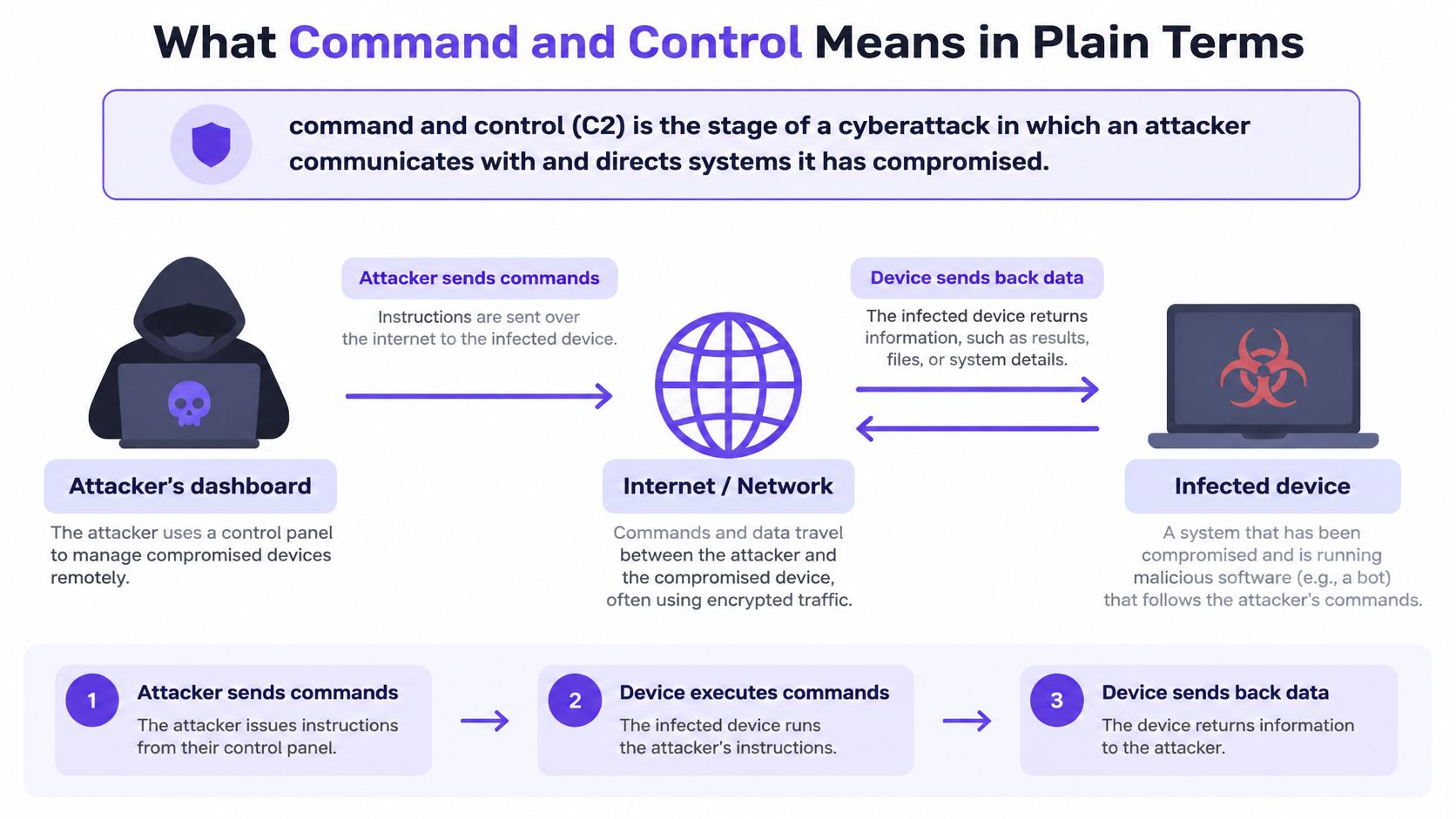
What ongoing control lets an attacker do
Once a working channel exists, the attacker can direct the compromised system to:
- Run commands: Execute tasks using the access available to the infected software.
- Download tools: Add capabilities beyond those in the original infection.
- Move laterally: Attempt to reach other systems on the network.
- Steal information: Send accessible files or collected results outward.
- Maintain persistence: Preserve access so activity can continue later.
These are possible actions, not an automatic outcome of every infection. Permissions, segmentation and other security controls still constrain what the attacker can achieve.
Likewise, deleting the original malicious download isn't proof that control has ended. Another component or communication route may remain. Defenders need to establish both what's running and whether unauthorized communications still work.
For an operator asking what is command and control in practical terms, the answer is remote direction after compromise. On shared WiFi, that changes the defensive question: not just whether a device is infected, but whether your network will let it reach its controller.
How a C2 channel Works from infection to command
Consider a visitor's laptop that was infected before arriving at your venue. Joining your WiFi doesn't cause the infection, but it may give the malicious software a fresh route to the internet.
The following sequence separates the software's intent to check in from the network activity needed to complete that check-in.
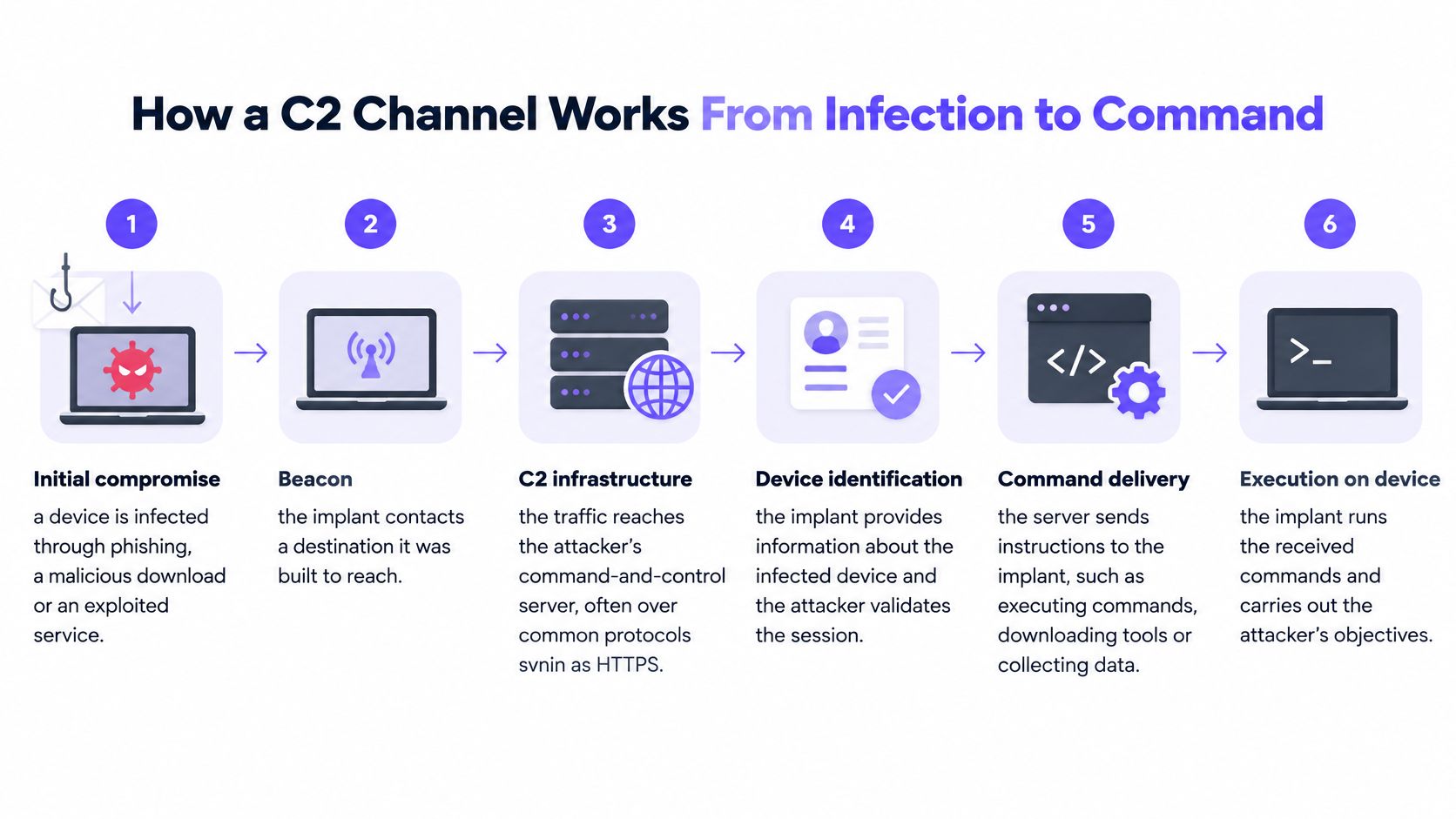
Initial compromise. A phishing attachment, malicious download or exploited service introduces an implant, meaning the software that runs on the compromised device. Defenders should distinguish the original entry point from subsequent network activity, since blocking one doesn't necessarily address the other.
Beacon preparation. The implant prepares a check-in, often called a beacon, to announce that it's available and ask for work. A timer may trigger this activity without the user opening anything, so browser activity alone won't explain every connection.
Name resolution. If the destination uses a domain and no usable address is already available, the device asks DNS to translate that name into an address. This is an early, lightweight decision point where defenders can evaluate the destination before the corresponding server connection starts.
Command delivery. If communication succeeds, the controller can return instructions, such as downloading another tool or collecting files. Defenders now have to consider the content and consequences of the exchange, not merely its destination.
Execution and continued access. The implant carries out the task and may return results or try an alternative route if communication fails. An investigation therefore needs to look for follow-on activity rather than treating a single blocked attempt as the end of the incident.
Read the pattern, not just the request
A small lookup repeated on a regular schedule to an unfamiliar domain deserves investigation. An occasional request to a known service may be routine, but neither timing nor familiarity settles the question alone. Legitimate update software also checks in automatically.
For broader background, Statlyst's malware trends in numbers provides context on malware activity. Operationally, though, your decision should rest on the destination, the requesting device's network context and the surrounding events.
You don't have to find the malicious file before disrupting its next domain-dependent check-in. That's useful containment, even while someone else handles device remediation.
Common C2 channels and how each one blends in
Different C2 channels resemble different kinds of legitimate activity, so defenders need controls suited to each.
C2 channels, how they blend in and where to catch them
| Channel | Why it blends in | Where defenders catch it |
|---|---|---|
| HTTP and HTTPS | Traffic resembles routine web browsing | TLS-aware filtering and reputation checks on destinations |
| DNS | Name lookups that almost every network must allow | Resolver with threat categories and query logging |
| Messages to and from mail servers that users expect | Mail gateway scanning for links and attachments | |
| Remote access (RDP, telnet) | Looks like administrator sessions | Segment guest networks and block admin ports outbound |
| Industrial protocols (DNP3, Modbus) | Expected traffic inside operational networks | Protocol-aware monitoring and OT segmentation |
HTTP and HTTPS make a useful disguise because applications constantly send web requests. A small encrypted callback can resemble an ordinary application call. Destination reputation helps, while TLS-aware controls need careful deployment, particularly where inspecting guests' encrypted traffic would create privacy and operational problems.
DNS has a different advantage: devices need name resolution for ordinary services. MITRE's Industrial Control Systems ATT&CK framework records DNS as a standard application-layer C2 mechanism, including hiding data in DNS fields and using DNS tunneling. Here, DNS isn't merely locating a controller; the queries and responses can themselves carry messages.
Match the control to the channel
Email can carry instructions through expected mail infrastructure. Gateway checks on links and attachments are useful, but they aren't a substitute for monitoring the broader communication path.
For remote-access protocols, ask why a guest device needs outbound administrative access at all. Restrict unnecessary services and keep guest networks separate from management systems. Authorized remote administration should have a defined route rather than a blanket exception.
Industrial protocols belong in a different context. A hospital or campus with operational equipment should keep that environment separated from visitor access and use monitoring that understands the expected protocol behavior.
Encryption also changes what observers can see. With DNS over HTTPS, name-resolution requests travel inside HTTPS, so resolver enforcement needs to account for encrypted alternatives rather than only conventional DNS traffic.
The common mistake is treating an allowed protocol as a trusted purpose. A familiar port or encrypted connection doesn't establish that the destination is safe.
Why attackers Lean on DNS and Rotating domains
A static destination gives defenders something stable to block. Attackers can make disruption harder by changing the names malware tries to reach.
A domain-generation algorithm, or DGA, computes candidate names from a seed, which may depend on time. In a hypothetical daily-seed example, malware generates a fresh set of names each day, while the attacker registers a matching name. Yesterday's blocklist may not contain today's destination.
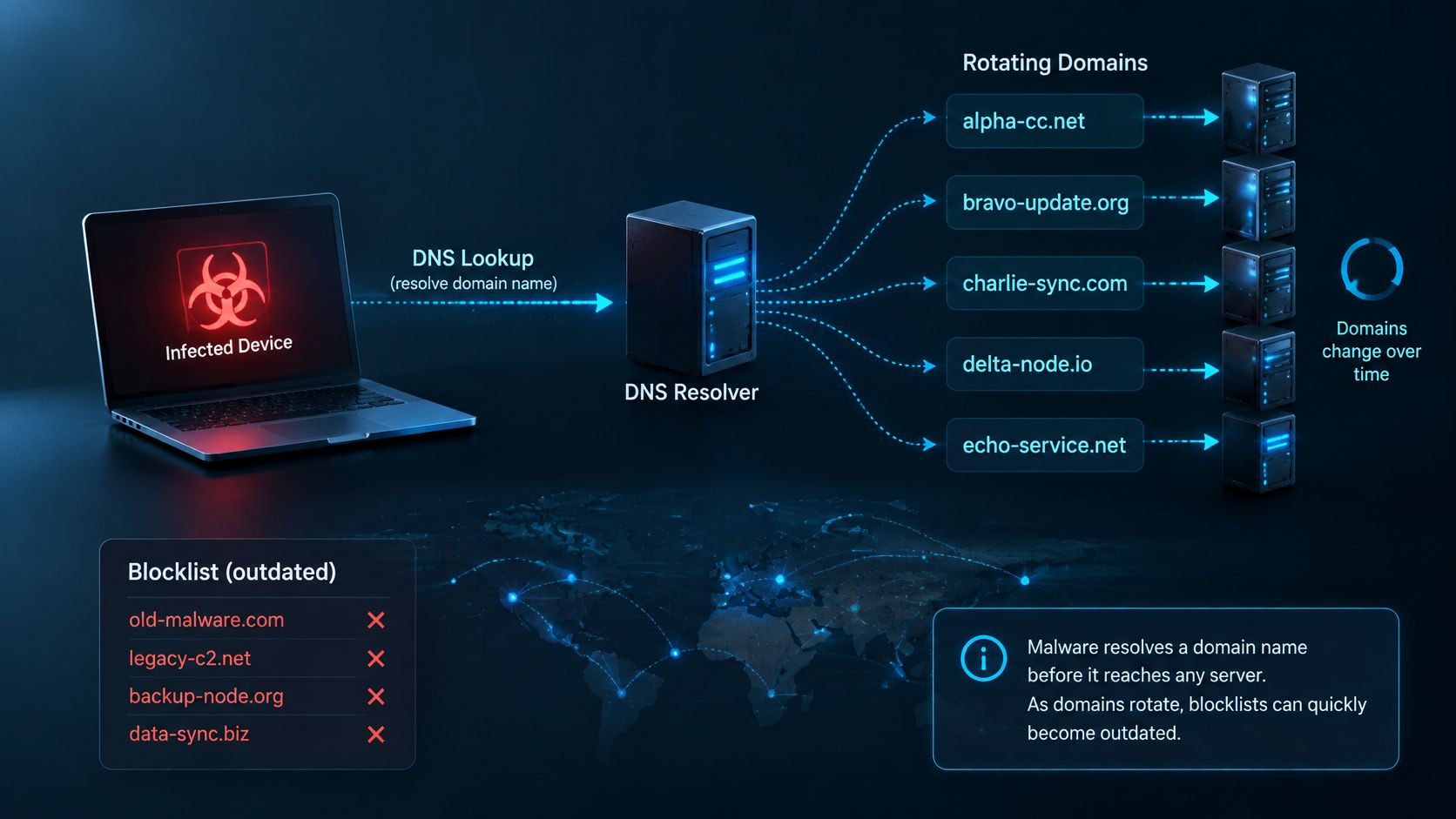
Attackers can also derive destination addresses or ports from DNS responses, or alter records through compromised third-party DNS infrastructure. CISA's DNS security guidance describes DNS security services as analyzing queries and taking mitigation action against malware, ransomware, phishing, viruses, malicious sites and spyware.
Intervene before accepting the destination
When a protective resolver recognizes a malicious name, it can withhold the usable answer. For a connection dependent on that answer, the attacker's changing backend never becomes the device's next destination.
That doesn't put DNS on every possible callback path. Cached answers, hard-coded addresses and alternative resolution routes require other controls. But where a fresh lookup is necessary, checking the name is more practical than chasing each changing server address individually.
DNS signals that point to a callback
These DNS patterns help prioritize investigation, but each is a clue, not proof of infection.
DNS signals, what they suggest and how to respond
| Signal | What it suggests | Response |
|---|---|---|
| Random-looking, high-entropy domain names | Possible algorithmically generated C2 domain | Block a domain assessed as malicious and review the source device |
| Repeated lookups to one name at regular intervals | Possible beaconing check-ins to a controller | Alert and identify the network segment |
| Very short TTL on answers | Possible infrastructure rotation to evade blocklists | Correlate with other signals before acting |
| TXT-heavy query or response traffic | Commands or data possibly encoded in DNS | Investigate for tunneling and block a malicious destination |
| Repeated failed lookups to one name | Possible retries against a dead or sinkholed domain | Check the device and look for fallback domains |
High entropy means a name looks unusually unpredictable. Legitimate services also use machine-generated names, so appearance alone isn't a sound blocking rule.
A short time to live, or TTL, tells a resolver not to retain an answer for long. That can support rapid infrastructure changes, but legitimate services use short-lived answers too. Similarly, TXT records have legitimate purposes even though attackers can abuse them to carry encoded content.
Combine evidence before escalating
A random-looking domain becomes more concerning when the same source requests it at regular intervals, receives short-lived answers and then tries related names after failures. The combination is more useful than treating every unusual query as a separate emergency.
Threat intelligence feeds can add destination context. Use that context alongside query history, policy decisions and network attribution, not as a replacement for them.
Practical rule: Record what the network observed separately from what the analyst suspects.
For example, a log may establish that a source requested a blocked domain. It doesn't establish that the device executed an attacker's command or that data left the network.
Guest WiFi makes attribution especially important. CISA's guest-network implementation guidance calls for guest DNS requests to pass through Protective DNS and for guest traffic to be segmented and labeled so anomalous events can be triaged by source group.
Preserve the timestamp, requesting source information, SSID or VLAN, queried name and policy outcome. Limit access and retention according to your organization's privacy requirements. You can coordinate a response without inspecting a visitor's personal files or collecting unnecessary identity details.
How DNS-Layer Defenses Stop a callback
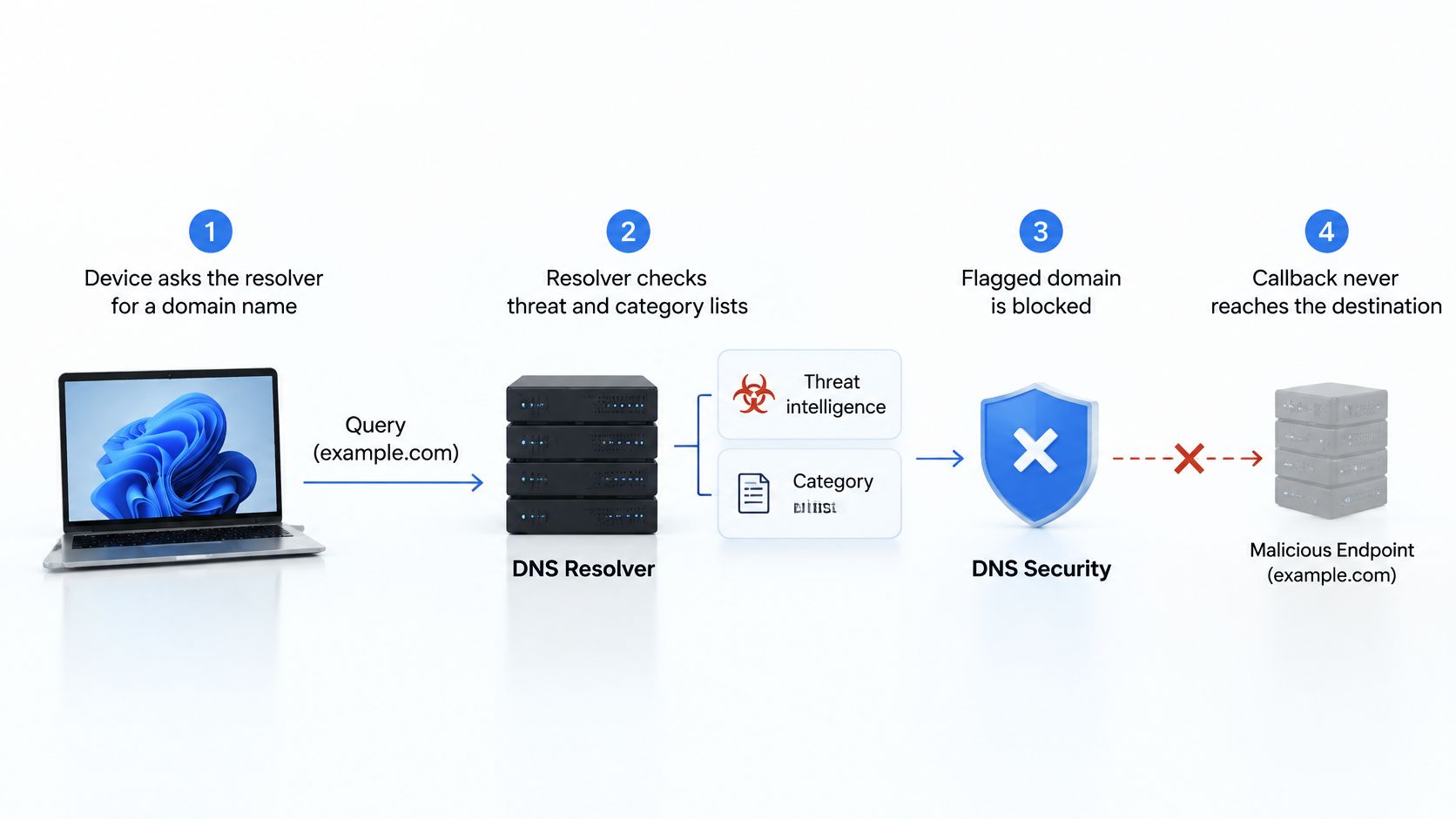
- The device requests a name. Its query reaches the approved resolver.
- The resolver checks policy. Threat intelligence and category rules determine whether the destination is permitted.
- A malicious destination is blocked. The resolver returns a blocking response rather than the usable destination address.
- The decision is recorded. Logs retain the time and source context, with SSID or VLAN attribution supplied by the network integration.
The diagram shows that decision before the destination connection.
Make the policy hold on guest WiFi
Configure guest networks to use the approved resolver and restrict unauthorized resolution routes. Plan fail-closed behavior so a policy-service outage doesn't allow unchecked requests without detection, and test the availability consequences before deployment.
A DNS sinkhole is another response approach, redirecting a malicious lookup to a controlled destination. Your logs should distinguish redirection from refusal or another blocking response.
The video provides an additional explanation of the DNS protection approach.
DNS filtering doesn't clean the device. Hard-coded addresses bypass name resolution, and already-established sessions may continue, so pair DNS protection with segmentation and outbound connection rules.
Stopping a required lookup stops instructions through that route, but it doesn't remove the infection.
Check your callback blocking before an incident
Use this checklist with your network or IT team this week:
- Confirm resolver enforcement. Check guest, staff, and student SSIDs separately. Verify where their requests go, rather than relying only on the intended configuration.
- Test permitted and blocked outcomes. From each SSID, try a known-safe destination and the filtering service's designated harmless test domain. Don't use live malware infrastructure.
- Exercise failure behavior. In an approved maintenance window, test what happens when the policy service is unavailable. Confirm that the network follows the intended fail-closed policy and that the team receives an actionable alert.
- Inspect attribution. Make sure blocked-event records contain the SSID, VLAN, and time, either directly or through reliable correlation. Check that an analyst can retrieve the relevant evidence.
- Assign escalation ownership. Agree who reviews an alert, who can restrict a source device, and who communicates with the venue, guest, or device owner.
Pilot changes without disrupting the environment
A successful test needs more than a visible block page. Preserve the expected result, observed result and relevant log entry so another person can verify what happened.
Include ordinary guest activity in the pilot. Check that legitimate browsing and essential venue services remain usable, and document how staff should handle a mistaken block. A tightly scoped policy is easier to support than an unexplained interruption.
For customers who run change control, we plan a pilot on one SSID with your team or IT provider before anything wider changes. That gives the people responsible for approval a defined scope and evidence to review.
The decision is straightforward: can your current network prove what it blocked, where it happened and who should respond? If it can't, start with resolver enforcement and source attribution on a pilot SSID, then expand only after the tests produce dependable results.
Purple Shield blocks command-and-control callbacks and known phishing and malware domains at the DNS lookup, so the corresponding connection never starts. Visit Purple Shield to discuss protecting your guest WiFi and planning a pilot with your team or IT provider.